

Tuow ransomware is the file encryption threat that asks for money, promising false delivery of decryption tools
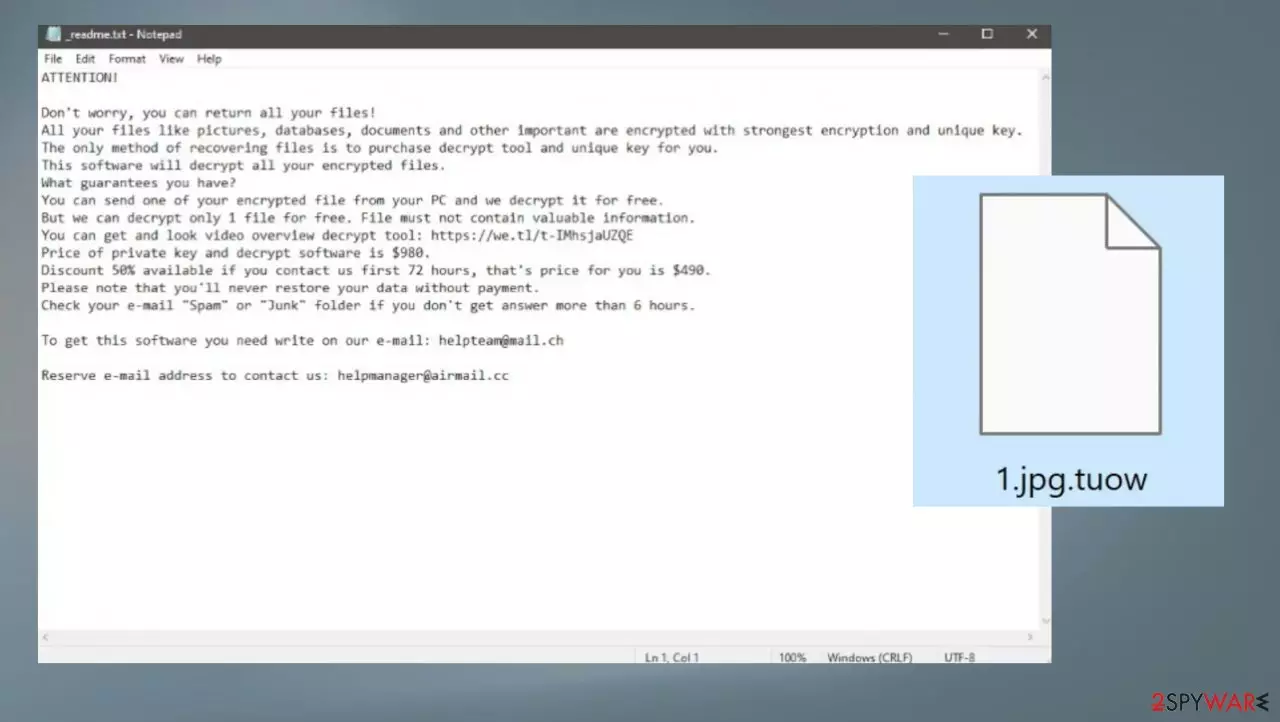
Tuow ransomware virus relies on powerful encryption algorithms because this procedure allows the infection to create a reason for cryptocurrency extortion. the threat creates additional issues with the machine, and people get scared into paying the ransom. That sum can go up to $1000, and criminals even use deceptive methods to trick people into following their instructions.
The threat infiltrates the machine and then locks pieces that can be considered valuable. Tuow file virus gets the name from the .tuow appendix to mark encrypted files. Then the payment for the alleged decryption tool gets asked via the ransom note message placed as the _readme.txt file on the desktop.
The piece can be placed in various folders on the machine that contain those encoded documents, images, audio, and video files. The infection makes files useless when the original code is altered significantly, and data becomes locked. There are additional processes, however, that Tuow ransomware can run on the machine.
More about the ransomware
Tuow file virus is a threat that is not a newly developed piece because the virus is derived from the Djvu ransomware family. This infection is more dangerous than it may seem. This variant and other previously released versions like Towz, Tohj, Powz, Pohj are not decryptable due to the additional changes to the code.
You need to consider that the virus is serious and avoid contacting criminals behind the virus at all costs. There is no reason to pay these extortionists. Tuow ransomware virus is a file-locking program that affects the machine, and nobody else cares about your files except you.
| Name | Tuow ransomware |
|---|---|
| Type | Cryptovirus, file-locker |
| File marker | .tuow |
| Family | Djvu ransomware |
| Distribution | Files attached to spam emails, data included in pirating software packages, other malware |
| Contact details | support@fishmail.top, datarestorehelp@airmail.cc |
| Ransom note | _readme.txt |
| Removal | Threat removal can be possible with antivirus tools |
| Repair | Recover the machine with apps like FortectIntego |
The infection is not decryptable because the threat was improved from the first version back in 2018. There is no need to contact Tuow file virus creators and other related criminals because victims can get more malware instead of the file decryption tool via email once contact is initiated.
Removing the threat
Tuow ransomware virus removal is a serious process that should be implemented as soon as it is possible. These infections can run additional programs and processes to keep the machine affected by the ransomware. Those changes include trojans[1] and other malware that significantly diminishes the performance.
Removing the infection should be the first step while fighting these threats because active Tuow ransomware can run additional rounds of encryption and damage files permanently. If victims pay and the virus still affects files, these losses mean that criminals have money and victims have nothing.
Remove the infection as soon as money-demanding messages occur, and the threat is made with encryption processes. Terminating the threat can be possible with AV detection[2] tools like SpyHunterCombo Cleaner or MalwarebytesMalwarebytes. This way, you can eliminate the Tuow file virus from your device and move to the recovery of the data.
Experts[3] recommend using properly anti-malware programs and scanning the machine fully, so all the pieces related to the malware and file locker can be indicated and removed from the machine. Infection can be persistent, so checking various places on the computer can help to terminate Tuow ransomware in time, and then victims can move to file recovery safely.

Repair the system files
Once a computer is infected with malware, its system is changed to operate differently. For example, an infection can alter the Windows registry database, damage vital bootup and other sections, delete or corrupt DLL files, etc. Once a system file is damaged by malware, antivirus software is not capable of doing anything about it, leaving it just the way it is. Consequently, users might experience performance, stability, and usability issues, to the point where a full Windows reinstall is required.
Therefore, we highly recommend using a one-of-a-kind, patented technology of FortectIntego repair. Not only can it fix virus damage after the infection, but it is also capable of removing malware that has already broken into the system thanks to several engines used by the program. Besides, the application is also capable of fixing various Windows-related issues that are not caused by malware infections, for example, Blue Screen errors, freezes, registry errors, damaged DLLs, etc.
- Download the application by clicking on the link above
- Click on the ReimageRepair.exe

- If User Account Control (UAC) shows up, select Yes
- Press Install and wait till the program finishes the installation process

- The analysis of your machine will begin immediately

- Once complete, check the results – they will be listed in the Summary
- You can now click on each of the issues and fix them manually
- If you see many problems that you find difficult to fix, we recommend you purchase the license and fix them automatically.



Data recovery option
Tuow ransomware is not decryptable, and the infection creators demand money, but this ransom demand is not worth paying because the infection is released by criminals, not normal people. These communications with people behind malware programs can lead to major issues instead of data recovery.
The infection affects various parts of the machine and can be very persistent. Tuow file virus needs to be removed as soon as possible, so the virus cannot damage the computer further. This is the new variant of the existing threat, so solutions are limited and cannot be upgraded with each weekly release, however.
The best option is to use data backups so these files locked by the ransomware can be replaced with the proper copies of the altered file. That is not helpful if these pieces are not updated in time and users do not have other options for the file recovery after the attack by Tuow ransomware virus.
Since many users do not prepare proper data backups prior to being attacked by ransomware, they might often lose access to their files permanently. Paying criminals is also very risky, as they might not fulfill the promises and never send back the required decryption tool.
While this might sound terrible, not all is lost – data recovery software might be able to help you in some situations (it highly depends on the encryption algorithm used, whether ransomware managed to complete the programmed tasks, etc.). Since there are thousands of different ransomware strains, it is immediately impossible to tell whether third-party software will work for you.
Therefore, we suggest trying regardless of which ransomware attacked your computer. Before you begin, several pointers are important while dealing with this situation:
- Since the encrypted data on your computer might permanently be damaged by security or data recovery software, you should first make backups of it – use a USB flash drive or another storage.
- Only attempt to recover your files using this method after you perform a scan with anti-malware software.
Install data recovery software
- Download Data Recovery Pro.
- Double-click the installer to launch it.

- Follow on-screen instructions to install the software.

- As soon as you press Finish, you can use the app.
- Select Everything or pick individual folders where you want the files to be recovered from.

- Press Next.
- At the bottom, enable Deep scan and pick which Disks you want to be scanned.

- Press Scan and wait till it is complete.
- You can now pick which folders/files to recover – don't forget you also have the option to search by the file name!
- Press Recover to retrieve your files.


Did this guide help?
Be the first to comment