

Unlckr ransomware targets Russian-speaking computer users
Unlckr is a recently discovered file-encrypting virus. Ransomware uses RSA-2048 cryptography to encode various files. During data encryption, it appends .cr020801 file extension to audio, video, text, image, archives, databases, and other popular files. When files are taken to the hostage, malware provides data recovery instructions in the text file called ! _INSTRUKTSYA _ !. txt. However, instead of paying the ransom, you should focus on Unlckr removal with reputable malware removal program such as FortectIntego.
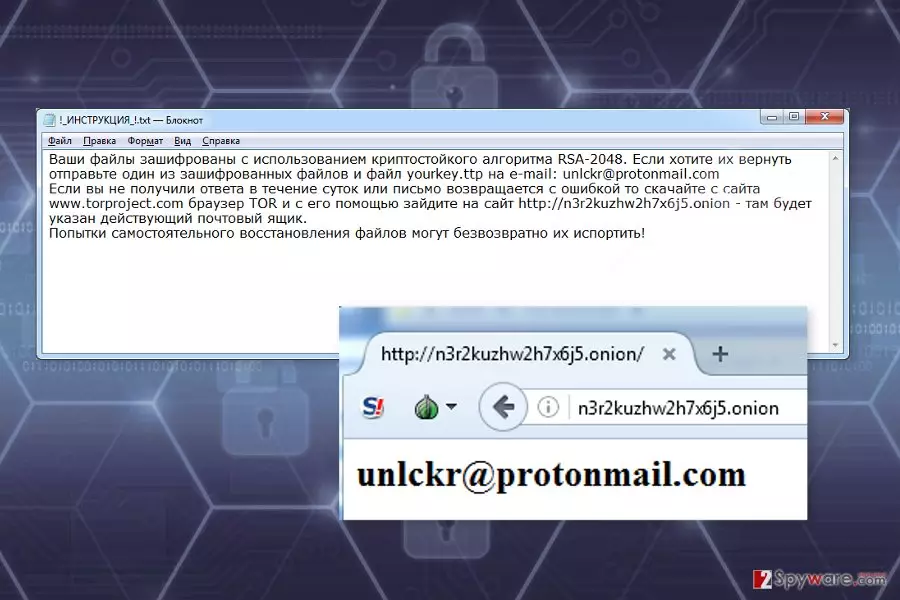
The research has shown that this crypto-malware might be related to Unlock92 ransomware. It also aims at Russian-speaking computer users because the ransom note is written only in the Russian language.
The ransom-demanding message asks to send one of the encrypted files to unlckr@protonmail.com. However, if authors of Unlckr ransomware does not respond within 24 hours, victims have to take further actions. They have to install TOR browser[1] and access a particular website that reveals a new criminals' email address.
Currently, it’s unknown how much money cyber criminals are asking for data recovery. It seems that the size of the ransom may vary based on the amount of encrypted files. However, you should not follow hackers’ orders. They may take the money and leave you with nothing. Instead of risking to experience an even bigger loss, you should remove Unlckr from the device as soon as you notice its appearance.
Apart from encrypting targeted data, Unlckr will also make changes to the Windows OS. Malware might make registry entries, install malicious files, delete Shadow Volume Copies or inject malicious codes into legitimate system processes. All these activities make the system vulnerable and might open the backdoor to other malware. Thus, it’s crucial to get rid of the virus as soon as possible in order to avoid bigger damage.

Dissemination strategies of the ransomware virus
Unlckr might enter the device with the help of infected email attachments, fake software updates or downloads. Thus, if you have clicked on a suspicious document or link included in the email or install bogus freeware or shareware, it may have lead to ransomware attack.
One of the most important lessons to learn about ransomware prevention is to avoid opening unknown email attachments. Cyber criminals may pretend to be from various companies or organizations. Thus, you may receive a fake letter from PayPal, FedEx or even governmental institution. However, before opening and checking information provided in the attachment, you have to double-check the information about the sender and look up for other details that may identify criminals.[2]
Installing free or illegal software might also end up with Unlckr hijack. Malware executable may be hidden and presented as a useful program. Thus, for software downloads, you should choose only reliable sources, such as publisher’s websites.
Removal of the Unlckr ransomware virus
After the Unlckr attack, it’s important to act quickly. Paying the ransom and communicating with cyber criminals may not end up as you wish for. Meanwhile, your computer might be infected with other malware as well.
The only safe way to remove Unlckr from the device is to use reputable and updated security software, such as FortectIntego or MalwarebytesMalwarebytes. Before installing, updating or running malware removal program, you may need to restart the computer to the Safe Mode with Networking. This helps to disable the virus and run automatic removal.
If you have faced problems with Unlckr removal and need extra help, please check our prepared instructions below. There you will also find our suggestions for data recovery. We cannot assure that these methods will help to restore all the encrypted files. Hopefully, you will be able to rescue at the most important documents.
Did this guide help?
Be the first to comment