

Don't want to be infected with data-stealing malware? Don't click on “Zoom_Conference_Invitation.zip” file

Email spam campaigns are the most common methods for malware propagation, and this time cybercriminals are using the troublesome COVID-19 situation and the fact that many people are working from home (it is not the first time, and definitely not the last). Zoom, along with a few other similar programs, is used for online meetings and communication between employees when away from the office or other workplace.
In this phishing campaign, users are presented with an attachment that allegedly holds a special code that would allow accessing a conference call. Crooks abuse the fact that the unique code is commonly sent for this purpose – and that is exactly what they are trying to imitate. Inside the “Zoom Conference Invitation” file is TrickBot banking Trojan – the notorious malware that focuses on stealing sensitive user data on Windows systems, all while being invisible to victims.
| Name | Zoom Conference Invitation email virus |
| Type | Malware, phishing, scam |
| Distribution | Malspam – the attackers send thousands of emails in bulk in order to infect as many users as possible |
| Attachment | Zoom_Conference_Invitation.zip |
| Payload | The extracted file carries Zoom_Conference_Invitation_1625.vs file which, once executed downloads and installs TrickBot banking Trojan on the computer |
| Dangers | Personal information compromise, identity theft, installation of other malware, reduced computer security |
| Removal | Access Safe Mode (if required) and perform a full system scan |
| Further steps |
Unfortunately, only a handful of AV programs currently detects the file as malicious. If your cybersecurity software is up to date, you could see one of the following detection names:[1]
- Trojan.GenericKD.46621081
- JS/Agent.A621!tr
- HEUR:Trojan-Downloader.Script.Agent.gen
- Trojan.KillProc2.16312
- Trojan.Downloader.Script.gen, etc.

Peculiarities of the attack and mitigation
Phishing is one of the most impactful and effective ways of spreading malware – especially when it comes to email spam. Hackers append a malicious attachment which is presented as an informative file for users – except that it is everything but that. Once a compressed file is opened, anything can be hidden inside, although victims never suspect that.
Cybercriminals commonly use intricate, advanced methods in order to make a fake email look legitimate, for example, they commonly use some well-known brand names, attributes, logos, context, and much more. In this case, however, the attackers didn't bother much and sent out a really primitive email. It includes the following text:
Subject: Zoom Invite XXXXXXX
Dear Valued Consumer,
Please find attached invitation.
The attachment, labeled Zoom_Conference_Invitation.zip, is a simple compressed ZIP file, which, once extracted, would produce a “Zoom_Conference_Invitation_1625.vs” file. Once opened, this file is capable of downloading the payload of malware – in this case, TrickBot.
Prevention measures, such as powerful security solutions – SpyHunterCombo Cleaner or MalwarebytesMalwarebytes – can be used to stop the attack before it even begins. Security applications are designed to check the actions and code of certain files with the help of heuristic methods, which allow the prevention of further actions of the malicious file. These apps can also aid you with TrickBot removal, although you should refer to the bottom section for more details on this process.
Once you eliminate the Zoom Conference Invitation email virus, you should also take care of Windows system health, as certain elements could get corrupted during the operation of malware. The best way to adhere to these issues is by employing automatic repair software:
- Download FortectIntego installer
- Click on ReimageRepair.exe

- If User Account Control (UAC) shows up, select Yes
- Press Install and wait till the program finishes the installation process

- The analysis of your machine will begin immediately

- Once complete, check the results – they will be listed in the Summary
- You can now click on each of the issues and fix them manually
- If you see many problems that you find difficult to fix, we recommend you purchase the license and fix them automatically.



If you want to know more about TrickBot…
TrickBot is a Trojan that was first discovered in 2016, and it's been targeting the customers of leading banks around the world. The virus has become well-known for its ability to mimic online banking windows and steal personal information like logins or passwords with help from Mimikatz post-exploitation tool.
Trickbot can also be used to siphon Bitcoin wallets, acquire access to email accounts, and then use those credentials laterally through other parts of your network/systems, meaning other people in your contact list might start getting spam emails boobytrapped with this malware.
It was no surprise that TrickBot had been actively performing attacks on CRMs and Payment Processors, as malware managed to hijack 250 million email accounts in 2019.[2] In the year 2020, during a coronavirus pandemic, cybercriminals behind this virus employed medical advice and testing lures for users to click attachments containing malicious macro commands which they never were aware would be following through with their actions. Though it's unclear what is next for this type of attack or if new measures will have any effect against hackers who are determined to succeed despite all odds set forth by those holding back from them.

It seems like the Zoom Conference Invitation email virus is yet another try to spread malware to more users and companies. Unfortunately, victims are present at every campaign, despite the cybersecurity warnings during the COVID-19 pandemic.
Trojan removal can be easy, as long as adequate security tools are used
First of all, it is important to note that TrickBot is a sophisticated malware operated by a cybercriminal gang as malware-as-a-service (MaaS).[3] It alters Windows operating system heavily, which might sometimes make it difficult to remove. Thus the first step we recommend is accessing Safe Mode:
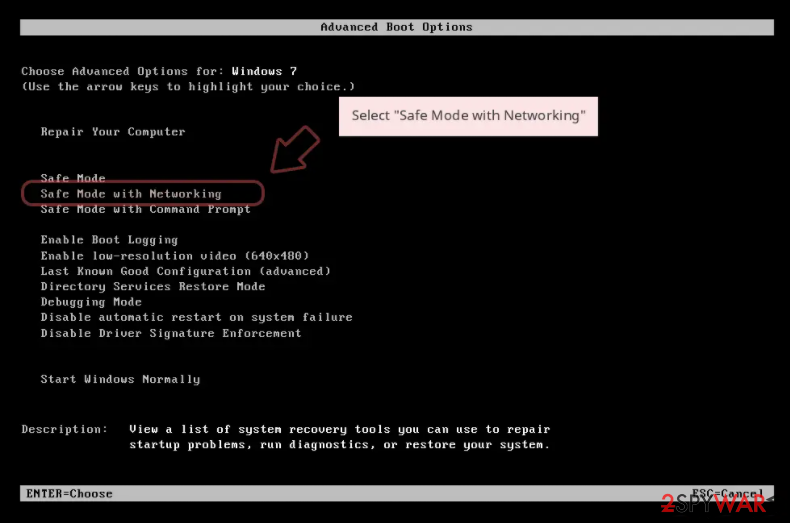
Windows 7 / Vista / XP
- Click Start > Shutdown > Restart > OK.
- When your computer becomes active, start pressing F8 button (if that does not work, try F2, F12, Del, etc. – it all depends on your motherboard model) multiple times until you see the Advanced Boot Options window.
- Select Safe Mode with Networking from the list.

Windows 10 / Windows 8
- Right-click on Start button and select Settings.
- Scroll down to pick Update & Security.
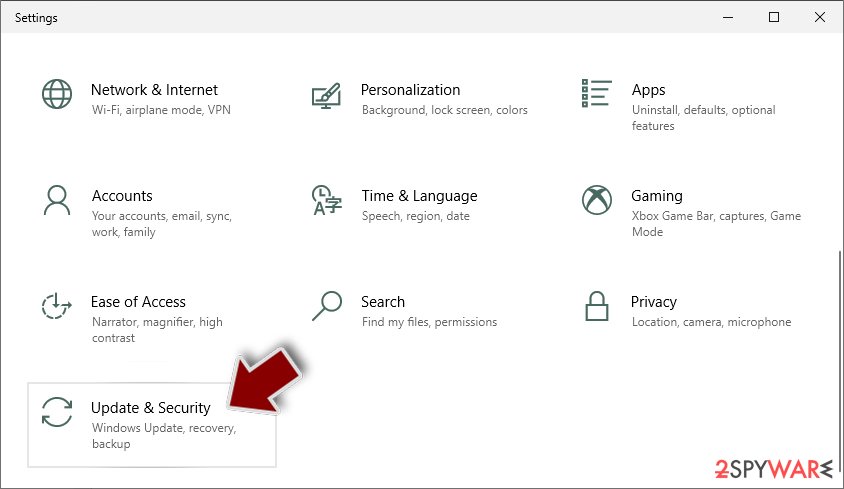
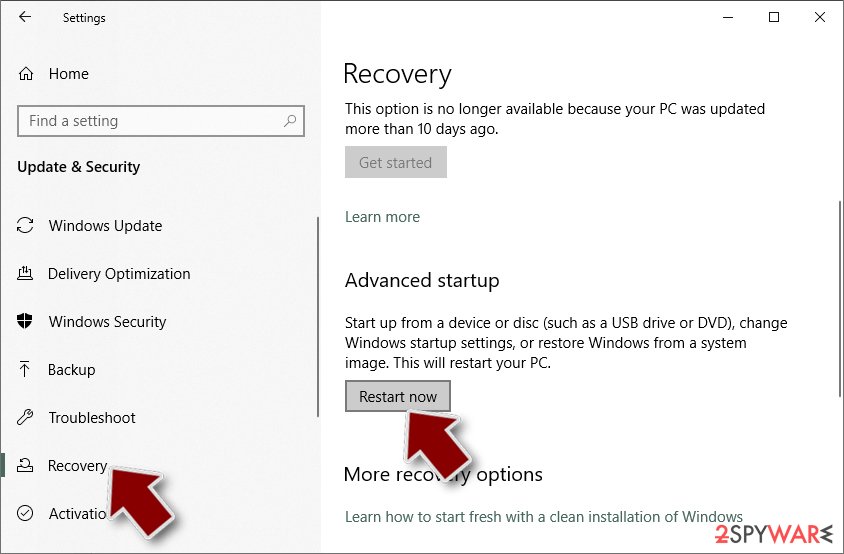
- On the left side of the window, pick Recovery.
- Now scroll down to find Advanced Startup section.
- Click Restart now.
- Select Troubleshoot.
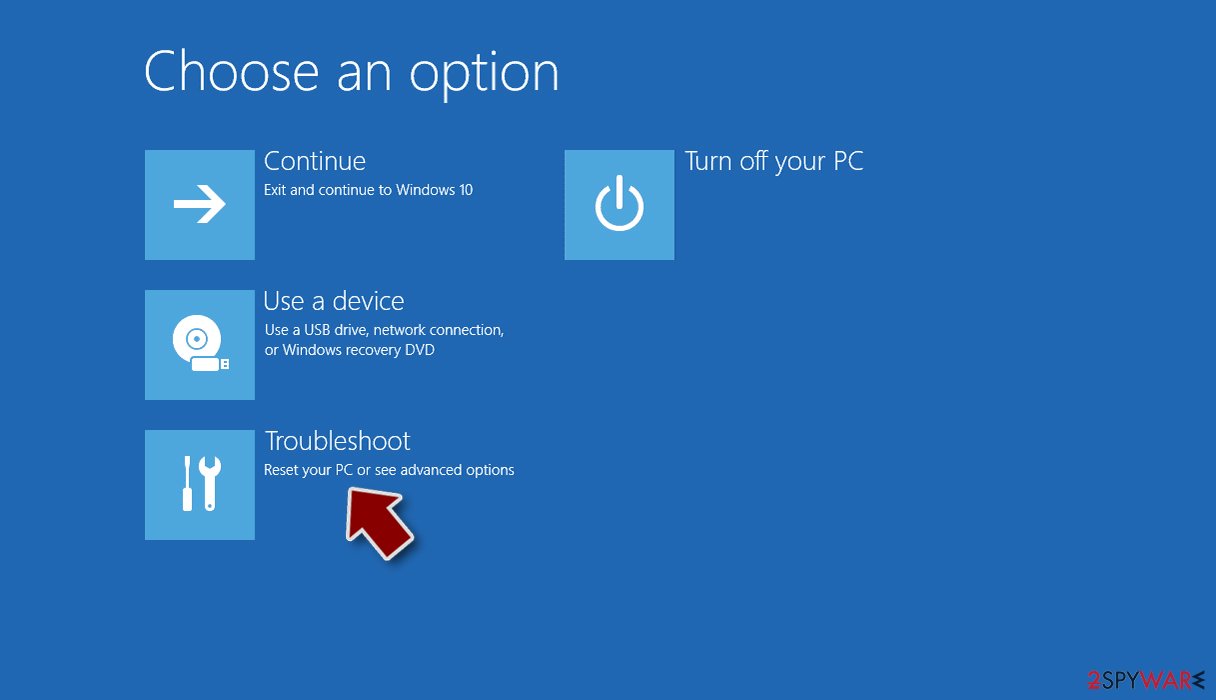
- Go to Advanced options.
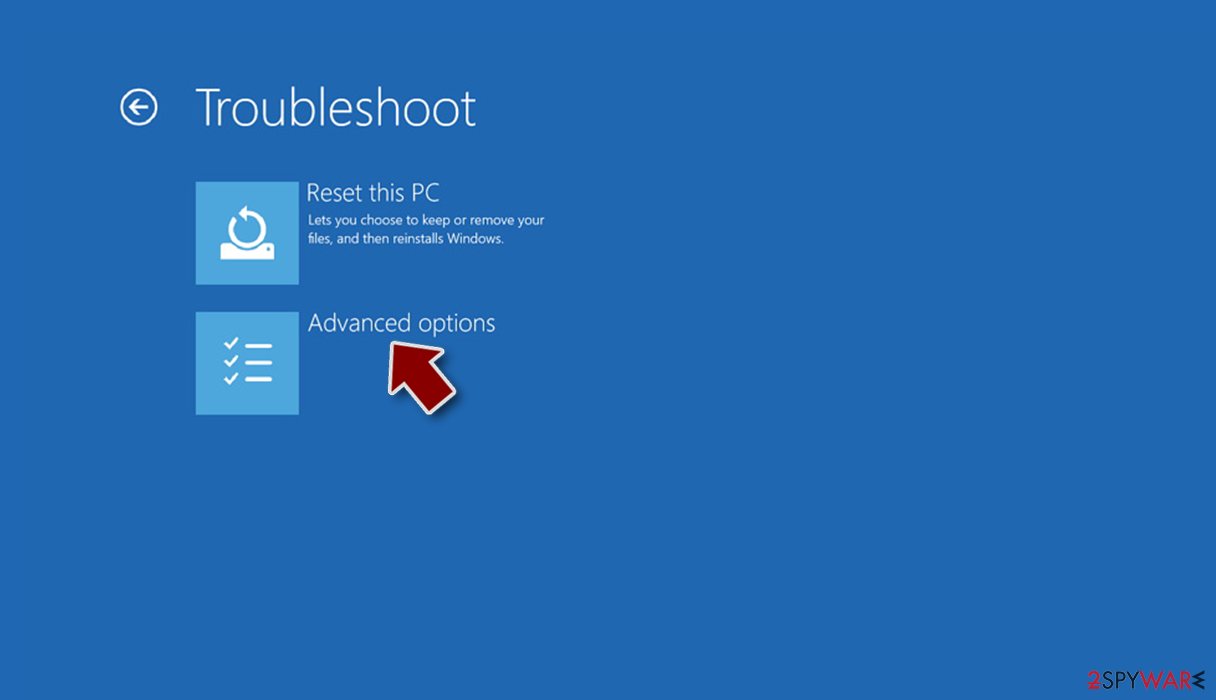
- Select Startup Settings.
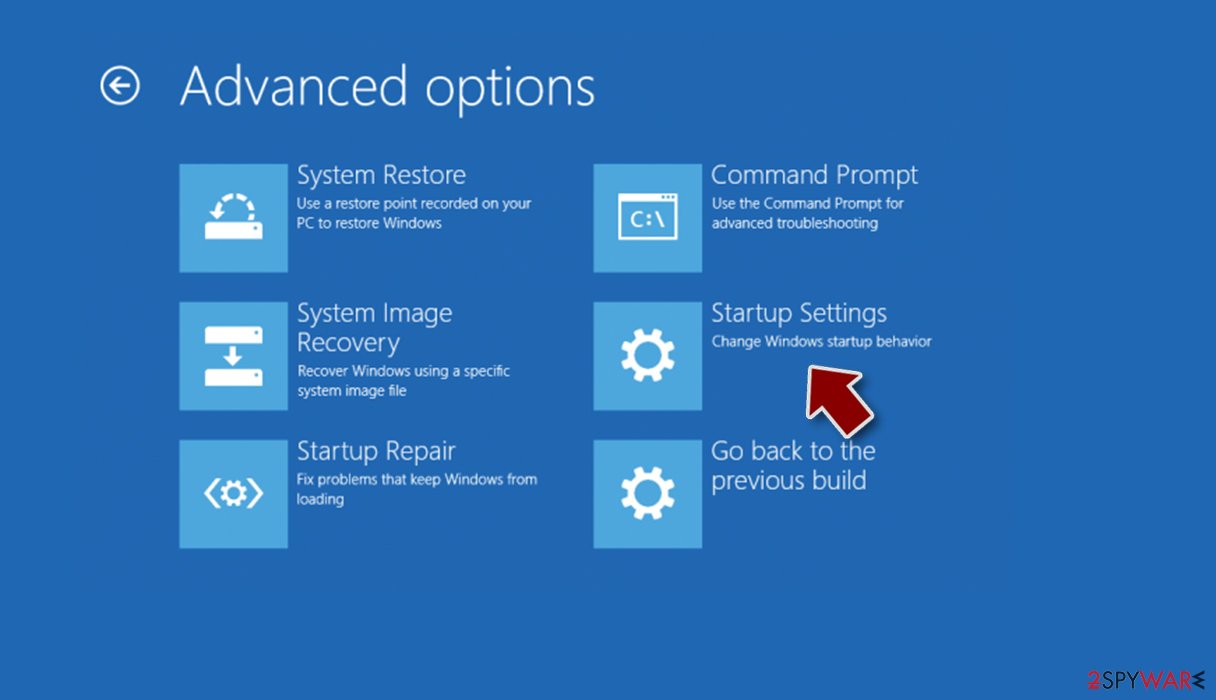
- Click Restart.
- Press 5 or click 5) Enable Safe Mode with Networking.
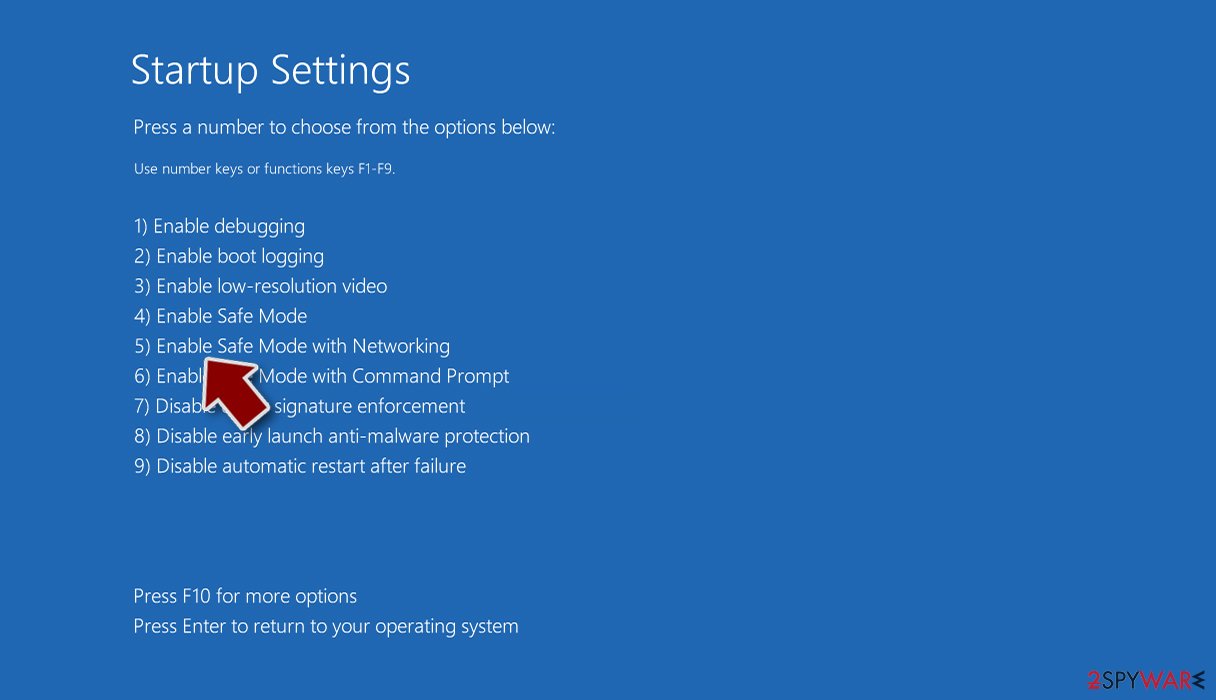


Once you reach Safe Mode, launch SpyHunterCombo Cleaner or another reputable antivirus, update it with the latest definitions and perform a full system scan to eradicate malware and all its malicious components.
Note that if you have not extracted the “Zoom_Conference_Invitation.zip” file and opened the .VS file, your computer should be safe. However, we still strongly advise you to perform a full system scan with security software just in case.
After the malware is eliminated, we strongly recommend you contact your bank and explained that you were infected with Trickbot – the support should be able to assist you in ensuring your information and bank account remains secure. It is also advised to change all your passwords for all accounts and enable two-factor authentication where possible.
Did this guide help?
Be the first to comment