

Mole03 ransomware appears, starts asking for ransoms
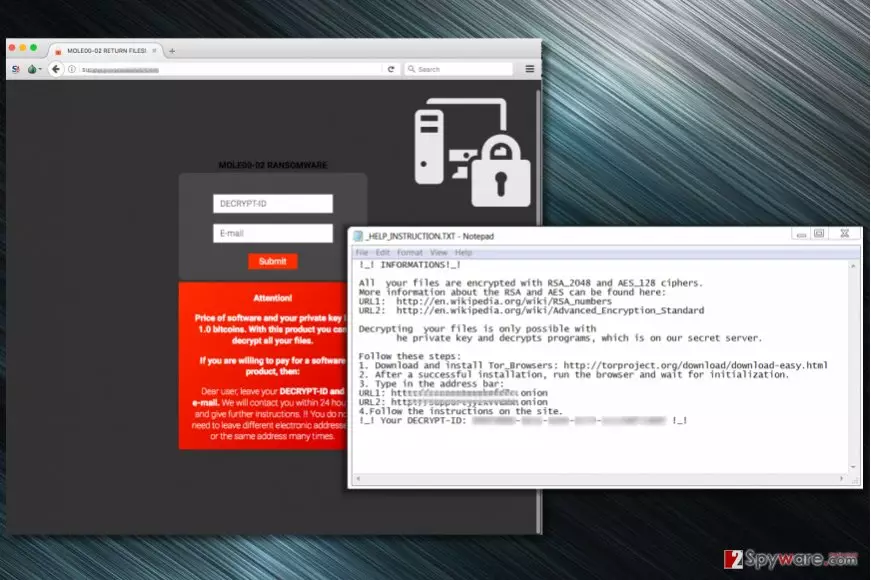
Mole03 ransomware is a computer virus that comes from CryptoMix malware family[1]. The virus appends .mole03 extension to encrypted files, whereas previous modifications used to append .mole00 or .mole02 file extensions to files. The ransomware is currently distributed via EiTest campaign.
Just like previous CryptoMix variants (Zayka, Noob, and CK), the ransomware drops the _HELP_INSTRUCTION.TXT file on the system. The note states that victim’s files were corrupted using RSA-2048 and AES-128 cryptography algorithms. The criminals urge the victim to install Tor browser and access particular .onion websites in order to find data recovery instructions.
The payment website asks to enter victim’s ID (provided in the ransom note) and email address. The criminals promise to contact the victim within 24 hours with instructions on how to recover data. The price for data recovery solution, according to criminals, is 1.0 Bitcoin.
The new CryptoMix variant attacks victims who visit compromised Internet sites via Google Chrome or Internet Explorer browsers. In case the user uses Google Chrome, the malicious script in compromised Internet sites launches the fake “HoeflerText wasn’t found” pop-up[2], urging to install a malicious file that contains the ransomware.
If the victim uses Internet Explorer, the malicious script reroutes him to a tech support scam site, stating that victim’s PC is infected with YahLover.worm and that the issue can be solved only by calling “Microsoft Technical Department at 877-804-5390.”
If your files were compromised by this disastrous virus, we highly recommend using anti-malware software to remove Mole03 first. It is must-do task before trying any data recovery solutions we provide. It goes without saying that we do not recommend paying the ransom because it does not guarantee a successful data recovery.
For Mole03 removal, we strongly recommend using FortectIntego or SpyHunterCombo Cleaner software. Before you allow one of these programs do the magic, you need to reboot your PC into a specific mode first. You can find clear instructions on how to do it below the article.

Distribution of the ransomware
This particular ransomware variant is mostly distributed using a technique that was previously employed in Spora ransomware campaign. The attackers compromise thousands of legitimate websites by adding a malicious script to them. This script identifies visitor’s web browser type and in case it detects Google Chrome, a deceptive pop-up appears on the screen.
The pop-up message states that “The “HoeflerText” font wasn’t found” and that the victim has to install it in order to view website’s content. However, the file behind this pop-up actually carries a malicious payload that is set to damage all victim’s files. At the moment, one of websites known to be compromised is one-hour[.]fr. If you are a French computer user, we suggest looking for help on LesVirus.fr website[3].
You should never install software from unknown websites. Keep in mind that the bogus “HoeflerText” pop-ups can bother not only Chrome but also Mozilla Firefox users. In case your website was compromised, you need to delete the malicious code by yourself or with the help of an expert.
Remove Mole03 ransomware and restore encrypted files
You must remove Mole03 virus. To do this, follow instructions provided below the article. You have to have an up-to-date security software with malware removal capabilities and have your computer run in a Safe Mode with Networking.
Once everything’s set, you can launch a full system scan and wait until the security product detects all malicious components. You might need to perform several scans. Once the security software detects the infection, remove it with the help of the software.
It is the easiest way to complete Mole03 removal. Besides, you should not attempt to delete this virus manually because it is a highly sophisticated ransomware example.
Did this guide help?
Be the first to comment