

Maos ransomware is a type of malware that may leave you locked out of personal file access forever

Maos is a dangerous computer virus known for its ability to lock all pictures, documents, videos, databases, and other personal files, rendering them useless. This is done with the help of a sophisticated encryption algorithm known as RSA[1] – this cipher is strong and can't be deciphered without a special decryption key, which is located on the cybercriminals' servers.
All files affected by the virus become distinctively different from normal ones as they acquire a .maos extension and lose their original icons, rendering them inaccessible. This can be incredibly disruptive to victims, who may not have backups of their important files.
Malware will then display a ransom note _readme.txt, demanding payment in order to receive the decryption key. To be more precise, crooks are asking to pay $480/$980 in bitcoin and deliver in a special cryptocurrency wallet. Victims are also offered to conduct test decryption to convince them that the decryption is allegedly possible – support@fishmail.top and datarestorehelp@airmail.cc emails are used for this purpose.
| Name | Maos virus |
|---|---|
| Type | Ransomware, file-locking malware |
| File extension | .maos appended to all personal files, rendering them useless |
| Family | Djvu |
| Ransom note | _readme.txt |
| Ransom size | $480/$980 |
| Contact | support@fishmail.top and datarestorehelp@airmail.cc |
| File Recovery | There is no guaranteed way to recover locked files without backups. Other options include paying cybercriminals (not recommended, might also lose the paid money), using Emisoft's decryptor (works for a limited number of victims), or using third-party recovery software |
| Malware removal | After disconnecting the computer from the network and the internet, do a complete system scan using the SpyHunterCombo Cleaner security program |
| System fix | As soon as it is installed, malware has the potential to severely harm some system files, causing instability problems, including crashes and errors. Any such damage can be automatically repaired by using FortectIntego PC repair |
More about the malware family
Djvu, which Maos virus stems from, is a widely-used and highly-effective type of malware that was first discovered in 2017. It continues to be a major threat to individuals and organizations today, with nearly a thousand different versions having been identified. It is estimated that hundreds of people fall victim to it every day.
One of the most common ways that people become infected with Djvu ransomware is through the use of pirated software installers. These installers often contain malware, which can be difficult to detect and can infect a system as soon as the software is installed. Some of the latest versions of ransomware include Mppn, Kcvp, Kcbu, and Tcbu, which are all highly dangerous and can cause significant damage to a victim's files and system.
It is important to avoid using pirated software and to be cautious when opening emails or downloading files from unknown sources to protect yourself from Djvu ransomware and other forms of malware.
The ransom note
Once it has successfully infiltrated a system and completed the encryption of a victim's files, the Mppn virus immediately opens a ransom note called _readme.txt. This note explains that the victim's files have been encrypted and that a ransom must be paid in order to receive the decryption key. The note typically includes instructions for how to make the payment, as well as telling users that they have an opportunity to allegedly reduce the ransom size by paying sooner than later:
ATTENTION!
Don't worry, you can return all your files!
All your files like pictures, databases, documents and other important are encrypted with strongest encryption and unique key.
The only method of recovering files is to purchase decrypt tool and unique key for you.
This software will decrypt all your encrypted files.
What guarantees you have?
You can send one of your encrypted file from your PC and we decrypt it for free.
But we can decrypt only 1 file for free. File must not contain valuable information.
You can get and look video overview decrypt tool:
https://we.tl/t-67n37yZLXk
Price of private key and decrypt software is $980.
Discount 50% available if you contact us first 72 hours, that's price for you is $490.
Please note that you'll never restore your data without payment.
Check your e-mail “Spam” or “Junk” folder if you don't get answer more than 6 hours.To get this software you need write on our e-mail:
support@fishmail.topReserve e-mail address to contact us:
datarestorehelp@airmail.ccYour personal ID:
Both law enforcement authorities and the security community strongly discourage victims of ransomware from paying the ransom. This is because making a payment to cybercriminals not only supports their illegal activities but also does not guarantee that the decryption key will be provided.

If you have fallen victim to ransomware, it is important to avoid paying the ransom. Instead, you should use a reputable anti-malware program to remove Maos ransomware and restore your files from backups, if available. It is also a good idea to regularly back up your important files to protect yourself from ransomware and other data loss scenarios. If you do not have backups, we provide alternative solutions that might just work for you.
1. Remove malware correctly
If you realize that your files have been locked by ransomware, it is important to remain calm and take action to prevent further damage. The first step in dealing with a ransomware infection is to remove it from your system. This is essential in order to prevent it from encrypting any more of your files and causing further damage.
The correct way of doing so is by disconnecting your affected device from the internet and network, as crooks may send the commands via Command & Control server.[2]
- Type in Control Panel in Windows search and press Enter
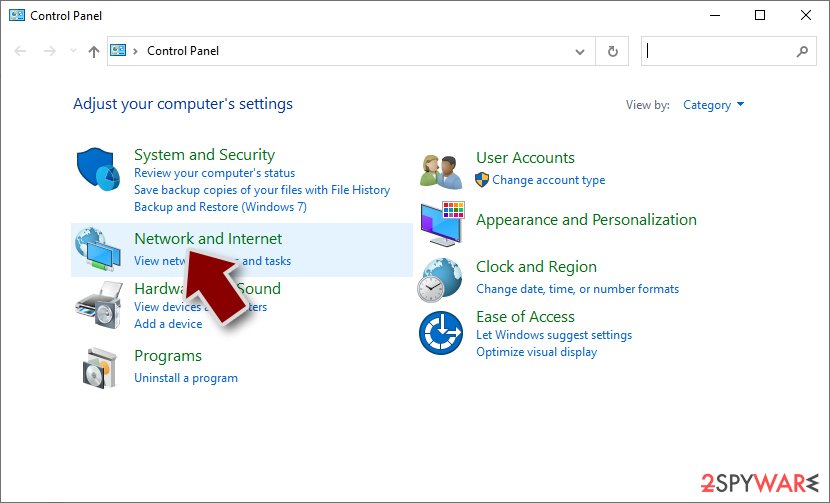
- Go to Network and Internet
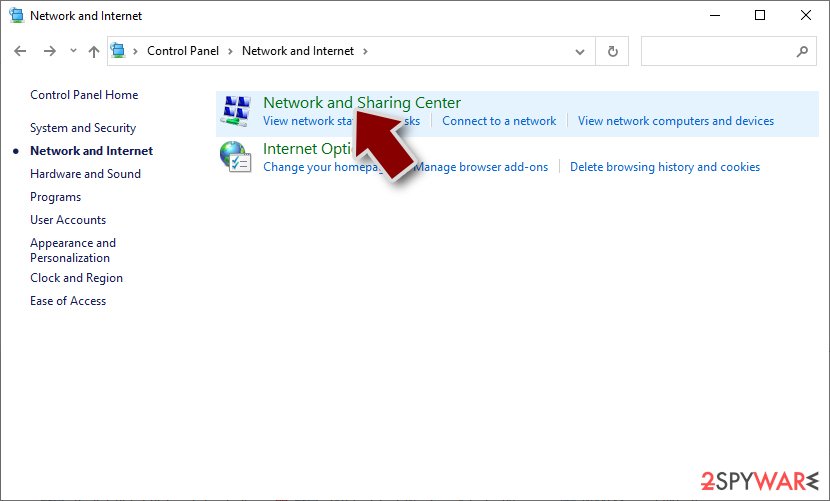
- Click Network and Sharing Center
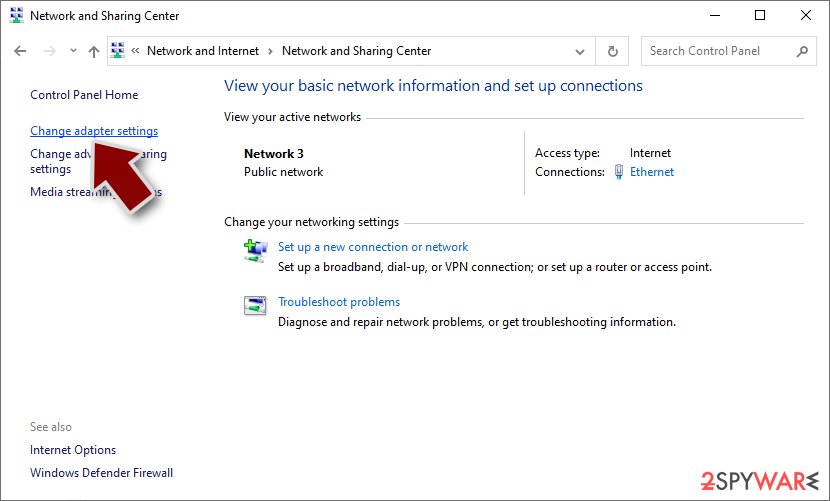
- On the left, pick Change adapter settings
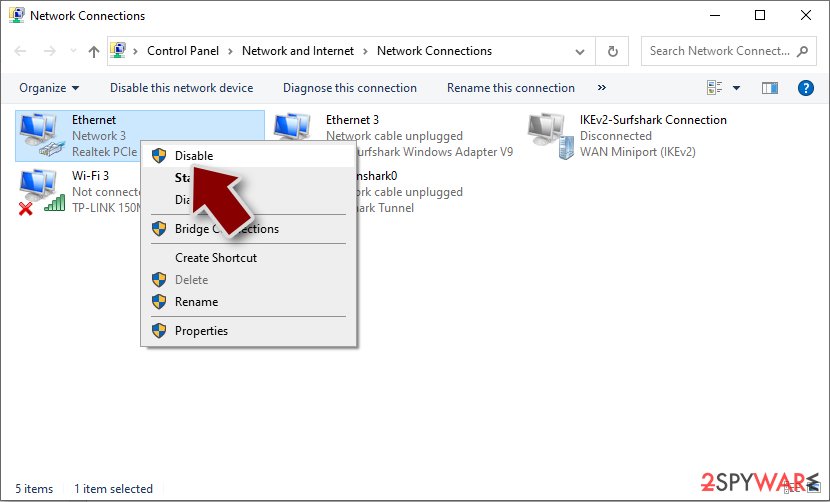
- Right-click on your connection (for example, Ethernet), and select Disable
- Confirm with Yes.


Some ransomware is designed to self-destruct after encrypting a victim's data, but this is not always the case. In many instances, ransomware is spread alongside other types of malware, such as data stealers or keyloggers.[3] This means that it is essential to remove all malware components in order to recover effectively from a ransomware infection.
The most effective way to eliminate all malware components is to use robust anti-malware software. This type of program is specifically designed to detect and remove malware, including ransomware and any other malicious components that may be present on a system. By using a program like SpyHunterCombo Cleaner or MalwarebytesMalwarebytes, you can quickly and easily locate all malicious components and remove them from your system.
2. Use a repair tool
Once malware is installed on a system, it can potentially cause severe damage to system files, resulting in instability issues such as crashes and errors. This damage can be repaired automatically using PC repair software. By using this type of program, it is possible to fix any problems caused by malware and restore the system to its normal functioning state. It is important to use a trusted and reputable PC repair program in order to ensure that the repair process is successful and that no further harm is done to the system.
- Download FortectIntego
- Click on the ReimageRepair.exe

- If User Account Control (UAC) shows up, select Yes
- Press Install and wait till the program finishes the installation process

- The analysis of your machine will begin immediately

- Once complete, check the results – they will be listed in the Summary
- You can now click on each of the issues and fix them manually
- If you see many problems that you find difficult to fix, we recommend you purchase the license and fix them automatically.


3. Data recovery process for .maos files
It is important to understand the limitations of security software and to have a plan in place for recovering from a ransomware infection. Removal of malware is something that this software is designed for, although it would not restore files affected by ransomware back to normal, despite popular belief.
That being said, anti-malware is a solution that can prevent ransomware from being executed on your system in the first place, so you should never ignore warnings coming from it. If you have already been infected and have no file backups, you are limited options, although you shouldn't give up just yet.
As your first step to data recovery, you should make copies of all your encrypted files and place them onto a separate medium, as they might become corrupted during the recovery process.
We recommend starting with the Emsisoft decryptor first. This option might not work for everyone, as it only works if data was locked with an offline ID. To check it, download the tool and run it as follows:
- Download the app from the official Emsisoft website.
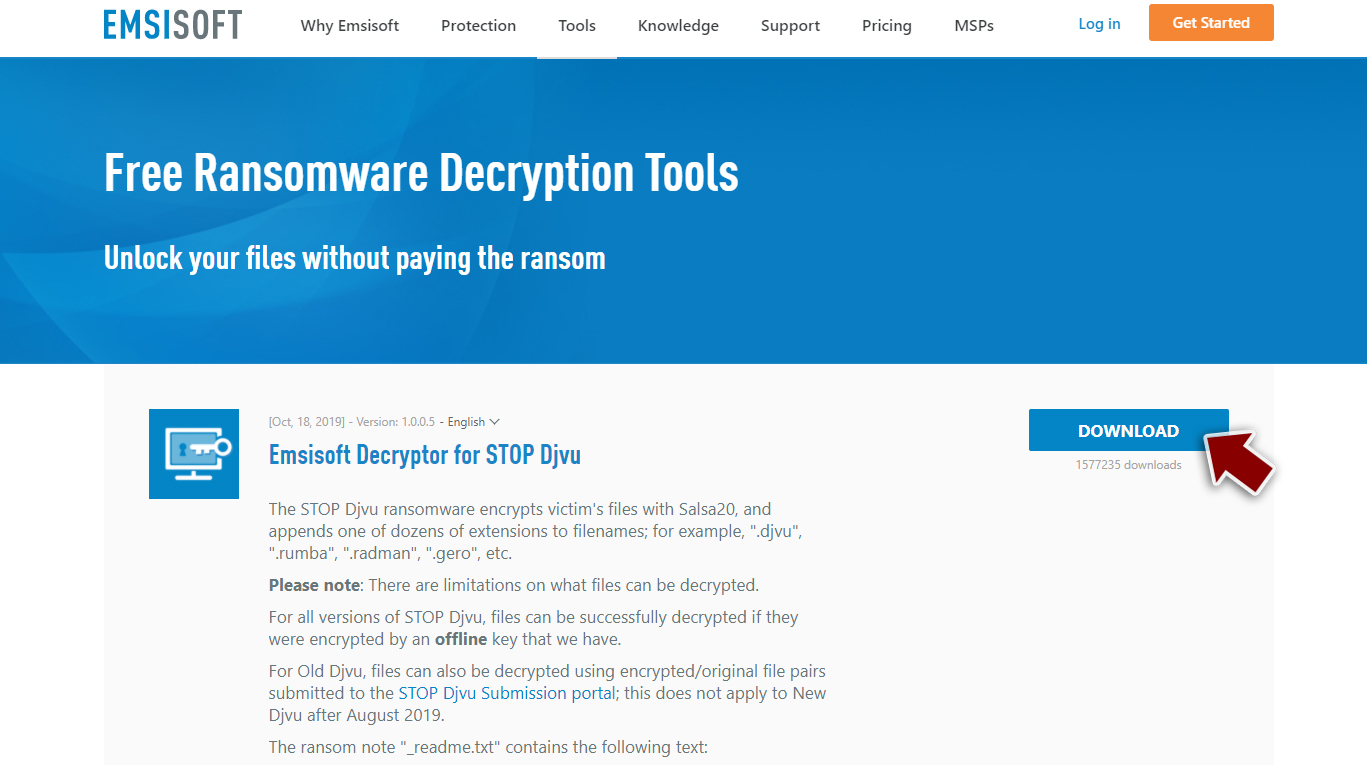
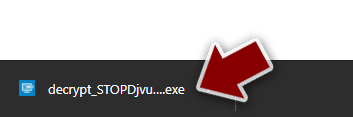
- After pressing Download button, a small pop-up at the bottom, titled decrypt_STOPDjvu.exe should show up – click it.
- If User Account Control (UAC) message shows up, press Yes.
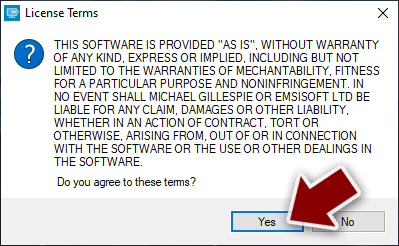
- Agree to License Terms by pressing Yes.
- After Disclaimer shows up, press OK.
- The tool should automatically populate the affected folders, although you can also do it by pressing Add folder at the bottom.

- Press Decrypt.



From here, there are three available outcomes:
- “Decrypted!” will be shown under files that were decrypted successfully – they are now usable again.
- “Error: Unable to decrypt file with ID:” means that the keys for this version of the virus have not yet been retrieved, so you should try later.
- “This ID appears to be an online ID, decryption is impossible” – you are unable to decrypt files with this tool.
Did this guide help?
Be the first to comment