

Serpent ransomware virus resurfaces in 2017
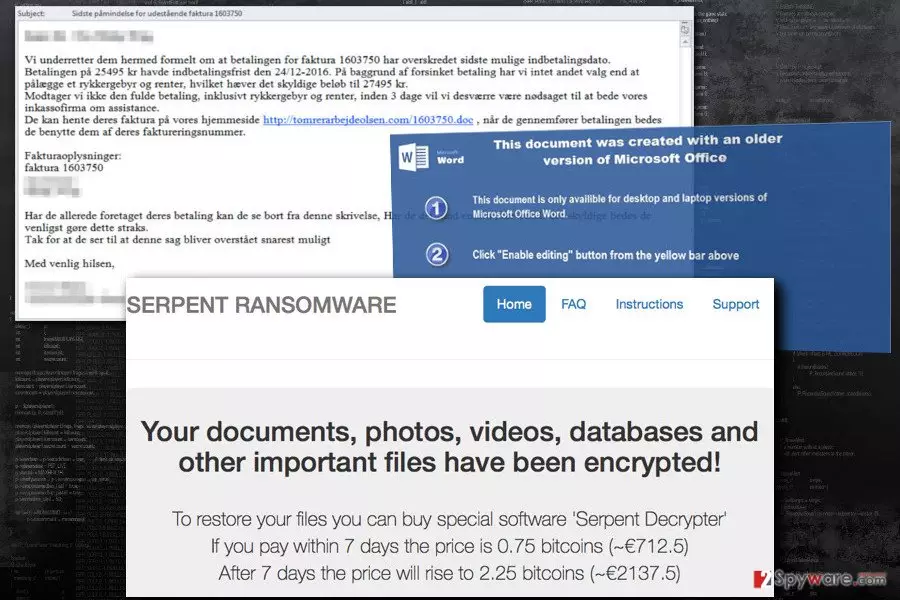
Serpent virus is a malicious file-encoding virus that works as an virtual extortion tool. Once installed, it corrupts all victim's files in order to make a ransom demand. It is a new family member of the Hades Locker and Wildfire ransomware family, which was spotted attacking Danish computer users.
The ransomware encrypts files using AES-256 and RSA-2048 encryption algorithms, adding .serpent, .serp or .srpx file extensions to them. The virus creates a ransom note called HOW_TO_DECRYPT_YOUR_FILES_[random_3_chars] in .html and .txt variants.
This file-encrypting malware variant uses a traditional infiltration method – malicious spam emails[1]. The infected email pretends to be an invoice and includes a download link to the MS Office document. If people agree to enable Macros[2] in this document, Serpent ransomware gets inside the system and locates itself in the newly created folder under %AppData% directory.
Then, the malware checks whether the victim is from the targeted country or not. If victim’s IP address reveals that he or she is from Armenia, Azerbaijan, Belarus, Georgia, Kyrgyzstan, Kazakhstan, Moldova, Russia, Turkmenistan, or Tajikistan, malware simply exists and does not encrypt your files. Sadly, computer users from other countries will have to deal with unpleasant features of the ransomware.
After checking the PC, Serpent malware connects to its Command & Control server[3] and sends details about the victim: the IP address and country, unique hardware ID and campaign ID. Then, the Server generates RSA key to encrypt 876 file types (included in virus' target list). During data encryption, all files are secured by both RSA-2048 and AES-256 algorithms and get a .serpent file extension.
Unfortunately, data recovery without necessary decryption key is nearly impossible if a victim does not have data backups. Not only ransomware deletes Shadow Volume Copies[4] but also overwrite deleted data using Cipher.exe process.
Following successful data encryption, the virus drops two files on the desktop – HOW_TO_DECRYPT_YOUR_FILES_[random_3_chars].html and HOW_TO_DECRYPT_YOUR_FILES_[random_3_chars].txt. These files are ransom notes where victims are informed that they need a specific Serpent Decrypter to restore their files. Hackers offer them a chance to use it in exchange of 0.75 Bitcoins. However, if victims won’t transfer the money in 7 days, the price will rise to 2.25 Bitcoins.
In the payment website, developers provide detailed instructions how the transaction has to be made. However, we want to discourage you from having business with cyber criminals. Nevertheless, you do not have data backups, remove Serpent from the PC. Paying the ransom may not bring back your files; hence you may lose lots of money[5].
You can always try additional data recovery methods and wait while malware researchers create a free decryption software. Take our advice and scan the computer with FortectIntego and start Serpent removal immediately.

The list of Serpent ransomware variants
.Serp file extension virus. It seems that developers of the new ransomware rushed to release an updated version of it, and at the beginning of April 2017 researchers spotted a brand new copy of it that adds different file extensions to encrypted files. This time, the malware appends .Serp file extensions to encrypted records. After a successful onslaught, the malware creates and saves README_TO_RESTORE_FILES(random characters).txt file, which carries the message from the cyber criminals.
The message contains links that point to a website created for a specific victim, and usually the only way to access it is to enter it via Tor browser. The new version still demands 0.75 BTC in exchange for the decrypter. Unfortunately, attempts to crack this virus and create a free decryption tool were unsuccessful, so files can be restored from a backup only.
.SRPX file extension ransomware. SRPX ransomware version emerged in July 2017. So far, it seems that the ransomware uses similar ransom notes as the previous version – README_TO_RESTORE_FILES_[3 characters].html, README_TO_RESTORE_FILES_[3 characters].txt. However, instead of using .serp file extensions, the malware now marks each encrypted file with .srpx file extension.
The ransom note contains a traditional explanation on how to access the darknet page with instructions on how to recover data. The victim has to install Tor browser first. The payment website presents Serpent Decrypter, which costs 0.25 Bitcoin within seven days from the day of the attack and triples after a week to 0.75 Bitcoin.
Currently, there aren't any antidotes to this ransomware variants, so we suggest you create data backups and increase the strength of your computer's security by installing an anti-malware software.
Ways to get infected with this ransom-demanding virus
We must say that this virus surprisingly reminds us of Cerber ransomware – the design of the payment page looks almost identical, and what is more, they are distributed using very similar methods. Serpent ransomware spreads via malicious spam emails and their attachments.
Danish computer users received an email which has a subject line “Sidste påmindelse for udestående faktura 1603750”, which informs about last remind for the outstanding invoice. As we already mentioned, the message includes a download link from where victims are asked to download the Word document. Malware is executed as soon as victim activate Macros by clicking “Enable content” button in the infected document.
In order to avoid Serpent or other ransomware viruses, you should be careful with received emails. Do not open provided links or download attached documents. As you can see, even safe looking files might include a dangerous virus.
Remove Serpent virus to continue using your PC safely
After ransomware attack, lots of computer users think about data recovery. However, it's just a second step. First, you need to remove Serpent virus. While malware is inside your device, all attempts to restore your files are the waist of time.
For Serpent removal, you need to use strong antivirus program. Install one of the tools listed below, update it and run a full system scan. If malware blocks access to the program or prevent from installing it, scroll down to the instructions below.
There you will find two methods that will help to access security tools and remove Serpent automatically. Sadly, virus elimination won't recover your files. However, our team has prepared few suggestions that may help to restore at least some of your files.
Did this guide help?
4 comments
Marian
Password works! Thank you!
Manuel
You made my day! I thought I wont be able to restore my files, but the password is valid!
Annette
You know, its scary to learn that some hackers got inside your PC and stole your files... Luckily, I decided to Google for information and found your website. Indeed, I was thinking about paying the ransom...
Getske
Which password and what works?