

How malicious is Aes256 ransomware?
Aes256 ransomware is a dangerous application which is related to AES-NI ransomware. Technically, it has been reported to use AES-256 Cipher[1] to encrypt people’s files and push them into paying a generous amount of money. According to its victims, it requires 10 BTC as the ransom which is supposed to help them recover their files. The same encryption standard has been used by Deadly virus, the latest versions of Cryptowall, Cryptolocker, and other threats that fall into ransomware[2] category. You can find out that you are infected by finding a ransom note named as !!Read This_Important!!!.txt on your computer’s desktop. Besides, the affected files are usually marked by .aes256 file extension which is appended to them as soon as this crypt-malware finishes its work. Of course, you can’t open these files and use them according to your needs. The only way to do that is to recover the data encrypted by Aes256 virus from back up or use the data recovery steps created by 2-spyware.com experts (provided at the end of the post). If you read the ransom note provided by this ransomware, you may be convinced that the only way to get your photos, music, business documents, etc. is to contact its developers via aes-ni@protonmail.com, aes-ni@tuta.io, or BitMsg, and purchase their decrypter. However, there is no guarantee that Aes256 decrypter, which offered by hackers, is an effective solution. According to FBI and security experts, you can’t be sure that after sending your money to hackers you will get a real and working decryption code needed to recover your files. These people are cyber criminals who are trying to increase their profits only.[3] That’s why you need to remove Aes256 virus and protect your remaining files first. Then, follow our data recovery steps and recover your files. If you need a tool for the removal of this ransomware, you can use FortectIntego.
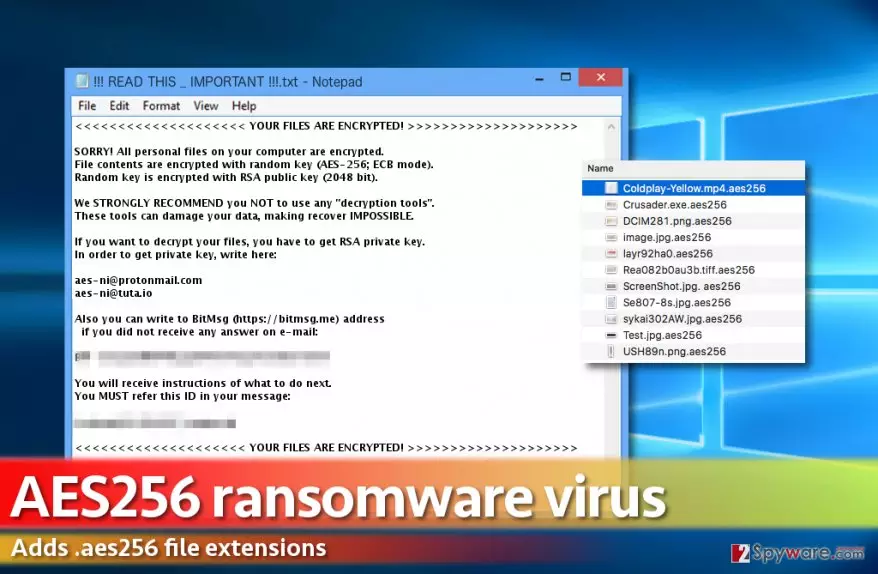
The first mentions regarding this ransomware showed up in the middle of December 2016.[4] Since then, people have been trying to recover their files. The ransom note of this malware looks like that:
<<<<<<<<<<<<<<<<<<<< YOUR FILES ARE ENCRYPTED! >>>>>>>>>>>>>>>>>>>>
SORRY! All personal files on your computer are encrypted.
File contents are encrypted with random key (AES-256; ECB mode).
Random key is encrypted with RSA public key (2048 bit).
We STRONGLY RECOMMEND you NOT to use any “decryption tools”.
These tools can damage your data, making recover IMPOSSIBLE.
If you want to decrypt your files, you have to get RSA private key.
In order to get private key, write here:
@protonmail.com
@tuta.io
Also you can write to BitMsg (https://…) address
if you did not receive any answer on e-mail:
[…]
You will receive instructions of what to do next.
You MUST refer this ID in your message:<<<<<<<<<<<<<<<<<<<< YOUR FILES ARE ENCRYPTED! >>>>>>>>>>>>>>>>>>>>
If you are not infected with this virus yet, you need to think about your files’ protection. Make sure you put the copies of your important files in external hard drives, USB sticks, and similar solutions. Also, keep in mind that they have to be disconnected to avoid the damage caused after infiltration of Aes256 virus or other ransomware. When it comes to system settings, you can keep System Restore function enabled on your computer. In case of infiltration, you will leave yourself a chance to recover some part of your files (e.g. the most important ones) via Windows Previous Versions feature. If you got infected, Aes256 ransomware removal must be a priority for you because it encrypts one portion of data at the set period.
How can I prevent infiltration of this ransomware?
Aes256 ransomware is usually spread via misleading emails telling people that they need to check their credit card transactions, invoices, missing reports, etc. However, such emails are usually filled with typo and grammar mistakes, so you should always read them carefully. Otherwise, by clicking the attachment you can let the malicious Trojan horse into your computer system which is aimed to download the file-encrypting malware. Besides, hackers have also started misusing legitimate websites by filling them with fake pop-up ads. By claiming that victims must update their Google font pack or similar software, they infect systems with ransomware viruses. To protect yourself, you need to be very careful while browsing the Internet. Make sure you double check every pop-up ad and, if it suggests you free updates, visit the official website of this program to make sure that they are real. Finally, stay away from websites filled with adult content or illegal domains because they can try to infect you with ransomware as well.[5]
Aes256 ransomware removal procedure
If you have already been infected with Aes256 ransomware, you need to remove its files from the system without wasting your time. Keep in mind that it can easily try to encrypt files that are kept on the network, cloud, and similar places. To prevent additional loss, don’t waste your time and install FortectIntego or SpyHunterCombo Cleaner for Aes256 virus removal. Of course, before running a full system scan, make sure you update these programs to renew their virus signature databases. Then, run a full system scan to detect all malicious files hiding in your computer system. If you can’t launch any of these programs and remove Aes256 ransomware with only one click, you need to use the following steps to get the control over your PC system back to you.
Did this guide help?
Be the first to comment