

Stupid – open-source ransomware that has a numerous variants
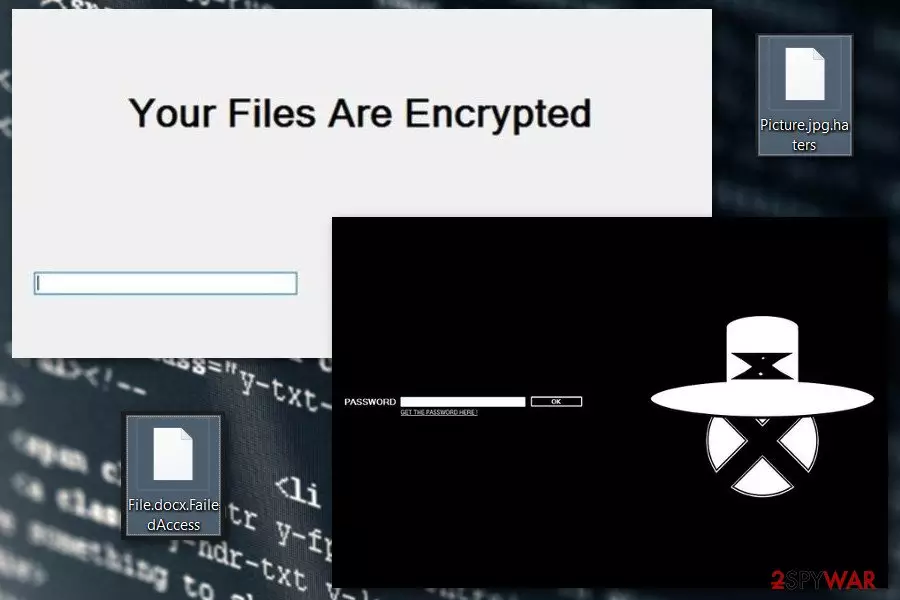
Stupid ransomware – a malicious program that can easily encrypt victim's files and leave them unreadable. Just like Annabelle ransomware, it belongs to the notorious group of crypto-viruses that are using the .NET programming language. The main difference between these variants is the extension appended to each of the infected files. Currently, malware is known for adding these suffixes:
- .haters,
- .xncrypt,
- .mikoyan,
- .failedAccess,
- .xmdXtazX,
- .try2Cry.
Stupid ransomware code is open on Github. It means that volunteer hackers can use the code for building customized versions without any restrictions. The latest version of this ransomware has been detected at the beginning of July 2020 by a G DATA team[1]. Dubbed as Try2Cry ransomware, the virus has a unique trait to worm USB flash drives. The number of extensions that it is capable of locking is rather low (up to 10), they are the most widely used and contain the most sensitive users' data.
It's not clear how much money the hackers expect to get for the Try2Cry virus and other Stupid variants decryption key. Nevertheless, experts do not recommend paying for the decryptor because most of the versions can be deciphered using a fully functional free Stupid decryptor. You can find download links below.
| Name | Stupid ransomware |
|---|---|
| Type | Ransomware virus |
| Variants | Haters ransomware virus, Suri ransomware virus, FailedAccess ransomware virus, Mikoyan ransomware virus, XmdXtazX ransomware virus |
| Appendixes | This notorious malware strain might add different appendixes, depending on the variant. The most popular extensions are .haters, .xncrypt, .mikoyan, .FailedAccess, .XmdXtazX |
| Locked files | The ransomware virus is capable of locking 61 types of files. This includes images, word documents, audios, videos, and other files/documents |
| Distribution | Such malware is spread via hacked RDP, malicious email messages and their infectious attachments, outdated software, etc. |
| Prevention | Always manage your email, do not open any letters that look suspicious to you. Also, keep your software regularly updated, employ antimalware protection, etc. |
| Removal | Get a tool such as FortectIntego to perform a full system scan. Afterward, continue to the end of this article where you will find automatical removal guidelines |
| Data recovery | Some data recovery solutions have been added to the end of this article. In addition, you can use the official decryption key that is available for Stupid ransomware variants |
Stupid virus is designed to corrupt 61 file types, including various image, audio, video and text files, that are stored in:
- My Pictures,
- My Music,
- Downloads,
- and other C:\\Windows and C:\\Programs top-level directories.
Following data encryption, Stupid ransomware gives victims instructions on how to redeem encrypted files. It’s unknown how much money it asks to pay; however, you should not consider this option. If you are thinking about paying the ransom, let us tell a few possible scenarios that should discourage you from reaching for your credit card.
Hackers are not obliged to recover your files. Ransomware is their illegal source of income, and they are interested in getting money. Keeping their promise to recover your data is a matter of their conscience. Thus, they may not provide a Stupid decryptor at all.[2]
If you decide to pay the demanded sum of money, you can always be asked to transfer more Bitcoins. Otherwise, authors of the Stupid malware might threaten to delete your files or cause other damage to the device. What is more, you might purchase not working or infected decryptor, and suffer from other malicious programs.
Thus, you should forget your damaged files for a while and remove Stupid ransomware using FortectIntego or another malware removal program. However, before installing security software, you may need to reboot your computer to Safe Mode with Networking first. You can find how to achieve such a task at the end of the article.
Some great news is that cybersecurity experts have already released a decryption tool for files that got touched by Stupid ransomware. Released by Michael Gillespie, the product works for Windows XP, Windows Vista, Windows 7, Windows 8, and Windows 10 versions. Additionally, the tool is active for both 32-bit and 64-bit-based operating systems.[3]

At the end of the article, you will find detailed Stupid removal instructions, as well as alternative data recovery methods. Keep in mind that all infected directories and locations need to be cleaned from harmful content, otherwise, the ransomware virus might boot itself up within the next computer restart. Criminals inject malicious components into places such as the Windows Registry[4] and Task Manager.
In addition, note that dangerous malware such as Stupid ransomware might be able of modifying the Windows hosts file.[5] Such type of activity is performed in order to prevent Windows users from accessing security-related websites and forums. Once you are uninstalling the ransomware virus, you have to delete the corrupted hosts file in order to unblock access.
Versions of the Stupid ransomware virus
Authors of the ransomware were definitely inspired by the success of the Cerber. They claimed that Haters virus is a new version of a well-known cyber infection. It uses CryptoCerber.exe or Cerber3Ransomware.exe executables in order to run data encryption procedure on the affected computer.
During data encryption, it appends .haters file extension and shows up a ransom note called “Form 2” where victims are asked to pay the ransom. However, the virus is decryptable by entering this code into the ransom-demanding window: masihmaubullyguaanjeng.
FailedAccess ransomware virus.
The significant feature of the ransomware is that it encrypts files on Desktop\projet sans fils\test folder only. All pictures, documents, multimedia and other files stored in this location is marked with .FailedAccess file extension.
Following data encryption, it triggers a ransom note in “You are Hacked by J.H” program window. Despite the fact users are asked to pay an unknown sum of money; there’s no need to follow such instructions. The virus is decryptable with a Stupid Decryptor.
It’s a poorly written ransomware that appends .mikoyan file extension to the encrypted files. As soon as all files are locked, the virus opens a “MIKOYAN ENCRYPTOR” window. It’s a ransom note where criminals in a broken English tell to pay 1 Bitcoin and send an email to mikoyan.ironsight@outlook.com.
However, wasting the money and paying the ransom is unnecessary. Previously mentioned Stupid Decryptor could recover these files for free.
This version of ransomware pretends to be a warning message from the Federal Bureau of Investigation (FBI). The XmdXtazX virus threatens to delete all files if victims don’t transfer 35 euros within 24 hours and don’t send an email to wcffedde-1559@ycrcrtwlf.com. However, you should rush to remove the virus only.
You can type this code – 666444QSW6842QSW666444 – to the ransom-demanding window and rescue your files for free. However, once files no longer have .XmdXtazX extension, you should take care of your computer’s security by scanning the system with antivirus.
This malware is another strain of the so-called Stupid ransomware. Once the virus manages to sneak into your Windows system, modifies entries, and launches the encryption process. When files are locked with secret keys, all of the documents end up with the .SLAV appendix and ransom demands start flooding victims through a ransom message that urges for 100 euros that need to be transferred in BTC cryptocurrency.

Try2Cry ransomware
Try2Cry ransomware virus has been revealed at the beginning of July 2020 by Karsten Hahn – a team member of the G DATA team. The ransomware may be spread via typical ransomware distribution means (spam emails, cracks, keygens, fake updates, etc.), though it stands out from the others due to the USB worm traits.
According to the researcher, the Try2Cry virus is capable of infecting USB flash drives by copying the Update.exe malicious file onto the connected drive and altering the existing files on it by adding the LNK shortcut. In addition, it generates several folders named using Arabic symbols. Once any of the malicious files is launched, the ransomware launches the Rijndael algorithm and encrypts the .doc, .ppt, .jpg, .xls, .pdf, .docx, .pptx, .xls, and .xlsx files using .try2cry file marker.
Although criminals are expecting the victims to contact them via Try2Cry@Indea.info email, experts recommend the only solution – a full Try2Cry removal using a professional anti-virus tool. This ransomware worm can be decrypted using the Stupid decryptor (the link provided below), so make sure to delete the virus from the machine and USB and then launch the decryption tool.

Security tips that will help to avoid ransomware
Developers of Stupid ransomware might use several strategies to spread malware and infiltrate devices. However, if you take precautions, you should not encounter ransomware. File-encrypting viruses can enter the system when you open a malicious email attachment, click on a malware-laden ad, install bogus software or fake update, etc. Thus, you should:
- Stay away from spam emails[6] and do not open any attachments that are included in unknown emails.
- Keep all your software updated.
- Do not install any programs or updates from unknown or shady sources.
- Avoid clicking suspicious ads, especially those that inform about detected viruses or offering to install software are dangerous!
In addition, we have noticed that some ransomware strains are able to distribute via hacked RDPs. According to research, the TCP port 3389 is the most vulnerable one that allows criminals to hack it and forcibly push the password in order to access the targeted machine remotely.
Lastly, you should be prepared for the worst and regularly update data backups.[7] They are crucial in case of the attack. The research team from Finland[8] reminds that not all ransomware-viruses are decryptable, so it’s better to keep copies of the most important files in the external storage device.
Terminate Stupid ransomware with the help of professionals
The only safe way to remove Stupid ransomware is to employ professional security programs. It’s nearly impossible to delete the file-encrypting virus manually without causing bigger damage because it can inject malicious code into legitimate system processes. Thus, you should install a powerful malware removal program to complete the elimination task. Taking risks and trying to complete the elimination on your own might bring big damage to your computer system or its software.
In order to lengthen the Stupid removal process for your computer, you can try scanning the entire system and look for malicious strings with a product such as FortectIntego, SpyHunterCombo Cleaner or MalwarebytesMalwarebytes. These tools will observe all infected directories and provide you with results regarding the altered software and system locations. Once you eliminate the cyber threat, go to the very end of this article and there you will find data recovery solutions, including the original decryption tool.
Did this guide help?
Be the first to comment