

WanaCrypt0r puts world healthcare and telecommunication organizations into panic mode
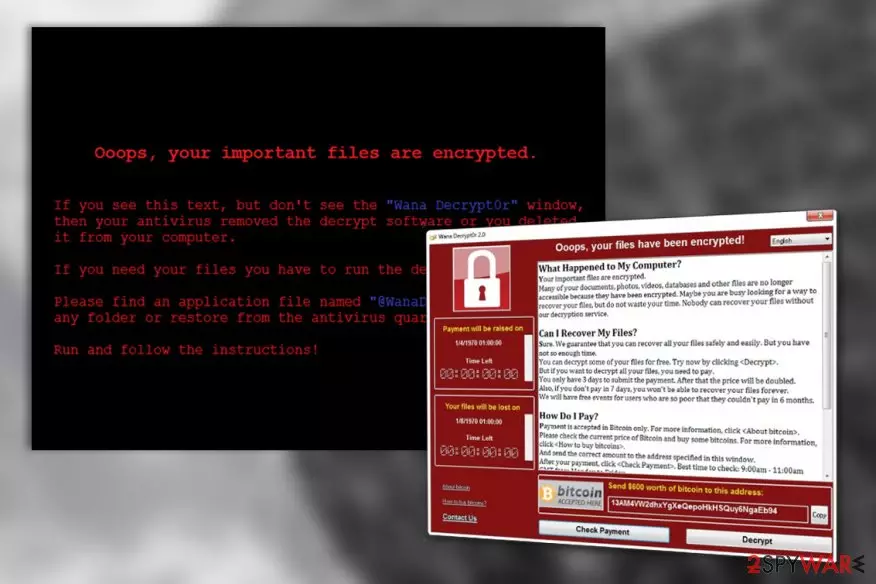
WanaCrypt0r virus is an encryption malware or the so-called ransomware [1] which is rapidly spreading through private computers and corporate networks [2] all around the world, encrypting computers and demanding cash for their recovery. Research shows that the ransomware travels under a variety of different names including WanaCrypt0r 2.0, WannaCryptor, Wana Decrypt0r, WannaCry or simply WCry. Once on the infected system, the parasite starts encrypting hundreds of file types using AES and RSA ciphers [3] which make the processed data unreadable and inaccessible to the victims. Besides, the affected files are also appended with .wncry, .wncrytt, .wcry or .wncryt extensions. The ransomware attack ends with a replacement of the desktop background and opening of the @WanaDecryptor@.exe window which informs victims about the unfavorable situation that is current on their computers and a questionable proposition on how to fix it. This window works like a ransom note, and the extortionists use it to set forward their demands. In particular, the extortionists want the victims to pay 600 dollars in Bitcoin within 3 days after the system infiltration and threaten that the sum will double if the transaction is not made in time. 7 days after the encryption are critical because beyond this period files can no longer be decrypted. At the same time, hackers talk about free events that they will launch in order to let “poor” victims recover their files free of charge. We can’t be sure whether the ransomware developers really want to play the Good Samaritans after they’ve just turned victims’ files into rubbish or that’s yet another of their evil ways to trick users into keeping the ransomware on their computers for half a year, potentially resulting in more damage to the system and more encrypted files. WanaCrypt0r removal is the only way this ransomware can be fought back, even though mere elimination of the malicious virus components does not come close to the full system recovery. You will dispose of the malware only by applying professional tools such as FortectIntego in the elimination process.
WanaCrypt0r ransomware makes no exceptions neither for the individual users nor the major companies and organizations when it comes to its attacks. Major healthcare and telecommunication companies in including NHS and Telefonica have already been affected, followed by 230,000 more computers worldwide [4]. The number of infected devices keeps growing minute-by-minute: 150 out of total 195 countries in the world are now under siege. Such rapid spread is related to the unconventional techniques that the malware developers use for its distribution. The leaked ETERNALBLUE SMB technology [5] which was initially created for the U.S. intelligence operations play the leading role in these events. In particular, we are talking about the MS17-010 vulnerability [6] which was patched by Microsoft in March 2017. However, not all Windows operating systems received the update. For instance, some of the already unsupported versions such as Windows XP, Vista or Windows 8 (Windows 8.1 is supported) were left with this security hole. Same goes for the users who run the latest software versions but have not taken the time to install this security patch. The result of this is hundreds of infected health centers, banks, universities, hotels, and similar organizations. If you are one of its victims, you must remove WanaCrypt0r ransomware from your computer ASAP. Please note that it is not recommended to alter registry and similar system components manually, especially if you are not tech-savvy. It is always recommended to use reputable security utilities for the ransomware decontamination and apply professional guidelines when it comes to data recovery.

Virus exploits Microsoft vulnerability to infect computers
WanaCryptor has been spread with the help of the flaw found in a popular communication protocol used by Windows OS. As we've already mentioned, Microsoft did release the patch for this EternalBlue vulnerability, but those, who didn't download it, left themselves vulnerable to this attack. It seems that ransomware virus, or at least its initial component, is spread by a worm that drops ransomware onto the system. It can easily spread thru networks and cause additional damage to its targets. As soon as ransomware is installed, it initiates the encryption of victim's files and starts showing such warning message:
Ooops, your important files are encrypted.
If you see this text, but don’t see the “Wana Decrypt0r” window,
then your antivirus removed the decrypt software or you deleted it from your computer.
If you need your files you have to run the decrypt software.
Please find an application file named “@WanaDecryptor@.exe” in any folder or restore from the antivirus quarantine.
Run and follow the instructions!
The damage depends on how much computers did WanaCrypt0r 2.0 infect: the ransom for one affected machine is worth $ 600 in Bitcoin. However, if you have backups, you should never think about contacting these hackers via their bitcoin addresses given. Security experts have already warned victims not to pay ransoms as there is no guarantee that hacker will send you a proper key that you need to decrypt your files.
Experts recommendations on WanaCrypt0r removal
To remove ransomware from your computer, you need to scan it with updated security software. Make sure you update your scanner before launching because it needs to have a full date base which includes the files of this virus. We recommend using Reimage, Webroot SecureAnywhere AntiVirus or Malwarebytes Anti-Malware to remove WanaCrypt0r virus from your computer. If you can't launch your scanners, you need to end malicious processes of this ransomware, including wannacry.exe, wcry.exe, 111.exe, lhdfrgui.exe, @WanaDecryptor@.exe and others. You can start the recovery of your files only after you remove this ransomware. Otherwise, it can start the encryption of another part of your files. The easiest way to recover files encrypted by WanaCrypt0r is to rely on backups. If you can't remember saving them, you can try using steps given in our “Data Recovery” section.
Did this guide help?
Be the first to comment