

Safari virus is the malware category that includes various cyber threats affecting Safari in a negative way

Safari virus is the term including malware that particularly targets Safari browser and makes the use of this web browser frustrating. The issue is closely related to the PUP which interrupts browsing sessions after modifying the system, filling it with required components and initiating other dangerous changes. As the title suggests, the virus can be seen only on Safari. The signs of its persistence are annoying alerts pushing you to install certain applications, troublesome commercial ads, and similar. However, the main issue related to Safari redirect virus is constant redirects to suspicious or possibly malicious sites. Users have been complaining about the suspicious behavior of the Safari in various online forums.[1] Many people still believe the myth that Apple devices are immune to malware and cyber threats. However, various investigations have revealed multiple security vulnerabilities in macOS and Safari.[2] Additionally, Mac malware has now been transferred to a separate category of viruses, so believe that the system is vulnerable as any other OS.[3]
| Name | Safari virus |
|---|---|
| Type | Browser hijacker/adware |
| Category | Potentially unwanted program/Mac virus |
| Symptoms | Redirects to suspicious websites, delivers intrusive content to the screen including commercial pop-ups and banners |
| Affects | MacOs and iOS devices |
| Distribution | Insecure installations of suspicious apps, deceptive sites, fake ads, spam |
| Main danger | Tracks and collects information about the user, exposes to possibly malicious content |
| Elimination | Use FortectIntego and run a full system clean |
Programs like this Safari virus have the main purpose of delivering commercial content to your screen so the revenue is generated from your clicks on those pop-up ads, banners or redirects. Unfortunately, these redirect may lead you to insecure websites and browsing on possibly malicious pages too often leads to malware infections.
However, the more disturbing fact about this potentially unwanted program is that the browser is not performing as it supposed to because when Safari redirects to websites it is not loading anything and often closes the tab or the program automatically. Browsing online becomes resultless because you cannot access wanted sites or search online as before.
Unfortunately, Safari redirect virus happens to be one of the key browser malware infections which exploit such vulnerabilities. It is a counterpart version of similar browser redirect infections for other browsers:
Safari malware does not operate via a specific application. Thus, its detection might take longer than usual. Furthermore, you may not find any shady software in the system list to uninstall, though this infection may facilitate the installation of shady applications and browser content.
Let us elaborate on possible behavior and symptoms which will help you determine whether your Safari browser might have been compromised. If you already can’t ward off annoying ads, you complete Safari virus removal by launching an anti-spyware tool, such as FortectIntego.

The same Safari redirect virus with different functionalities
When this type of infections lands on your browser, it gives out its presence by:
- Redirecting you to shopping domains or movie streaming sites without SSL certificates[4];
- Misguiding you to the domains advertising pornographic content;
- Promoting potentially fraudulent browser extensions;
- Urging you to install fake Safari updates or shady browser scanners;
- Directing to browser-based tech support scams;
- Cramming you with sponsored ads.
Sooner or later, you will realize that there is a malicious presence on the browser. Safari tech support scams and forged updates are the most popular versions of this Safari browser virus. Because people get scared and reveal the important information like account credentials to the people who disguise as IT experts.
Speaking of the latter, you may easily tell a difference between legitimate update alerts and fake pop-up notifications simply by looking at the URL domain promoting such update. Even if the very notification may seem identical to the original, shady URL random address consisting of multiple numbers and characters will hint that the update is not supported by the Apple company.
Another highly popular tendency for a redirect virus to misguide you to unknown websites that ask you to install a questionable Adobe Flash Player or another tool. You should keep your software up-to-date more frequently so these fake updates and promotional content couldn't trick you into installing questionable applications. Make sure to remove Safari virus using proper tools that you got from the official provider also.

Some of such domains that Safari redirect virus exposes you to even behave quite aggressively: you are asked to enable an extension in order to leave the page. In those cases, there is no need to enable any add-ons, but instead forcefully shut down it.
Other variations of a browser redirect virus operate via web scripts which might direct to the web pages supposedly alarming you about your infected computer. Researchers[5] note that developers of such browser threats exploit the name of a well-known threat to leave a more intimidating impression.
Claims that your computer will be “disabled” or “blocked” are just absurd. Such messages always contain a phone number and urge you to take immediate action within 5 minutes. In those cases, you can simply close the tab via the Activity Monitor. Any interaction may lead to more severe malware infiltration than Safari redirect virus.
Another possible scenario of a Safari virus is that it may direct to a website containing exploit kits.[6] The latter has been widely used by certain ransomware developers, such as Cerber or CryptoMix.
In addition, you should be aware that redirect infections also contribute to spying to users. Since it operates via web scripts, they may be used to collect information identifying users’ browsing habits. Safari redirect virus can access information like your IP address, location, most viewed and searched items or even your activity on social media.
It is possible that they may also attempt to collect personal details. As a result, soon your email spam folder might be crammed with messages offering disputable products or services. In some cases, a more menacing attachment might be delivered with such an email as well.[7]
Speaking of mobile users who are using the Safari mobile version should be extremely vigilant. Certain variations of browser redirect infections may not simply cram you with ads, but redirect you to a shady domain before diverting you to a legitimate website, Google, Yahoo, or Amazon, for instance.

Redirect virus prevention tips
If you are dealing with a program that affects your browser, you have more chances to curb it and avoid it. Observing the above-discussed operation peculiarities, redirect malware operates via web scripts that are not visible for ordinary users.
However, their “shapeless” form lets them execute several commands. You are most likely to encounter them in peer-to-peer file sharing domains or ad-supported movie streaming and gaming sites.
Such domains often contain such ads as “No one has played this game..”, “Things no one knew about…”, etc. Such domains often contain fake buttons[8] suggesting you install highly dubious virus scanners. If you encountered hijack through this method, you will need the assistance of malware elimination tool to help you eradicate the infection.
In addition, such browser redirects do not function via apps, you should still pay attention to the installation wizards. Despite what program, you download, opt for “Custom” settings to detect irrelevant add-ons and deselect them. Choosing Advanced installations always gives you the advantage of de-selecting additional programs from the download list.
Eliminate Safari virus during a proper system scan
In order to detect and delete all components and the browser virus, you may combine two methods – automatic Safari virus removal and manual. As for the latter, below guide will instruct how you can delete all shady extensions possibly related with the annoying redirect phenomenon.
The instructions will also show how to perform full browser reset to get rid of web scripts. This action will also help you remove Safari virus. You may also review the list of system apps to check whether no questionable applications settled on the computer.
Delete from Safari
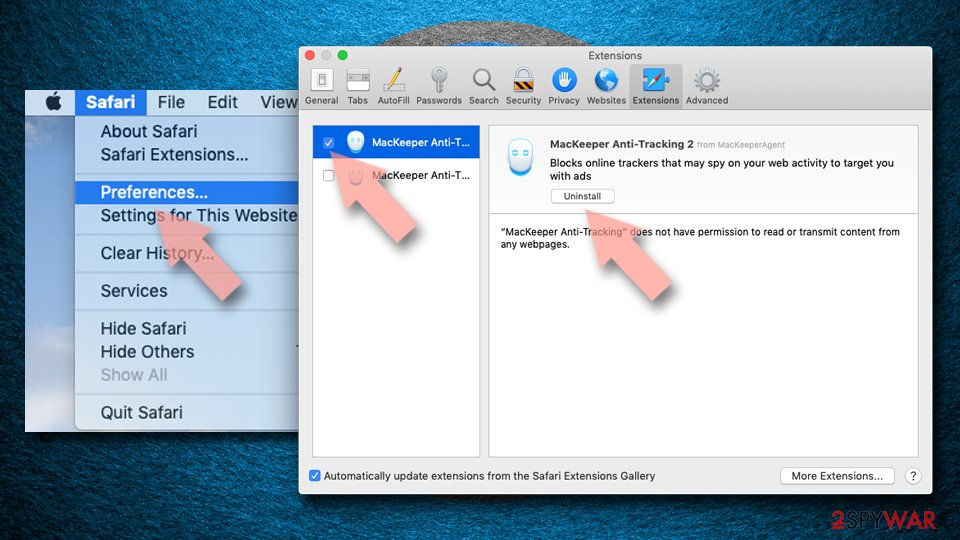
Remove dangerous extensions:
- Open Safari, click Safari in the menu at the top-left of the screen, and select Preferences.
- Go to the Extensions tab, look for any suspicious entries, and click Uninstall to remove them.

Clear history and website data:
- Click Safari in the menu and pick Clear History.
- Set Clear to all history and confirm with Clear History.


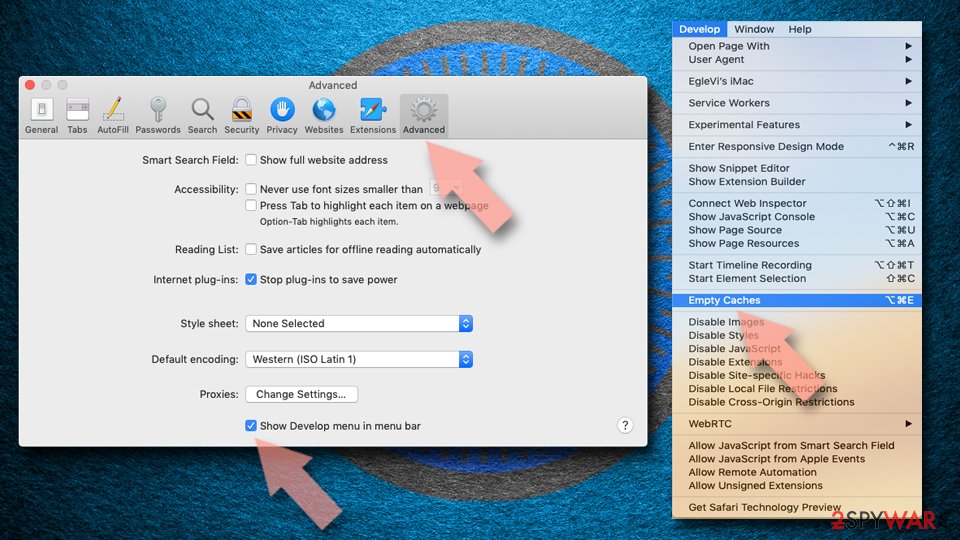
Reset Safari:
- Click Safari in the menu and select Preferences > Advanced.
- Enable Show Develop menu in menu bar.
- From the menu bar, click Develop and select Empty Caches.

Did this guide help?
Be the first to comment