

Developers of Jhash ransomware use online payment platform Payza to obtain illegal profits
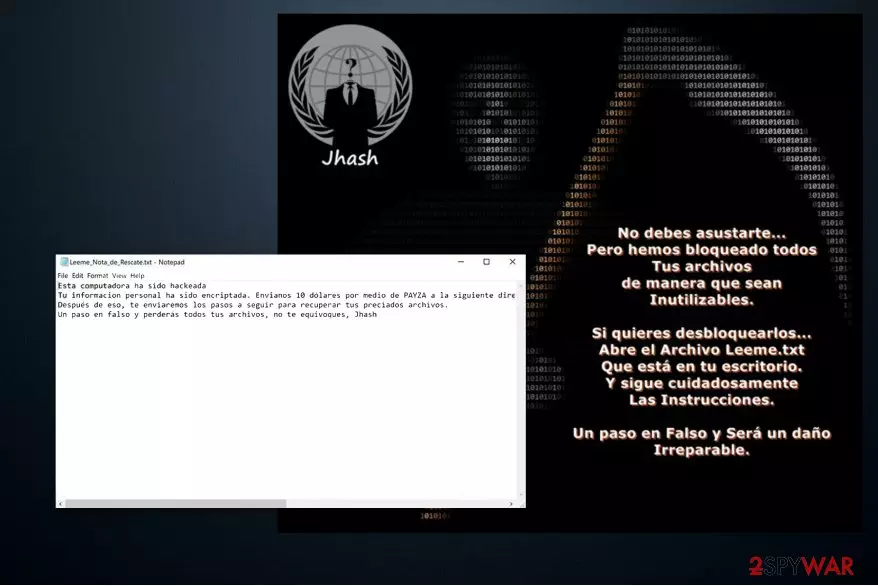
Jhash virus is created to encrypt data on the victimized computer and demand a ransom for a decryption key. Once the malicious program is in the system, it starts data encryption using AES algorithms[1], appends .locky extension and drops a Leeme_Nota_de_Rescate.txt ransom note written in Spanish.
Analysts from DieViren.de[2] note that there is no proof showing that this ransomware is related to an infamous Locky virus. In fact, the source code of Jhash malware is based on the infamous Hidden Tear ransomware. There are identical variants such as Teamo, Losers, GIBON and other file-encrypting viruses.
The text file carefully instructs the victims on how to recover their data — they are asked to pay a $10 ransom using an online payment platform Payza. Even though the ransom amount is extremely low in comparison to the usual ones, you should not motivate the attackers to continue their illegal actions. Remove Jhash virus instead of paying the ransom.
Besides, do not get deluded by the scam offers of alternative Jhash decryptors online. Malevolent people take advantage of desperate people and lure them into purchasing expensive and useless decryption tools. It is just a popular method to generate illegal profits for scammers.

Instead, you could employ FortectIntego or MalwarebytesMalwarebytes to start Jhash removal for you. These are the most reputable security applications which will quickly detect the executables of the ransomware and eliminate them. Additionally, it will maintain your computer’s security in the future and prevent malware attacks.
Spam e-mail messages are used to distribute the ransomware
Typically, hackers send thousands of spam e-mails containing a malicious attachment[3]. Once the inexperienced computer user clicks on it, the executable file is dropped, and ransomware successfully infiltrates on the system.
To increase the rate of the infections, developers imitate invoices and other essential documents sent by famous companies. They look like legitimate files and trick users to click on them. Thus, we encourage you to monitor your online activity carefully and avoid opening suspicious e-mail letters.
Moreover, ransomware might possess a form of a fake software update offered on the web. You may encounter a pop-up claiming that you need to upgrade Adobe Flash Player or even Windows OS. None of these false messages are real. You should always close the tab/window and never install programs or updates from unreliable websites.
Additionally, remember that it is extremely important to keep your anti-malware software updated regularly. It will help you to prevent the infiltrations of high-risk computer infections and avoid financial or data losses.
A professional security software will help you terminate Jhash virus
We always recommend using an antivirus system to remove Jhash and other ransomware since it is the safest way. Hackers tend to program malware to open backdoors to infiltrate different types of malicious programs on the infected computer. A regular computer user is not qualified to detect and eliminate them all.
Thus, we suggest downloading a reputable anti-malware software from verified developers. After the installation, let it scan your files thoroughly and start a Jhash removal.
However, those who still opt for manual termination can follow the detailed guide provided at the end of this article.
Did this guide help?
Be the first to comment