

GHOST ARMY ransomware is a new strain of Crypt888 virus
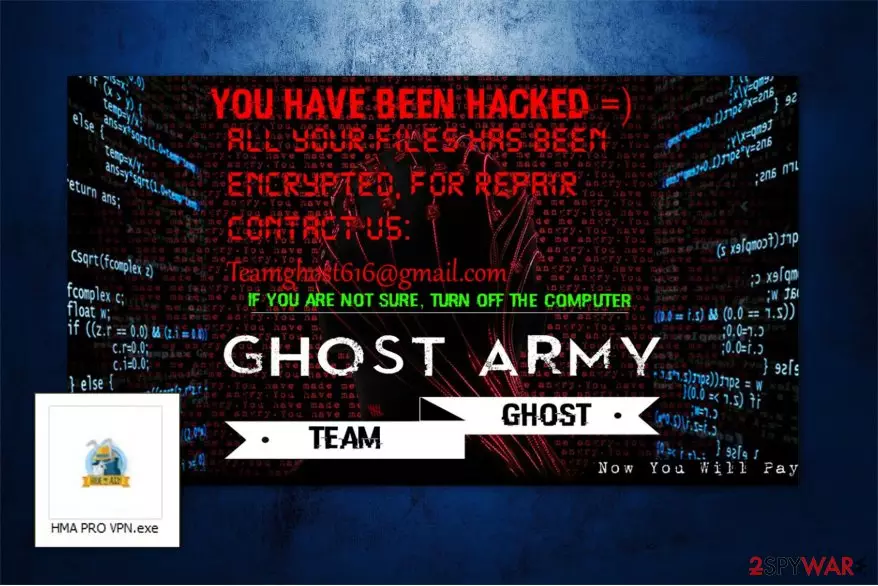
GHOST ARMY virus is file-encrypting computer threat which aims to gain profits by blocking the access to the most valuable information on the victimized system. It spreads as a fake Hide My Ass VPN software and uses sophisticated algorithms for data encryption. Later, it appends Lock. extension to the encoded files and changes the wallpaper of the desktop to the ransom note which indicates teamghost616@gmail.com email for contact purposes.
According to the research, this is another variant of another high-risk computer threat — Crypt888 ransomware. Note that there are numerous other versions of this file-encrypting virus, like MIRCOP, Aviso, Zuahahhah, etc. All of the mentioned computer hazards are dangerous and might damage your system permanently if you delay the termination procedure. Likewise, do not hesitate and complete Ghost Army removal as soon as possible.
Once the wallpaper is changed to the ransom note, GHOST ARMY'S victims see the following message:
YOU HAVE BEEN HACKED =)
ALL YOUR FILES HAS BEEN ENCRYPTED. FOR REPAIR CONTACT US:
teamghost616@gmail.com
IF YOU ARE NOT SURE, TURN OFF THE COMPUTER
GHOST ARMY
TEAM GHOST
Like most of the other ransomware-type viruses, this variant tries to convince people that they have no other option than relying on the criminals. They urge to contact them via email for further payment details to recover the encrypted information. However, note that this crypto-malware can be decrypted using a professional tool. You can find free GHOST ARMY decryptor at the end of this article.

Therefore, do NOT pay the ransom. Although, to use the decryption software you must remove Ghost Army virus in the first place. You can either use the elimination guide which is attached below or employ a robust malware removal tool to help you with the procedure. We strongly recommend using FortectIntego since its design is easy to use for inexperienced computer users.
After you get rid of GHOST ARMY, you might try alternative recovery methods if you are unable to retrieve all compromised files. Each one of them is briefly described at the end of this article together with the instructions on how to use it. Additionally, you might try to get back your data from backups stored in the Cloud[1].
Ransomware infection spreads as a fake VPN software
Experts from SenzaVirus[2] warn that people should avoid visiting shady and unreliable websites. Usually, they are controlled by hackers who place obfuscate software downloaders to spread their malicious programs. This particular infection is lurking in the cyberspace as a fake VPN called Hide My Ass.
Additionally, be aware that most of the cyber threats are distributed in peer-to-peer (P2P) networks[3] as software cracks and updates. Likewise, you should not seek to download audio, video or program files illegally. It is important to always install applications only from official sites and verified developers.
You should also be cautious when you receive emails from unknown senders. Other high-risk computer infections are distributed via malicious letters as invoiced or other important documents. Never open suspicious email attachments even if the message seems to come from a well-known company.
Safely uninstall GHOST ARMY virus
As we have already mentioned, neither pay the ransom nor contact the criminals. They might use deceptive techniques to trick you into believing that you have no other choice. Note, that you can get rid of GHOST ARMY easily — pick a professional malware removal software and let it check your system thoroughly.
We suggest using FortectIntego, SpyHunterCombo Cleaner, or MalwarebytesMalwarebytes for GHOST ARMY removal. If you have a different security software, make sure that it is powerful enough to help you with this high-risk computer infection. If not, feel free to use one from the list above. They are tested and strongly recommended by our IT specialists.
After you remove GHOST ARMY, either use recovery methods provided below or head straight to the decryption tool. In case you struggle with ransomware elimination procedure, you can use guidelines attached at the end of this article.
Did this guide help?
Be the first to comment