

Promock ransomware – a file-encrypting cyber threat which belongs to the Djvu ransomware family
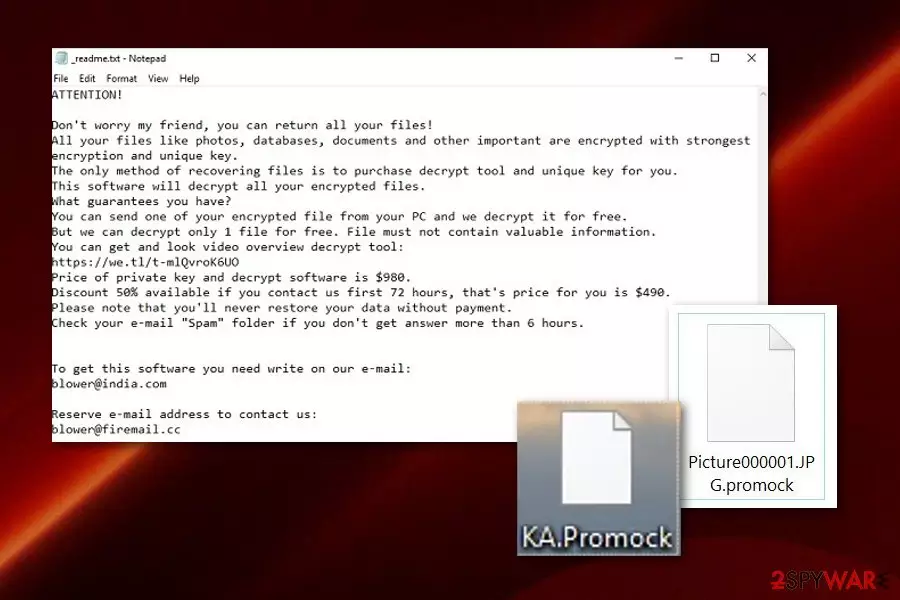
Promock ransomware is a file locking infection which comes from the Djvu ransomware and STOP ransomware families. As you might have already heard, Djvu is a widespread cryptovirus which has been reappearing with new versions for several months now. Promock virus came out together with Promoz and Promorad viruses which all are capable of encrypting data on the targeted computer and appending the .promock, .promok, .promoz or .promorad file extensions. After that, the ransomware virus[1] delivers a _readme.txt ransom note which offers the decryption tool for 980 dollars and a 50% discount if contact is made in three days. The criminals provide blower@india.com and blower@firemail.cc email addresses as a way to make contact and ensure their victims that the only way to restore blocked files is by purchasing the decryption tool from them. However, this information is false and might be delivered only to scam you. The virus, together with its versions .promoz, .promok, and .promorad, is already decryptable with STOP decrypter. (a direct download link)
| Name | Promock |
|---|---|
| Type | Ransomware |
| Danger level | Very high. The threat can place malicious content all over the computer system and execute hazardous payload to encrypt stored data |
| Belongs to | Djvu ransomware |
| Appendixes | .promock, .promok |
| Ransom message | _readme.txt |
| Price | The price starts from 980$ and is divided into half if the victim shows contact in 72 hours |
| Emails | blower@india.com and blower@firemail.cc |
| Spreading | Email spam, unprotected websites |
| Detection | FortectIntego is a malware detection tool |
Promock ransomware is a dangerous malware which uses unique cryptography to lock up all files that are found on the infected computer system. This data might include images, PDF sheets, powerpoint presentations, excel documents, notepads, other text documents, audio, and video files.
According to the message provided by Promock, cybercriminals allow sending one small file for free decryption as evidence that the decryption tool truly exists:
ATTENTION!
Don't worry my friend, you can return all your files!
All your files like photos, databases, documents and other important are encrypted with strongest encryption and unique key.
The only method of recovering files is to purchase decrypt tool and unique key for you.
This software will decrypt all your encrypted files.
What guarantees you have?
You can send one of your encrypted file from your PC and we decrypt it for free.
But we can decrypt only 1 file for free. File must not contain valuable information.
You can get and look video overview decrypt tool:
hxxps://we.tl/t-ll0rIToOhf
Price of private key and decrypt software is $980.
Discount 50% available if you contact us first 72 hours, that's price for you is $490.
Please note that you'll never restore your data without payment.
Check your e-mail “Spam” folder if you don't get answer more than 6 hours.
To get this software you need write on our e-mail:
blower@india.com
Reserve e-mail address to contact us:
blower@firemail.cc
Your personal ID:
–
Note that, Promock ransomware might be created only for scamming purposes as what the cybercriminals truly care about is just receiving money from you. According to Virusai.lt experts,[2] crooks who distribute ransomware are very likely to scam their victims, so that is why you should avoid making any contact with these people.
Additionally, hackers urge for Bitcoin as this cryptocurrency[3] is one of the most popularly used. Also, such currency transfers do not require providing any particular information, so the transferring process cannot be tracked down. We suggest carrying out the Promock removal by using reputable anti-malware and enabling all malicious activities in the system.
You need to remove Promock virus before you start searching for data recovery solutions. Use software such as FortectIntego, SpyHunterCombo Cleaner, or MalwarebytesMalwarebytes to detect the malware and all content that relates to it. Talking about file restoring options, you can try some third-party tools that we have provided below the article. Make sure that you use them exactly as required in the instructions.

Most popular distribution sources of ransomware appear to be email spam and infected payload
According to research, ransomware is often spread via legitimate-looking email messages. Sometimes crooks pretend to be from well-known organizations or say that an order has been received and the user needs to pay for it, etc. If the victim falls for believing in these kinds of words, he/she takes big risks on opening the attached file or accessing the inserted link.
We recommend avoiding to open rogue email messages[4] or letters that you were not expecting to receive. If you have received some type of official message, make sure that the company will try to contact you again if the case is very important or you can write or call them by looking for contact details on the organization's original website.
Continuously, note that ransomware infections can be found on non-original websites which do not fit the recommended security requirements. These pages are often left improperly disclosed and allow various hackers to plant rogue content in them. That is why you should keep a distance from all questionable-content that you might overcome on the web.
Promock ransomware should be removed only automatically
Note that trying to remove ransomware from your computer system manually is not a great idea. These threats might plant rogue content in the Windows Registry, Task Manager section, and other locations of your Windows computer. Make sure that before you perform the Promock removal, you use automatical computer software to scan the system and find all malicious content. We suggest you use tools such as FortectIntego, SpyHunterCombo Cleaner, MalwarebytesMalwarebytes.
Remove Promock virus before you start recovering your data. You can try our below-provided file-restoring software, however, it might be useless if you do not terminate the cyber threat at first. Additionally, make sure that you activate the Safe Mode with Networking or System Restore feature to disable the malicious activity of the ransomware virus.
Did this guide help?
Be the first to comment