

Cosakos ransomware – a ransom-urging malware that can secretly bring AZORult trojan to the surface
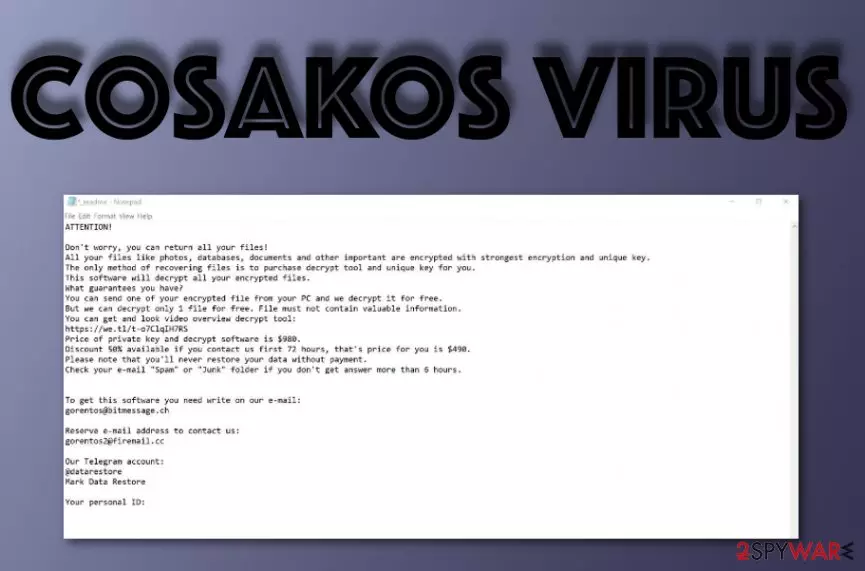
Cosakos is a ransomware virus that is related to the Djvu and STOP ransomware families. However, the most untypical act of this virus is that it can lead its victims to the installation of a Trojan horse named AZORult. After successful encryption, the virus appends .cosakos file extension to each locked component and displays the _readme.txt message. Ransom demands can vary from $490 to $980, depending on the time of contact. Victims are often lured into money swindling operations by transferring the demanded price while believing that the criminals will truly send the decryption tool for blocked files.
| Name | Cosakos |
|---|---|
| Type | Ransomware |
| Family | Djvu/STOP |
| Extension | .cosakos |
| Note | _readme.txt |
| Price | $490/$980 |
| Additional threat | AZORult |
| Promotion | Email spam |
| Identification | FortectIntego |
Cosakos virus is a sneaky threat that enters the system with the help of spam messaging. This type of malware often initiates various malicious processes in the background. Sometimes, ransomware[1] erases Shadow Volume Copies of encrypted data so that the decryption process will be even harder to perform without their software.
However, you should not be afraid of the people who have launched Cosakos ransomware on your computer. The more the people fall for their tricks, the better it will be for the crooks. So instead of paying the demanded price, we offer to take a look at the end of this page and find other data recovery solutions that might appear to be really handy.
Note that Cosakos removal needs to come first before data decryption. If you do not fully get rid of the ransomware virus, it might reboot itself the next time you start your computer and complete the encryption all over again. For malware investigation, we recommend using a trustworthy machine tool such as FortectIntego.
The ransomware can fill various locations with malicious content that is crucial for the threat's successful operation. So in order to remove Cosakos ransomware fully, you will need to check different types of directories on your Windows machine. This includes the Windows Registry and Windows Task Manager sections.

Once Cosakos ransomware is on your computer system, you will definitely notice that. First, you will spot all kinds of files renamed by adding the .cosakos appendix. Furthermore, you will receive a payment-demanding message looking like this:
ATTENTION!
Don't worry, you can return all your files!
All your files like photos, databases, documents and other important are encrypted with strongest encryption and unique key.
The only method of recovering files is to purchase decrypt tool and unique key for you.
This software will decrypt all your encrypted files.
What guarantees you have?
You can send one of your encrypted file from your PC and we decrypt it for free.
But we can decrypt only 1 file for free. File must not contain valuable information.
You can get and look video overview decrypt tool:
https://we.tl/t-2P5WrE5b9f
Price of private key and decrypt software is $980.
Discount 50% available if you contact us first 72 hours, that's price for you is $490.
Please note that you'll never restore your data without payment.
Check your e-mail “Spam” or “Junk” folder if you don't get answer more than 6 hours.To get this software you need write on our e-mail:
gorentos@bitmessage.chReserve e-mail address to contact us:
gorentos2@firemail.ccOur Telegram account:
@datarestore
Mark Data RestoreYour personal ID:
–
This ransom message is carried not only by Cosakos ransomware but also by other versions of Djvu ransomware. The aim of these criminals is to collect as much income as possible and by not agreeing to pay them you force their operations to fail. What is even more dangerous about ransomware is that it can inject other forms of malicious software.
For example, different variants of STOP ransomware, supposedly including also Cosakos ransomware, aim to plant AZORult Trojan horse[2] on the infected system. As you might already know, these beasts are capable of remotely controlling the entire system, collecting sensitive information, and injecting malicious objects of their own.

Advanced identification of emails might prevent ransomware appearance
According to research, ransomware developers choose stealth installations sources such as email spam, legitimate-looking attachments, exploit kits, peer-to-peer websites, outdated software, free Adobe Flash Player[3] updates, and similar. The best way to achieve full computer security and prevent these dangerous infections as possible is to:
- Carefully manage all of your emails. Always identify the sender and do not open the message if it comes from an unknown source. Even if the letter does come from a well-known organization, still check for possible grammar mistakes and think if you were expecting to receive anything important lately.
- Avoid browsing in unsecured third-party sources. There are a lot of websites that lack required protection and when fallen into the hands of bad actors, these sources are misused for malware distribution. You should especially avoid places such as video-streaming, porn-watching, gambling, and adult dating websites.
- Take care of automatical protection. Automatical safety has the same importance level just like manual protection measures. What you have to do here is choose a reliable an expert-tested anti-malware tool that includes lots of safety features. Besides, do not forget to regularly update your program.
Advanced removal solutions for Cosakos ransomware
Cosakos virus might bring severe harm to your machine/device and this threat needs to be eliminated right after detection. If you do not get rid of it as soon as possible, you might end up with another malicious infection on your computer. Be aware of this ransomware virus and take required actions against it right after the discovery.
The Cosakos ransomware removal process is possible to complete safely and successfully only if you use reliable anti-malware software for help. Scanning the entire system for malicious objects is also a crucial thing to do. For this purpose, we recommend downloading one of these tools: FortectIntego, SpyHunterCombo Cleaner, or MalwarebytesMalwarebytes.
Besides, after you remove Cosakos ransomware from the system, it is very important that you secure your future data. According to experts from LosVirus.es,[4] the best way to keep your files and documents safe from malware attacks is to store them on remote serves such as Dropbox, iCloud or in a remote device such as a USB Flash drive.
Did this guide help?
Be the first to comment