

Ambrosia ransomware – malware that uses extortion by locking personal files on the host computer
Ambrosia ransomware is a file locking virus that was first spotted in the first half of August 2020 by security researcher xiaopao.[1] The malware belongs to a much broader family of cryptoviruses known as Scarab, which was initially released in 2017, and then relaunched in 2020 with dozens of new versions being released since then.
Ambrosia ransomware uses a combination of RSA and AES[2] algorithms to encrypt pictures, music, videos, documents, databases, videos, and other personal files on the infected computer. Suchlike files are appended with .ambrosia extension, and victims can no longer access the data. To unlock files, they require a key that is held by cybercriminals on a remote server.
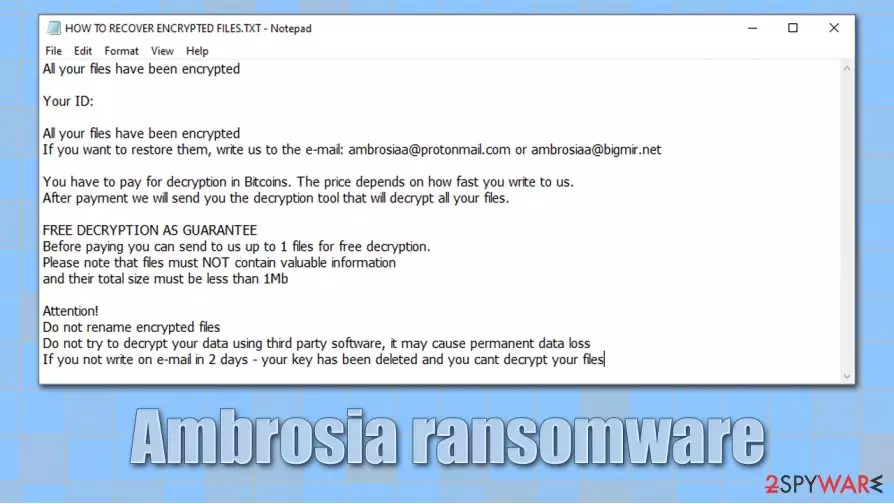
Malware also drops a ransom note called HOW TO RECOVER ENCRYPTED FILES.txt, which asks to contact hackers via ambrosiaa@protonmail.com or ambrosiaa@bigmir.net emails and pay a ransom in Bitcoin cryptocurrency.
| Name | Ambrosia ransomware |
| Type | File locking virus, crypto-malware |
| Distribution | Spam email attachments, exploits, web injects, vulnerabilities, fake updates, cracks, etc. |
| Malware family | Scarab ransomware 2020 |
| File extension | Each of the encrypted file names are scrambled and an .ambrosia extension added. Example of the encrypted file: 2g0000000001G0zw9ltGFW4dMRunK1hk6.ambrosia |
| Ransom note | HOW TO RECOVER ENCRYPTED FILES.txt |
| Contact | ambrosiaa@protonmail.com or ambrosiaa@bigmir.net |
| File recovery | Besides backups that should have been prior to the ransomware infection, there are little chances of retrieving all data successfully. The only remaining choices are paying criminals (which is not recommended) or attempting to use third-party recovery solutions |
| Malware removal | To delete the infection from the computer, perform a full system scan with anti-malware software such as SpyHunterCombo Cleaner or MalwarebytesMalwarebytes |
| System fix | After you delete ransomware from your computer, you should also attempt to remediate Windows instead of reinstalling it with tools such as FortectIntego |
There are several ways how you can get infected with the Ambrosia virus, as hackers use multiple distribution tactics in order to make the infection spread to as many victims as possible. Researchers Some of the examples include:
- Malicious spam email attachments and embedded hyperlinks
- Exploit kits and software vulnerabilities[3]
- Unprotected Remote Desktop (RDP) connections
- Fake Flash Player updates or virus infection notifications
- Pirated software installers and software cracks, etc.
As evident, you would not have to deal with Ambrosia ransomware removal and a complicated file recovery procedure if you would have protected your computer prior to the malware attack. To prevent such outcomes in the future, you should make sure that you equip your machine with powerful anti-malware and update your software regularly, never open malicious email attachments, use strong passwords, and backup all your important files on another medium.
Ambrosia files virus targets the most common file types that are used by regular consumers, including PDF, MS Office documents, various picture formats, etc. This is done to cause maximum damage to victims and increase the chances of receiving a ransom payment.

While many other ransomware viruses only append an extension to the locked files, Ambrosia ransomware replaces the original name with a random string, and only them appends .ambrosia marker at the end. This way, users cannot recognize their data completely.
As soon as Ambrosia file encryption is complete, they can see the following ransom note:
All your files have been encrypted
Your ID:
All your files have been encrypted
If you want to restore them, write us to the e-mail: ambrosiaa@protonmail.com or ambrosiaa@bigmir.netYou have to pay for decryption in Bitcoins. The price depends on how fast you write to us.
After payment we will send you the decryption tool that will decrypt all your files.FREE DECRYPTION AS GUARANTEE
Before paying you can send to us up to 1 files for free decryption.
Please note that files must NOT contain valuable information
and their total size must be less than 1MbAttention!
Do not rename encrypted files
Do not try to decrypt your data using third party software, it may cause permanent data loss
If you not write on e-mail in 2 days – your key has been deleted and you cant decrypt your files
Ambrosia ransomware does not differ much from other malware that operates the same way – Makop, Oonn, WastedLocker, GoldenEye, and many others. Threat actors behind these strains claim that there is no other way to recover files apart from paying the ransom and also offer free test decryption, which proves that the decryption tool works.
However, it is not uncommon for hackers to never send the required decryptor, even after bitcoins are paid. Besides, receiving payments is what the attackers want – they will continue their malicious deeds as long as they receive profits from this illegal business. Thus, remove Ambrosia ransomware from your system, and attempt different data recovery methods that we provide below.
Data recovery options for .ambrosia files
It is important to note that you will not be able to open .ambrosia files even after you eliminate the ransomware infection from your computer. However, it is important to remove malware to prevent incoming data from being encrypted in the future. In other words, you need to delete Ambrosia ransomware from your system if the infection has occurred with the help of powerful anti-malware software.
However, before you do that, you should also backup all the encrypted .ambrosia files, as they might be lost forever otherwise. Since encrypted data does not hold any malicious code, it is safe to be transferred to online storage or a physical device.
To recover .ambrosia files, you need a decryption key that is only accessible by ransomware developers (hence, they are capable of using extortion). Since a combination of RSA and AES is used, calculating the correct key is impossible, as each identifier is unique.
Despite this, you should think twice before you pay cybercriminals, as you might lose your money as well. Instead, rely on the following options:
- Wait till security experts find bugs within malware and develop a working decryptor for Ambrosia ransomware
- Use built-in Windows recovery solutions (although these are typically destroyed by ransomware infection)
- Employ third-party recovery tools that might sometimes retrieve at least some of the locked data.
Also, malware infection can sometimes damage Windows system files, and you might have to reinstall it even if you delete the virus. Instead, you can attempt to fix system errors and crashes with the help of automatic repair tools such as FortectIntego.

Remove Ambrosia ransomware correctly
Many users, especially those who never encountered a cryptovirus before, straight out panic when they see that gigabytes of data are no longer usable. While such a situation is really complicated as there is no easy way to recover files after the encryption, panicking will not solve any problems – you must focus on Ambrosia ransomware removal instead.
However, you should first make a copy of the compromised files if you have no backups, and only then remove Ambrosia ransomware virus from the system. For that, you should employ a powerful anti-malware solution and perform a full system scan. If malware is tampering with your security software, you can instead access Safe Mode, as explained below.
As mentioned above, scanning the machine with anti-malware will not recover .ambrosia files, as security software is not designed for such a purpose.
Did this guide help?
Be the first to comment