

R3f5s ransomware – Dharma family member that will not let go of your files until you pay
R3f5s ransomware is a cryptovirus that locks all files on the targeted computer until a ransom is paid to the cybercriminals. R3f5s virus belongs to the infamous Dharma ransomware family, which has been spewing out new versions of itself since 2016. As soon as the payload file of R3f5s file-locking parasite lands in a computer system, the encryption of victims' personal data begins. Consequently, just like with its previous versions (RDX, Kut or 259) all files are renamed and appended with a complex three-part extension (assigned victim ID, criminals contact email in brackets, and .r3f5s appendix).
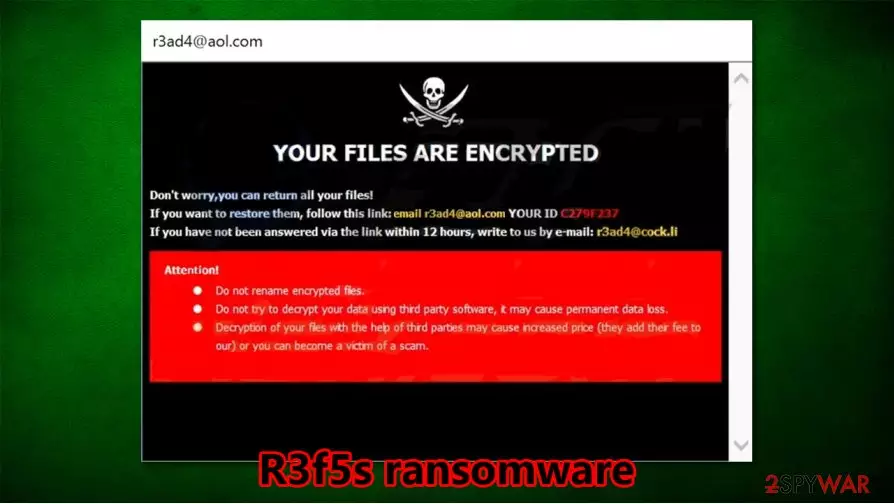
Following successful encryption, two ransom notes show up – one as a pop-up window, the other one as a text file (FILES ENCRYPTED.txt). The latter one is very short and consists only of two emails provided (r3ad4@aol.com and r3ad4@cock.li) to establish contact with the developers of the .r3f5s virus in order to decrypt locked data. The pop-up ransom note is a bit more comprehensive and states that victims shouldn't try to rename or unlock their files with third-party tools, as this may cause permanent data loss. The cybercriminals also provide a unique ID that should be sent to them upon contact. The same two emails are provided. Further details, like ransom amount, preferred payment method, or timeline, are not specified. Both ransom notes are published at the end of this paragraph.
| name | R3f5s ransomware, .r3f5s virus |
|---|---|
| type | Ransomware, Cryptovirus |
| Family | Dharma ransomware family |
| ransom note | FILES ENCRYPTED.txt file and a pop-up window appear after encryption is completed |
| appended file extension | A difficult three-part extension is appended to all non-system files. |
| issues | All personal data is renamed and inaccessible |
| malware removal | Trustworthy anti-malware software should be used to remove R3f5s ransomware |
| system checkup | Once R3f5s ransomware removal is completed, a system tune-up should be done with the FortectIntego tool to eradicate any changes that the virus has done to computer system-related files and device settings |
As always, we strongly advise against any contact with the cybercriminals. Study shows[1] that victims who paid the threat actors ended up spending twice as much, as those who focused on system restoration. In addition to that, when the developers of R3f5s virus, and malware alike, are paid, this encourages them to attack more people, this fuels their mischievous campaigns.
We suggest using SpyHunterCombo Cleaner or MalwarebytesMalwarebytes to automatically remove R3f5s ransomware from infected devices. The longer the malware stays in a computer, the more harm it could do. In the future, be sure to have a trusty anti-malware software like mentioned above to watch your back.
After you are done with R3f5s ransomware removal, we strongly advise doing a complete system checkup with the FortectIntego tool because Dharma family members do extensive damage to computer system files, start-up, and other settings. If neglected, these altercations might lead to crashes, malware renewal, constant error messages, etc.
In the pop-up ransom window, creators of .r3f5s ransomware state:
YOUR FILES ARE ENCRYPTED
Don't worry,you can return all your files!
If you want to restore them, follow this link:email r3ad4@aol.com YOUR ID 1E857D00
If you have not been answered via the link within 12 hours, write to us by e-mail:r3ad4@cock.li
Attention!
Do not rename encrypted files.
Do not try to decrypt your data using third party software, it may cause permanent data loss.
Decryption of your files with the help of third parties may cause increased price (they add their fee to our) or you can become a victim of a scam.

If victims somehow missed the pop-up window, cybercriminals leave their contact info in a text file on all contaminated folders:
all your data has been locked us
You want to return?
write email r3ad4@aol.com or r3ad4@cock.li
Methods of malware distribution
As strange as it may sound, hackers are working their butts off to outsmart everyday computer users. There are various types of malware[2], and then there are numerous variants of those types. It would take us forever to expand on each category and their variations.
Entirely another thing is with the distribution of their creations. These opportunities are limited, so cybercriminals try to camouflage their malware as unsuspiciously as possible. For example, we all have received spam emails. Most of them are harmless because they go where they supposed to – the spam inbox folder, where they are constantly deleted; but if you'd receive a letter appearing as a legitimate letter from your bank saying that there have been some errors on your account and that an updated invoice is in the attached file, or that you must push a link to go to your account now to do some urgent adjustments. You would be very intrigued to do that, wouldn't you? STOP!
This is just one example of how cybercriminals try and fool everyday people. Stay aware, get to know their body of work, acquire a trustworthy anti-virus software to watch over you, and stay safe.
Remove R3f5s ransomware and tune-up your computer afterward
Once a computer is infected with any kind of malware, a chain reaction starts, and victims could end up losing not only their data but their identities, savings, etc. As soon as any malicious program is detected, it must be removed swiftly. To remove R3f5s virus experts[3] advise using time-proven anti-malware software such as SpyHunterCombo Cleaner and MalwarebytesMalwarebytes.

Unfortunately, R3f5s ransomware removal won't magically decrypt your files. But you can restore them from backups as soon as you run as full system scan with the FortectIntego tool to make sure that there are no changes made to system start-up items and other settings, along with system files. If the .r3f5s ransomware got its hands on some of them, the app will automatically find them and reverse them.
Did this guide help?
Be the first to comment