

.exe ransomware – file-locking parasite created for money extortion
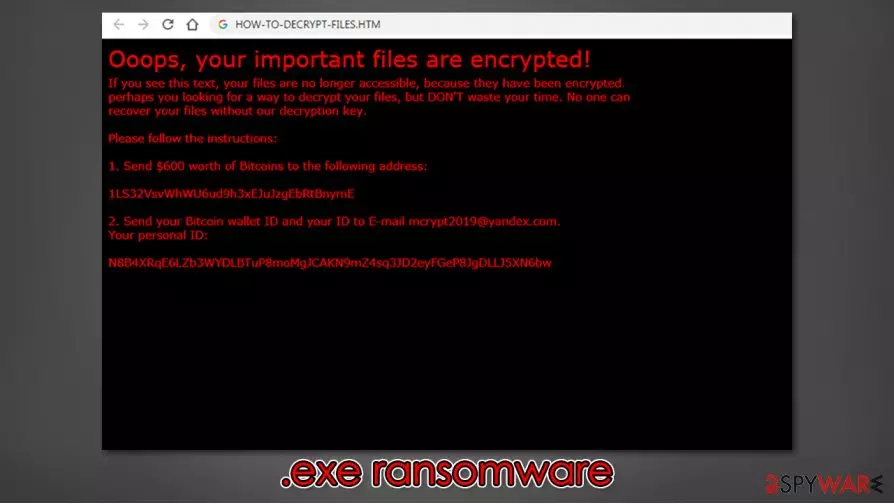
.exe ransomware is a cryptovirus created for the sole purpose of money extorsion. It derives from the Xorist ransomware family, members of which are known for using XOR[1] or Team cryptography methods. Like its previous versions, the PAY IN 24 HOURS virus, and ZaLtOn, the .exe cryptovirus locks victims' non-system files, thus rendering them useless, i.e., inaccessible. During the encryption process, all personal data is appended with a .exe extension.
Afterward, creators of the .exe virus present ransom notes in 3 different ways – a pop-up window, HOW-TO-DECRYPT-FILES.HTML file, which is placed on the desktop, and they even change the desktop wallpaper. The wallpaper message claims that all files are encrypted and urges users to open the HTML file. The pop-up window contains a few swear words and is meant to unlock the encrypted files when a correct key is written in (supposedly after the ransom is paid). In the HTML file, the cybercriminals are very abrupt – they inform the victims to forward them 600 USD in cryptocurrency Bitcoins (BTC) to their crypto-wallet – 1LS32VsvWhWU6ud9h3xEJuJzgEbRtBnymE. After that, the victims should send their given personal ID and their BTC wallet ID to the cyber thieves email – mcrypt2019@yandex.com.
| Name | .exe ransomware, .exe virus, .exe cryptovirus |
|---|---|
| Type | Ransomware, Malware |
| Family | Xorist ransomware family |
| Appended file extension | .exe is appended to all non-system files |
| Ransom note | Desktop wallpaper, pop-up window, HOW-TO-DECRYPT-FILES.HTML |
| rANSOM AMOUNT | To regain their files victims are asked to forward $600 in BTC |
| Criminal crypto-wallet address | 1LS32VsvWhWU6ud9h3xEJuJzgEbRtBnymE |
| criminal contact details | mcrypt2019@yandex.com |
| Malware removal | To remove .exe ransomware use a dependable anti-malware software |
| System tune-up | Once .exe ransomware removal is completed, users should check for system irregularities with the FortectIntego tool |
We advise not to pay the ransom. There's absolutely no guarantee that you will receive the promised tool for .exe file-locking virus decryption after a ransom is paid. Criminals are criminals for a reason. Instead of getting what you were promised, you might infect your device further with some additional malware like trojans[2] or just lose your money.
All malware should be eliminated promptly. Trustworthy anti-malware software like SpyHunterCombo Cleaner or MalwarebytesMalwarebytes should be used to remove .exe ransomware. These apps will locate, isolate, and delete the infection, and all its allocated files spread out through the computer.
Although anti-virus programs are suitable for malware removal and protection from it (if updated regularly), some might not be able to fix what the virus has done to system files and settings. So after .exe ransomware removal and before restoring your data from backups, experts[3] recommend using the FortectIntego tool to check for abnormalities with a push of a button. This app will restore your device to a pre-contamination phase so you could enjoy it anew.
Creators of .exe ransomware enclose this message in the HOW-TO-DECRYPT-FILES.HTML:
Ooops, your important files are encrypted!
If you see this text, your files are no longer accessible, because they have been encrypted.
perhaps you looking for a way to decrypt your files, but DON'T waste your time. No one can
recover your files without our decryption key.Please follow the instructions:
1. Send $600 worth of Bitcoins to the following address:
1LS32VsvWhWU6ud9h3xEJuJzgEbRtBnymE
2. Send your Bitcoin wallet ID and your ID to E-mail mcrypt2019@yandex.com.
Your personal ID:

Ransomware distribution methods used by the cybercriminals
There different types of malware – trojan horses, adware, worms, and so on, and it is spread in various methods. But ransomware is usually distributed by spam emails and via torrent websites. Computer users should always be aware of cybercriminal's intentions.
Spam emails are sent out in thousands when conducting so-called spam campaigns. These emails might contain either mischievous hyperlinks to malicious sites or infected attachments. Once either of these is opened, a payload file is downloaded onto the device, and encryption starts right away. You can avoid it easily by never opening any hyperlinks in letters sent from unknown senders and by always scanning attachments with proper anti-malware software before downloading it.
Using torrent websites is another sure way to get your system infected. Cybercriminals tend to hide their “products” camouflaged as software or game cracks (illegal activation tools). Avoid these sites and support your desired game/software developers by buying their products directly from their official websites or distributors.
Guidelines for .exe ransomware removal and system health check
We mentioned before that any malware must be immediately erased from any device right after detection. The longer any malware stays on a computer, the more damage it could do, and dealing with cybercriminals could lead to a lose-lose situation.

To remove .exe ransomware from the infected device, we recommend using reliable anti-malware apps like SpyHunterCombo Cleaner and MalwarebytesMalwarebytes. Either of these will find the .exe virus and delete it. Furthermore, these apps will safeguard your passageways on the internet if updated regularly.
Unfortunately, .exe ransomware removal won't decrypt your files. A company called Emisoft is continuously updating its decryption tools, but since it's a brand new virus, the required key might still be in development. Transfer all encrypted files to offline storage, like a USB drive, and check up on us later as we constantly update our readers with the newest updates.
When your computer is virus-free, you have to take care of its health. Xorist family cryptoviruses are known for their changes to system settings and system-related files. These changes might cause devices to exhibit abnormal behavior, such as crashes, overheating, severe lag, etc. To fix any altercations the .exe virus has done to the system with a push of a button, we suggest using the FortectIntego tool.
If your anti-malware software fails to find or remove .exe ransomware, try doing the same thing but while in Safe Mode with Networking mode.
Did this guide help?
Be the first to comment