

Zimba ransomware – a cryptocurrency demanding file-locking parasite
Zimba ransomware is yet another file-encrypting and ransom demanding computer virus from the infamous Dharma family. Most of the ransomware operates the same way. First, it encrypts[1] the victim's personal pics, documents, audio, and other files and appends some sort of extension (in this case, a complex triple extension, ending with .zimba). Then it creates ransom notes that could either be pop-up windows or text files, placed everywhere so that the victim would find it easily.
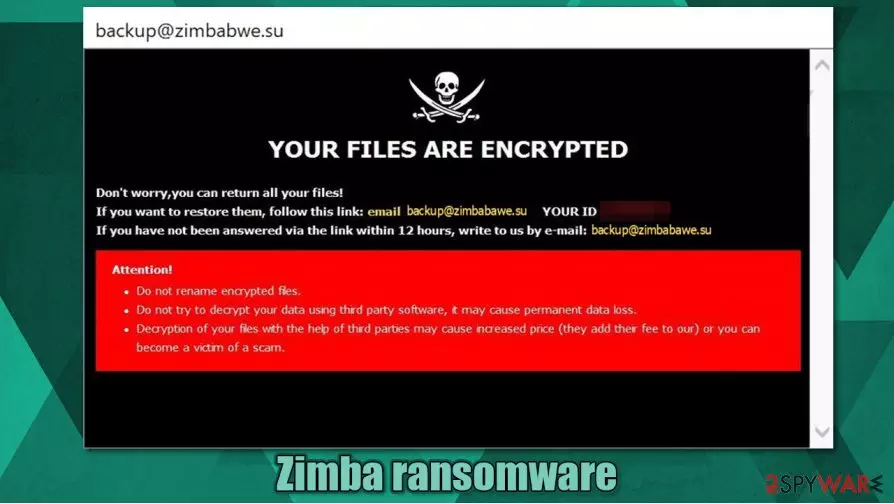
Following a successful encryption, Zimba virus (similarly to its versions – Sss, MUST, and R3f5s) generates a pop-up window, named backup@zimbabwe.su, and ransom note text files, called FILES ENCRYPTED.txt. The message is very short and consists of just an email address to contact the criminals. The pop-up window, on the other hand, is a bit more instructive. Within it, the .zimba file virus creators explain that all victim files were encrypted and that the only way to get them back is by meeting their demands.
Two emails are provided saying that the second one should be used only if they don't respond within twelve hours, but the emails are the same – backup@zimbabwe.su, and a unique user ID is appointed. Then, the cybercriminals threaten the users not to try any third-party decryption tools or rename the files, leading to permanent data loss. No more info is given, nothing about the ransom size or the preferred payment method, no free decryption of a few files guarantees the victims that they really possess the needed tools for decryption.
| name | Zimba ransomware, .zimba virus |
|---|---|
| type | Ransomware |
| Family | Dharma ransomware |
| Appended file extension | A complex three-part extension is appended to all non-system files: 1. unique user ID; 2. cybercriminals email address in brackets; 3. .zimba extension |
| Ransom note | A pop-up window (backup@zimbabwe.su) and text files (FILES ENCRYPTED.txt) |
| Criminal contact details | backup@zimbabwe.su |
| Malware removal | Eliminate .zimba file virus with a dependable anti-malware software |
| System Health check | A system tune-up is in order after Zimba ransomware removal. Use the FortectIntego tool to scan your device and fix any irregularities |
Even though a ransomware infection is a nightmare that users want to wake up from immediately, but don't panic. We're here to help you. Don't even consider contacting the criminals even to find out the ransom amount to satisfy your curiosity. Paying the ransom is the worst thing that any ransomware victim can do because it empowers and fuels the cybercriminals, like the developers of Zimba ransomware, to initiate more attacks and create more sophisticated, undetectable malware.
People should get rid of the virus immediately. We suggest using powerful anti-malware apps like SpyHunterCombo Cleaner and MalwarebytesMalwarebytes to remove Zimba ransomware from infected systems. Virus deletion won't decrypt your files, but it's what it should be done before attempting the file recovery.
When you're done with Zimba ransomware removal, we strongly advise doing a full system check-up with a powerful tool like the FortectIntego to locate and repair any issues that the virus might have done to system files and its settings.
Message from the cybercriminals in the pop-up window reads:
YOUR FILES ARE ENCRYPTED
Don't worry,you can return all your files!
If you want to restore them, follow this link:email backup@zimbabwe.su YOUR ID –
If you have not been answered via the link within 12 hours, write to us by e-mail:backup@zimbabwe.su
Attention!
Do not rename encrypted files.
Do not try to decrypt your data using third party software, it may cause permanent data loss.
Decryption of your files with the help of third parties may cause increased price (they add their fee to our) or you can become a victim of a scam.

The brief message from the ransom note text files:
all your data has been locked us
You want to return?
write email backup@zimbabwe.su
Malware distribution methods
There are different kinds of malware[2], so it also spreads in different ways. But the most common ways cybercriminals are infecting everyday computer user's devices are file-sharing platforms and spam email campaigns. Nowadays, to stay safe while browsing, people should always have a trusty anti-virus software watching their backs.
While commencing spam email campaigns, cyber thieves send out thousands of spam emails across the globe. These emails contain one of two evils – either an infected attachment or a hyperlink to a malicious site. If either of these is opened, a payload file gets access to the computer, and infection is initiated.
Lots of malware is hidden in the torrent sites because anyone can upload anything onto there. It's an ideal place for cybercriminals to hide their creations camouflaged as popular game cracks, pirated software, and so on. To stay safe on the internet, please refrain from these sites so you can evade a massive headache.
Eliminate Zimba ransomware correctly
All malware should be dealt with promptly. The same goes for Zimba ransomware. Removal of the ransomware won't decrypt your files; however, you shouldn't doubt for a second to get rid of it before more harm comes your way.

We advise using trustworthy and powerful anti-malware software like SpyHunterCombo Cleaner or MalwarebytesMalwarebytes to remove Zimba ransomware from your devices. Reliable anti-virus apps are a must these days, for they will safeguard your passageways on the world wide web.
Malware, like Dharma family ransomware, tends to make changes in the system files and settings to help them with their purpose. These altercations might lead to computers exhibiting anomalous behavior. To eradicate these changes, after Zimba ransomware removal, experts[3] advise using a powerful system tune-up tool like FortectIntego.
Did this guide help?
Be the first to comment