

SWP ransomware – a computer virus that scares victims into paying the ransom
SWP ransomware is a computer virus that's made with the sole purpose in mind – money extorsion. When this virus gets access to a computer it immediately encrypts all non-system files and appends an elaborate three-part extension to all data (see extension details in the table below). All encrypted data is inaccessible until decoded.
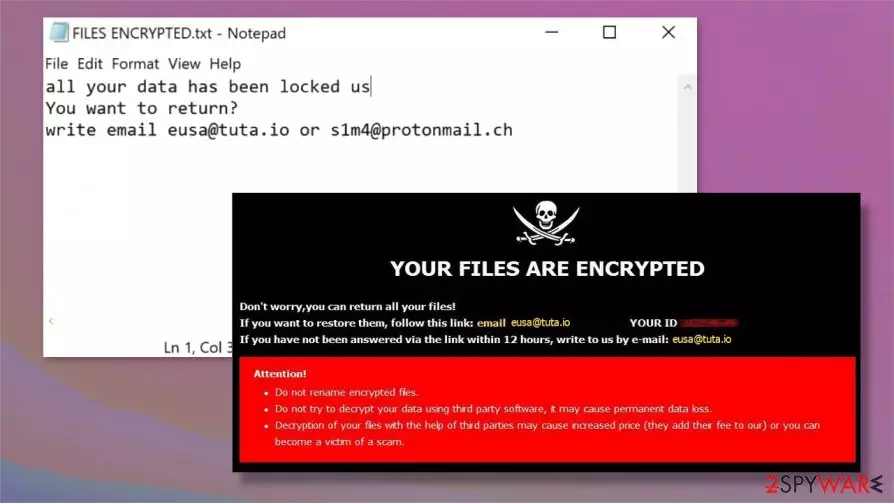
Afterward, SWP ransomware virus creates two types of ransom notes on the infected computer. One as a pop-up window, the other ones as text files (FILES ENCRYPTED.txt). Since this virus belongs to the Dharma ransomware family, the ransom notes are pretty much identical to its previous versions like Dex, Kut, Sss. Messages in the text file ransom note are very short and are comprised of two emails (eusa@tuta.io, s1m4@protonmail.ch).
Cybercriminals put some more work in the pop-up window ransom note. They explain that all victim files were encrypted and that the only way to get them back is by paying the perpetrators. They also warn not to use any third-party software to decrypt the .SWP files, and no to rename any of the encrypted data, as both of these actions could cause permanent data loss. The same two emails (as in txt. files) are provided to establish contact. A unique personal ID is appointed to each victim. No further details about the ransom amount or preferred payment method are provided.
| name | SWP ransomware |
|---|---|
| type | Ransomware, cryptovirus |
| family | Dharma ransomware |
| appended file extension | A triple extension is added to all non-system files: 1. appointed personal victim ID; 2. one of the criminal email addresses (eusa@tuta.io) in brackets; 3. SWP extension |
| Ransom note | A pop-up window and FILES ENCRYPTED.txt files |
| criminal contact details | Cybercriminals are providing two emails to contact them: eusa@tuta.io and s1m4@protonmail.ch |
| MAlware removal | Remove SWP ransomware and any other kind of malware immediately after detection or first sight of the ransom notes |
| System Fix | After SWP ransomware removal, victims should use the FortectIntego tool to scan and fix any issues that the cryptovirus might have caused to system core files |
In most cases the cybercriminals are not lying on one instance – only they can decrypt the locked data. But in no way does that mean that victims should contact the perpetrators and meet SWP ransomware demands. There are numerous cases,[1] where the victims didn't receive any decoding software. So they lost their money and their data.
Cybercriminals, like the creators of SWP file virus, could take things to another level. Instead of sending victims the decryption software they could send them some more malware, like Trojan horses[2]. Never trust criminals. Look for other data recovery options.
All users should focus on malware removal. To automatically remove SWP ransomware we suggest using time-proven apps like SpyHunterCombo Cleaner and MalwarebytesMalwarebytes. If the malware prevents itself from deleting, please use our instructions given at the bottom of this article.

SWP ransomware removal is the first step to getting your system back on track. Since Dharma family viruses are known to making changes to system files and setting it is strongly recommended to run a full system scan with the FortectIntego app to find and fix any of the damage the virus might have done.
Ransom note message from the FILES ENCRYPTED.txt files:
all your data has been locked us
You want to return?
write email eusa@tuta.io or s1m4@protonmail.ch
Text from the ransom pop-up window:
YOUR FILES ARE ENCRYPTED
Don't worry,you can return all your files!
If you want to restore them, follow this link:email eusa@tuta.io YOUR ID 1E857D00
If you have not been answered via the link within 12 hours, write to us by e-mail:s1m4@protonmail.ch
Attention!
Do not rename encrypted files.
Do not try to decrypt your data using third party software, it may cause permanent data loss.
Decryption of your files with the help of third parties may cause increased price (they add their fee to our) or you can become a victim of a scam.
Evading malware while browsing on the internet
There are different kinds of malware designed for different purposes: ransomware locks files until a ransom is paid, keyloggers collect user data (such as a bank, social media logins), and so on. But they have some similarities too – it's how they spread. Although there are various distribution methods, the most common are file-sharing platforms and spam emails.

File-sharing platforms, such as The Pirate Bay, BitTorrent websites, are an ideal place for cybercriminals to hide their creations. They can name malware whatever they think will lure unaware users. It might be a new pirated software or a crack for some latest games. We advise you to never visit these kinds of websites.
We have all received spam emails. But we never thought so many viruses can be hidden in mischievous hyperlinks or infected attachments. Please don't open any phony-looking hyperlinks and never download any attachments without scanning them with a powerful anti-malware software first.
Guidelines for SWP ransomware virus removal and quick system tune-up
All malware should be removed hastily, doesn't matter if it's pesky adware or the dangerous trojan horses. We suggest using either SpyHunterCombo Cleaner or MalwarebytesMalwarebytes to remove SWP ransomware from infected computers automatically. These trustworthy apps will locate, isolate, and remove the virus with all its allocated files.
Unfortunately, SWP ransomware removal won't decrypt your files. But don't rush to delete the encrypted files or to restore your data from backups. Experts[3] recommend performing a full system scan with the FortectIntego app to find and fix any damage the SWP cryptovirus might have done to system core files and its settings.
Did this guide help?
Be the first to comment