

ZIN ransomware – a cryptovirus appending a complex three-part extension to victim files
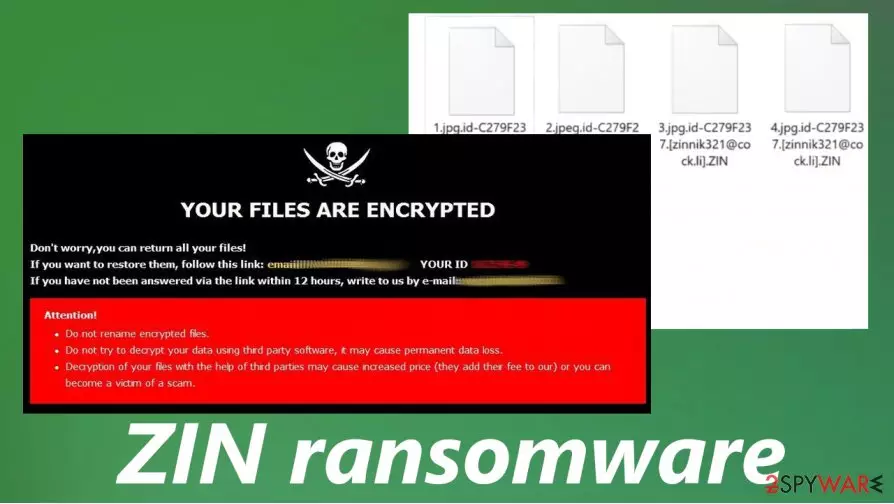
ZIN ransomware is a computer virus that encrypts all data on a targeted computer preventing its users from accessing it. Every personal file (picture, archive, documents, audio/video file, etc.) of the victim is encrypted with a military-based AES[1] encryption algorithm and renamed appending a complicated triple extension (see details in the table below).
ZIN ransomware derives from the Dharma ransomware family, known to the world since the first quarter of 2019. All members of this family (like Cvc, SWP, Fireee, and others), including ZIN ransomware virus, create two types of ransom notes – a pop-up window and FILES ENCRYPTED.txt text files, following successful encryption (both notes are presented at the end of this paragraph).
| name | ZIN ransomware, .zin file virus |
|---|---|
| type | Ransomware |
| Family | Dharma ransomware |
| Ransom note | A pop-up window and text files, named FILES ENCRYPTED.txt |
| Appended file encryption | During encryption, all non-system files receive a three-part extension, which consists of a unique appointed user ID, email address of the criminals (in brackets), and .ZIN extension |
| Criminal contact details | To establish contact with the criminals, two emails are provided – zinnik321@cock.li and zinnik321@tutanota.com |
| Malware removal | All malware needs to be removed with the help of a professional, trustworthy anti-malware software |
| System fix | Following ZIN ransomware removal, we highly recommend using the FortectIntego tool to revert any changes that the virus might have caused to the computer system and its files |
As per usual with the ransomware from the Dharma family, the ransom notes in the text files, generated by ZIN ransomware are short and uninformative. It mainly consists of two emails that the cybercriminals provide to establish contact – zinnik321@cock.li and zinnik321@tutanota.com.
A bit more instructions are provided with the ransom note pop-up window. In it, the developers of ZIN file virus explain that all victim files are locked and if they want to regain access to the data, the users must contact them via the two provided emails.
Then the creators of ZIN ransomware issue the usual warnings, advising against renaming the files or trying to decode the encrypted data with any third-party software as that might lead to permanent data loss. No further details about the ransom amount or preferred payment method are stated.
As always we strongly advise against making contact with the criminals and against paying the ransom. The latter is the worse thing ZIN ransomware victims could do because paying the hackers only motivates them to expand their cyber attacks and finances their search for more effective infection methods.

Our recommendation is to remove ZIN ransomware with a dependable anti-malware software like SpyHunterCombo Cleaner or MalwarebytesMalwarebytes. The longer any malware stays in a device the more damage it could do.
Following ZIN ransomware removal, victims shouldn't rush to retrieve their data from backups. First of all, they should use the FortectIntego application to remove or restore any damage or modifications done to the system files/settings by the virus. Only then users can be sure that their computer system is crispy clean.
Short message in the FILES ENCRYPTED.txt files:
all your data has been locked us
You want to return?
write email zinnik321@cock.li or
zinnik321@tutanota.com
The pop-up window ransom note generated by ZIN ransomware states:
YOUR FILES ARE ENCRYPTED
Don't worry,you can return all your files!
If you want to restore them, follow this link:email zinnik321@cock.li YOUR ID –
If you have not been answered via the link within 12 hours, write to us by e-mail:zinnik321@tutanota.com
Attention!
Do not rename encrypted files.
Do not try to decrypt your data using third party software, it may cause permanent data loss.
Decryption of your files with the help of third parties may cause increased price (they add their fee to our) or you can become a victim of a scam.
Most common methods the cybercriminals use to infect unaware computer users
There are various types of malware, nowadays, and it's spread using different techniques. But as a rule, ransomware is mainly distributed using two old methods – spam email and file-sharing platforms. If you stick to our suggestions maybe they will help you to avoid these nasty computer viruses.
Spam emails are distributed when hackers initiate spam email campaigns. Tens of thousands of letters are sent out to unsuspecting computer users all over the world. These spam emails might contain one of two (or both) – hyperlinks that redirect to malicious sites or infected attachments. When either of these are clicked or opened, a payload file is downloaded onto the computer and the encryption process begins.

Another method preferred by the cybercriminals is hiding their creations in file-sharing platforms. Hackers can upload their created ransomware into websites like The Pirate Bay, and camouflage them by naming them whatever they think will attract future victims. Could be pirated, expensive software, game cheat codes, or practically anything else.
If you want to evade ransomware, please refrain from using torrent sites, cracked software[2], and cracks themselves. Never open any hyperlinks in shady-looking emails and always scan all email attachments with a proper anti-malware app before downloading or opening them.
Guide for .ZIN file virus elimination and quick system repair
Victims of ransomware attacks should never meet the demands of the criminals. Instead, they should focus on ZIN ransomware removal and overall system health. There are different ways to retrieve your data without the intervention of cybercriminals.
To automatically remove ZIN ransomware we advise using trustworthy antimalware software like SpyHunterCombo Cleaner and MalwarebytesMalwarebytes. Keeping either of these apps' virus databases up-to-date could save you from future cyber attacks.
When your computer system is virus-free, experts[3] recommend performing a full system scan with a powerful system repair tool like the FortectIntego app, to find and repair any irregularities in system settings, registry, and other core locations. Then you can be sure that ZIN virus is deleted.
Did this guide help?
Be the first to comment