

NORD ransomware – file-locking virus attacking everyday computer users
NORD ransomware is a cryptovirus that encrypts all non-system files with a military-grade algorithm and tries to extort money for a decryption tool. This file-locking parasite belongs to the WannaScream ransomware family. Members of this lineage encode data with AES-256[1] algorithm.
When encrypting all personal data like pics, backups, documents, and so on, NORD ransomware virus appends a tricky three-part extension to all the files in this sequence: original filename; 1. appointed victim ID in brackets; 2. email address of the cybercriminals, in brackets; 3. .NORD extension.
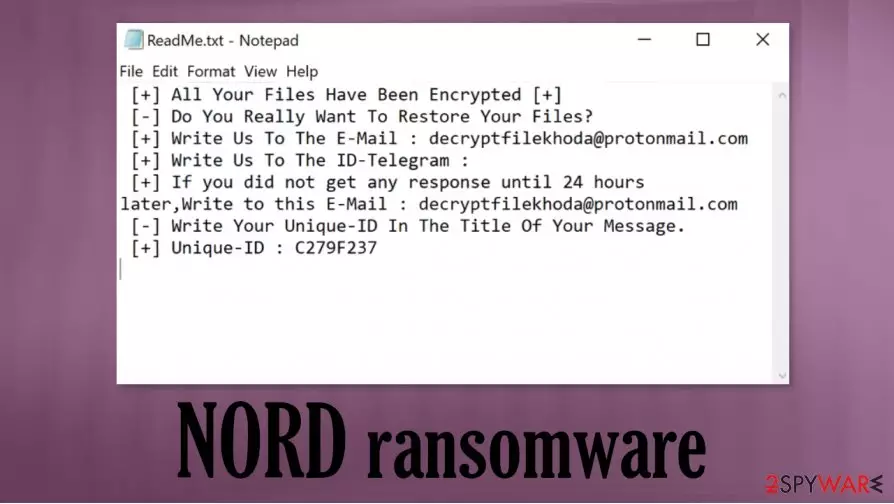
After the renaming and encryption are completed, NORD file virus generates two types of ransom notes – a pop-up window (info.hta) and a bunch of text files, titled ReadMe.txt, spread out throughout the computer and can be found literally everywhere the owner of an infected device would look,
| name | NORD ransomware, NORD file virus |
|---|---|
| type | Ransomware, Cryptovirus |
| family | WannaScream |
| ransom note | A pop-up window (info.hta) and text files (ReadMe.txt) |
| Appended file extension |
A tricky three-part extension is added to all filenames: [appointed user ID].[decryptfilekhoda@protonmail.com].NORD |
| Criminal contact details | decryptfilekhoda@protonmail.com, nordunlock@protonmail.com, rescueme55@protonmail.com |
| Virus Removal | Remove malware with powerful anti-malware tools so all its files are definitely deleted |
| System fix | It is recommended to perform a full system scan with a system repair tool like the FortectIntego following NORD ransomware removal |
As in many cases with ransomware, the pop-up ransom windows are much more informative than the text files. In the first part of the note, creators of NORD ransomware provide their victims with a unique user ID and give an email to establish contact with them (they provide two emails, but they're one and the same).
Then NORD ransomware developers specify that the ransom will have to be paid in cryptocurrency – Bitcoins, and the price depends on how quickly the victims contact them. Full instruction on how to obtain this cryptocurrency is provided. Also, free decryption of 5 files is offered, thus ensuring the victims that the hackers possess the required decryption tools and will send them after the payment.
The last part is, as usual, is meant to intimidate NORD ransomware victims by stating that if they try to rename the encrypted files or try using any third-party tools to decrypt the locked data, it may lead to permanent data loss, or ironically, users might become victims of some scams. The message in the text files is pretty much the same so it's no point in reiterating it, you can see both ransom notes at the end of this paragraph.

We always advise against any contact with cybercriminals. Victims should remove NORD ransomware from their infected devices immediately. Although manual removal is possible, it is recommended to leave such dirty work to professional anti-malware software like SpyHunterCombo Cleaner or MalwarebytesMalwarebytes.
Malware usually messes up system files and settings what may lead to system crashes, severe lag, and other irregular performance. So experts[2] advise using system repair software like the FortectIntego app after NORD ransomware removal to revert any changes that the file-locking parasite has done.
A short message from the makers of NORD ransomware in the text files, names ReadMe.txt:
[+] All Your Files Have Been Encrypted [+]
[-] Do You Really Want To Restore Your Files?
[+] Write Us To The E-Mail : decryptfilekhoda@protonmail.com
[+] Write Us To The ID-Telegram :
[+] If you did not get any response until 24 hours later,Write to this E-Mail : decryptfilekhoda@protonmail.com
[-] Write Your Unique-ID In The Title Of Your Message.
[+] Unique-ID : –
The more instructive message sent with the pop-up ransom window states:
All your files have been encrypted by Wanna Scream!
due to a security problem with your PC. If you want to restore them, write us to the e-mail decryptfilekhoda@protonmail.com
Write this ID in the title of your message:-
In case of no answer in 24 hours write us to this e-mail:decryptfilekhoda@protonmail.com
You have to pay for decryption in Bitcoins. The price depends on how fast you write to us. After payment we will send you the tool that will decrypt all your files.
Free decryption as guarantee
Before paying you can send us up to 5 files for free decryption. The total size of files must be less than 4Mb (non archived), and files should not contain valuable information. (databases,backups, large excel sheets, etc.)
How to obtain Bitcoins
The easiest way to buy bitcoins is LocalBitcoins site. You have to register, click 'Buy bitcoins', and select the seller by payment method and price.
hxxps://localbitcoins.com/buy_bitcoins
Also you can find other places to buy Bitcoins and beginners guide here:
hxxp://www.coindesk.com/information/how-can-i-buy-bitcoins/
Attention!
Do not rename encrypted files.
Do not try to decrypt your data using third party software, it may cause permanent data loss.
Decryption of your files with the help of third parties may cause increased price (they add their fee to our) or you can become a victim of a scam.

Rising cybersecurity level with simple steps
These days cyberattacks are getting more and more frequent with ransomware like Fair, LANDSLIDE, and HOTEL, so increasing the cybersecurity level is a must not only for companies but for everyday computer users too. That's where we step because we're here to help. Stick to our suggested guidelines, and you might dodge malware infections:
- Every app on a device has to be up-to-date. Hackers exploit outdated software, so all the latest updates must be installed on all software, including your Operating System.
- Purchase a professional anti-malware application and update its virus database regularly so the latest malware can't get through to your devices.
- Keep backups. If malware like ransomware gets through your system security, you can remove it and restore your data from backups.
- Keep system settings at top-notch performance. Use system repair tools to make sure that there are no system irregularities.
- Stay away from high-risk sites like file-sharing platforms and learn how to discern phishing[3] and spam emails.
Guide for NORD ransomware removal and system repair
Victims of cyberattacks know that getting your device infected with NORD ransomware virus and cryptoviruses alike is a nightmare. Although paying the cybercriminals might seem like the easiest way out, users should never do that because that only empowers the hackers to extend their attacks and search for new, more effective ways of attacks.
Instead, victims should remove NORD ransomware, fix their computer system registry, and search for other means of data recovery. While manual virus removal is possible but it could be a tall task even for tech-savvy people, so we advise using trustworthy anti-malware software like SpyHunterCombo Cleaner or MalwarebytesMalwarebytes to do it automatically.
The next step is taking care of your system registry because NORD file virus could have modified it. We recommend performing a full system scan with a system tune-up like the FortectIntego app to find and revert any changes that the virus might have caused with a push of a button.
Did this guide help?
Be the first to comment