

Leitkcad ransomware – a cryptovirus that urges its victims to establish contact via the TOR browser
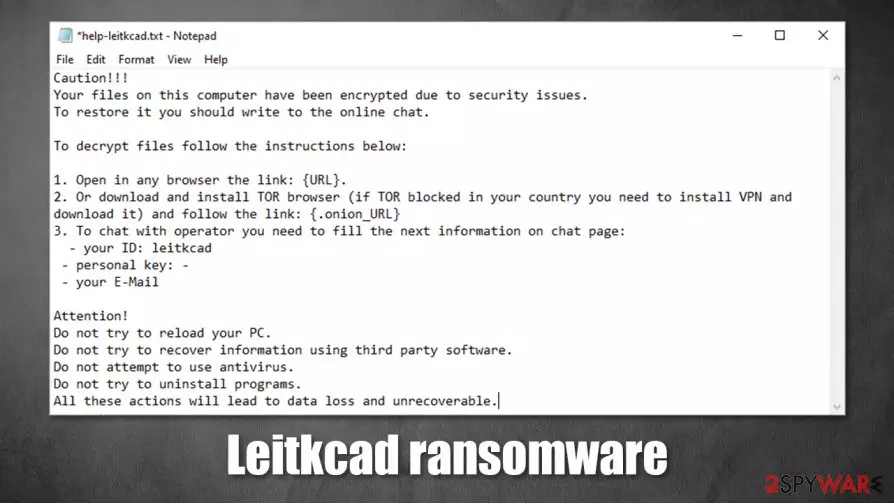
Leitkcad ransomware is a file-locking computer virus that encrypts[1] all non-system files on a victim's device and then tries to extort an unspecified amount of money for a decryption tool. As as as it finishes the data (documents, pictures, audio/video files, etc.) locking process, it appends them with a .leitkcad extension. This renders the files inaccessible until a decryption tool is used.
When the first part of Leitkcad virus purpose is accomplished, it creates ransom notes, titled help-leitkcad.txt, and spreads them all over the infected machine so that the victim would see it wherever they look. Within these notes, ransomware creators usually state explanations, instructions on how to contact them, and various threats of what their victims can and can't do.
| name | Leitkcad ransomware |
|---|---|
| type | Ransomware, cryptovirus |
| Appointed file extension | .leitkcad extension is added to all personal victim files |
| Criminal contact details | The cybercriminals want to be contacted only via chat available on the TOR browser |
| Ransom note | help-leitkcad.txt |
| Distribution | Spam emails, file-sharing platforms, malicious sites |
| Virus removal | Ransomware shouldn't be joked with and should be removed ASAP from any device with a reliable anti-malware program |
| System overall health | Since malware tends to mess up important system settings it's strongly advised to use a system tune-up tool like the FortectIntego to undo all changes |
Contrary to other file-locking computer viruses like BBGT, Igdm, Nsemad, and others, the ransom note of Leitkcad ransomware is short and uninformative. It starts with a short statement that all files were locked because of a security issue.
Then the cybercriminals explain to their victims how to contact them. All communication would have to be done via a chat, which is accessible only when using the TOR browser.[2] The perpetrators provide instructions on how to install the required browser and set up the chat.
The end of the ransom note of Leitkcad virus is all about threats. The developers of this cryptovirus urge their victims not to reload their PC, uninstall any programs, run anti-malware software, and not try decrypting files with any third-party tools. According to the criminals, any of these actions could damage their files and render them useless.
Usually, ransomware creators try to convince their victims to meet their demands by offering a free decryption guarantee or even providing a link to a video where the necessary toolkits can be seen in action. That's not the case with Leitkcad ransomware as no such guarantees are offered, the ransom amount isn't specified, and no additional instructions are provided.

Since the ransom price isn't specified, we advise victims to immediately remove Leitkcad ransomware and don't even write the cybercriminals to feed their curiosity. Trust the elimination of the file-locking parasite to professional anti-malware applications like SpyHunterCombo Cleaner or MalwarebytesMalwarebytes.
When the device is virus-free, experts[3] recommend performing a full system scan with a powerful system repair tool like the FortectIntego to revert any changes that the virus might have caused to system settings. If left unattended, these changes could cause the device to work improperly.
This message is seen in all help-leitkcad.txt ransom notes:
Caution!!!
Your files on this computer have been encrypted due to security issues.
To restore it you should write to the online chat.To decrypt files follow the instructions below:
1. Open in any browser the link: {URL}.
2. Or download and install TOR browser (if TOR blocked in your country you need to install VPN and download it) and follow the link: {.onion_URL}
3. To chat with operator you need to fill the next information on chat page:
– your ID: leitkcad
– personal key: –
– your E-MailAttention!
Do not try to reload your PC.
Do not try to recover information using third party software.
Do not attempt to use antivirus.
Do not try to uninstall programs.
All these actions will lead to data loss and unrecoverable.
Ransomware spreading techniques used by the hackers
Cybercriminals have many weapons at their disposal, but our research shows that the most common ways everyday computer users get their devices infected is through spam emails and file-sharing platforms. We're here to help, so read our short infection summary, and you may evade cyberattacks.
Criminals love to use file-sharing platforms, such as eMule, The Pirate Bay, 1337x because they just have to think of a name that will lure people into downloading the torrent and upload their ransomware. Hackers usually camouflage their creations as the latest or most popular game cracks and unlocked licensed software. Refrain from using these types of websites altogether.
We've all received spam emails. They're sent out by tens of thousands during so-called spam campaigns. Some of them could slip by the email provider's security and end up in your regular inbox. Watch out for hyperlinks in such emails, as they redirect to malicious sites where a virus file could be downloaded onto a device even without clicking on anything – it's called drive-by downloading.
Also, please never download any email attachment without scanning it with a reputable, professional anti-malware application. The cybercriminals could name the file as .docx, .txt, .zip, or any other file type, and as soon as you would download it, your device gets infected. Learn how to identify such emails by reading our manuals and articles and stay safe.

Instructions for Leitkcad ransomware removal from infected computers
Getting your computer infected with any kind of malware is a nightmare. It must be eliminated immediately, either after detection or the first sight of the ransom notes. Although manual removal is possible, it is very difficult to perform for regular computer users; the best way to remove Leitkcad ransomware is with a reliable anti-malware program that will do it automatically.
However, encrypted files on the device won't get decrypted after Leitkcad ransomware removal. Still, don't reconsider eliminating the virus, as only more harm could come your way if you decide to meet the criminals' demands. After you get rid of the virus, and clean your system with a powerful system repair tool like the FortectIntego, look for other data recovery methods.
Did this guide help?
Be the first to comment