

Kobos ransomware – a cryptovirus that prevents access to all personal files until the ransom is paid
Kobos ransomware is a type of malware that encrypts personal data on a targeted device and tries to extort Bitcoins as a ransom for a decryption toolkit. During the encryption, personal files are appended with a three-part extension, which reminds Dharma ransomware family viruses like Msf, GLB, SUKA, and others.
Original filenames are appended with assigned unique victim ID.[ArtemisDC@keemail.me].kobos extension. Due to the encryption and changed names, the files are rendered useless because they can't be accessed until decryption software is used to unlock them.
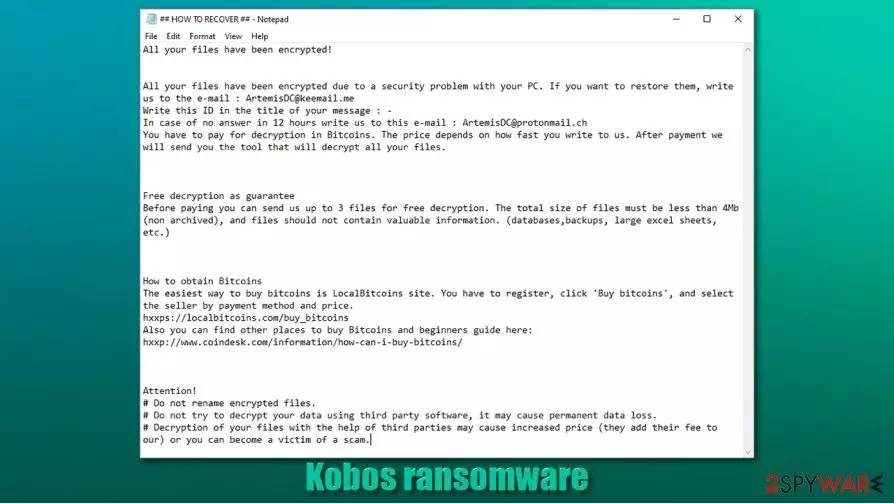
After encryption, Kobos virus creates a ton of ransom notes, titled ## HOW TO RECOVER ##.hta, and spreads them throughout the infected device so that the victims would find them literally wherever they look. These messages are intended to persuade and intimidate owners of affected machines into paying the ransom.
| name | Kobos ransomware, .kobos file virus |
|---|---|
| type | Ransomware |
| Relations | No relations are detected as of yet, but the message in the ransom notes are almost identical to the ones from the Dharma family ransomware |
| Ransom note | ## HOW TO RECOVER ##.hta |
| Appointed file extension | Personal files are appended with an appointed user ID, criminal contact email, .kobos extension |
| Criminal contact details | ArtemisDC@keemail.me and ArtemisDC@protonmail.ch |
| Malware removal | Professional anti-malware software should be used to eliminate all malware threats |
| System health | Ransomware might modify computer system files and settings, so we recommend using the FortectIntego to revert these changes |
Most people are unaware of ransomware distribution techniques, hence they unknowingly grant malware access. There are two most likely ways cybercriminals use to distribute ransomware payload files – spam emails and file-sharing platforms. Without a doubt, net getting your computer into trouble is the best outcome, so try to stay away from high-risk websites and suspicious emails in the future.
The ransom note message of Kobos ransomware is unbearably similar to Dharma family ransomware notes. It starts with an explanation that all files were locked due to a security issue, and if the victim wants to regain access to those files, he has to contact the criminals via two given emails – ArtemisDC@keemail.me and ArtemisDC@protonmail.ch.
Kobos virus developers offer a free decryption of 3 files, thus trying to prove that the required decryption tool is real and works. Although the ransom amount isn't specified, it's clear that the assailants want to be paid in cryptocurrency Bitcoins because they provide detailed instructions on how to obtain them. The last part of the ransom note, as always, contains various threats to the victims.
Getting your devices infected with ransomware is a nightmare, but meeting the criminals' demands is the worse way out of this sticky situation. The FBI warns ransomware attack victims not to pay the ransom,[1] as that motives the cybercriminals to extend their attacks and fuels their research for more complex malware.

We recommend listening to the guys who fight cybercrime and to remove Kobos ransomware from infected devices. As manual elimination might seem too difficult of a task for inexperienced users, we suggest leaving the dirty work to reliable anti-malware software like SpyHunterCombo Cleaner or MalwarebytesMalwarebytes.
Since ransomware might corrupt numerous system settings and its files, experts [2] advise using system repair tools to like the FortectIntego to perform a system tune-up after Kobos ransomware removal. These changes, if not restored, might cause crashes, severe lag, and other system issues.
In the ransom note, the cybercriminals state:
All your files have been encrypted!
All your files have been encrypted due to a security problem with your PC. If you want to restore them, write us to the e-mail : ArtemisDC@keemail.me
Write this ID in the title of your message : –
In case of no answer in 12 hours write us to this e-mail : ArtemisDC@protonmail.ch
You have to pay for decryption in Bitcoins. The price depends on how fast you write to us. After payment we will send you the tool that will decrypt all your files.Free decryption as guarantee
Before paying you can send us up to 3 files for free decryption. The total size of files must be less than 4Mb (non archived), and files should not contain valuable information. (databases,backups, large excel sheets, etc.)How to obtain Bitcoins
The easiest way to buy bitcoins is LocalBitcoins site. You have to register, click 'Buy bitcoins', and select the seller by payment method and price.
hxxps://localbitcoins.com/buy_bitcoins
Also you can find other places to buy Bitcoins and beginners guide here:
hxxp://www.coindesk.com/information/how-can-i-buy-bitcoins/Attention!
# Do not rename encrypted files.
# Do not try to decrypt your data using third party software, it may cause permanent data loss.
# Decryption of your files with the help of third parties may cause increased price (they add their fee to our) or you can become a victim of a scam.
Two most common methods used by hackers to infect devices with ransomware
In this day and age, the world wide web is crawling with various malware. The two most used cybercriminals' techniques to distribute their creations are file-sharing platforms, such as torrent sites, and spam emails. Use our suggestions, and you might evade the nightmare that is a ransomware infection.
File-sharing platforms like The Pirate Bay, 1337x, are full of all kinds of torrents ready to download at a push of a button. But these downloads might contain something little extra – ransomware payload files. Instead of using these types of sites, support your beloved game or other software developers by purchasing their products either directly from them or from their official distributors.
Opening a hyperlink in a spam email or downloading its attachment is another sure way to get your device infected with malware. Cybercriminals try to trick unaware users into doing these actions. Learn how to distinguish phishing emails, never open any of their links, or download any attachments without scanning them first with a reliable anti-virus application.

Guidelines for Kobos ransomware removal from affected machines
Paying the ransom might only bring more peril to the victims of the Kobos virus. There's no guarantee that the promised decryption key will ever be delivered after the payment is made. Additional malware could be sent instead, or the assailants could just disappear.
That's why we recommend users to remove Kobos ransomware from their devices. Manual elimination could be a tough task even for tech-savvy computer users, so we advise leaving the dirty work to professional anti-malware software like SpyHunterCombo Cleaner or MalwarebytesMalwarebytes to do it automatically. According to VirusTotal,[3] only 40 out of 70 anti-virus engines caught this cryptovirus, thus confirming the need for a trustworthy anti-malware app to protect your device.
Once Kobos ransomware removal is completed, don't rush to restore your data from backups. First, you need to take care of the overall system health. The best way to do it is by using the FortectIntego app or similar powerful system tune-up tools to fix any system issues the file-locking parasite could have done.
Did this guide help?
Be the first to comment