

4help ransomware – a cryptovirus that leaves FILES ENCRYPTED.txt ransom notes after it encrypts victim data
4help ransomware is a type of malware created for one purpose – extort cryptocurrency by forcing its victims to purchase a decryption tool required to regain access to encrypted files on an infected computer. This particular file-locking parasite belongs to the ever-growing Dharma ransomware family.
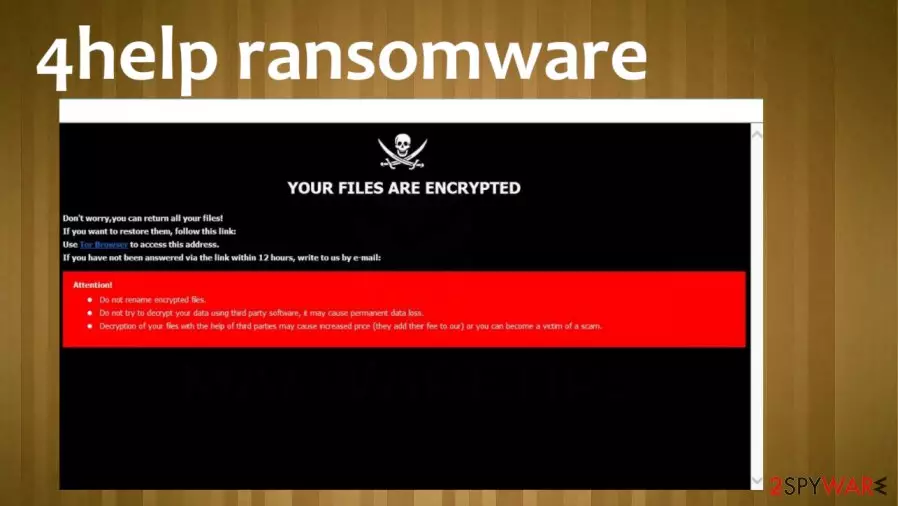
While encrypting files on a victim's computer, this cryptovirus appends all non-executable files, such as photos, images, documents, archives, and so on, with a .4help extension, hence the name of the cyberthreat. As soon as that's done, ransom notes are created – a pop-up window and FILES ENCRYPTED.txt text files.
With these notes, developers of 4help ransomware virus state their instructions and demand their victims to reach out using either of the two given emails – hlper4y@tutanota.com or hlper4y@cock.li, to receive further directions on how and where to forward the unspecified amount of money.
| name | 4help ransomware |
|---|---|
| type | Ransomware |
| family | Dharma ransomware |
| Appointed file extension | Files are appended with .4help extension |
| Ransom note | Text files FILES ENCRYPTED.txt and a pop-up window |
| Criminal contact details | hlper4y@tutanota.com and hlper4y@cock.li |
| Threat elimination | Dharma family ransomware, as all malware, should be removed with trustworthy anti-malware software to make sure it's done appropriately |
| System Health check | Using the FortectIntego tool or similar powerful system tune-up software might ensure that users devices don't exhibit any abnormal behavior after infection removal |
It is common with cryptoviruses from this lineage (e.g., Kobos, 21btc, Mpr, and many others) that the ransom notes are short and uninformative. The same goes for messages within 4help virus ransom notes. This text is displayed in the pop-up window:
YOUR FILES ARE ENCRYPTED
Don't worry,you can return all your files!
If you want to restore them, follow this link:email hlper4y@tutanota.com YOUR ID –
If you have not been answered via the link within 12 hours, write to us by e-mail:hlper4y@cock.li
Attention!
Do not rename encrypted files.
Do not try to decrypt your data using third party software, it may cause permanent data loss.
Decryption of your files with the help of third parties may cause increased price (they add their fee to our) or you can become a victim of a scam.
While this one is presented in the text files that are spread out throughout the infected device:
all your data has been locked us
You want to return?
write email hlper4y@tutanota.com or hlper4y@cock.li
As always, we stand against contacting the cybercriminals and, needless to say — against meeting any of their demands. There's no guarantee that the victims would receive the necessary decryptor after a made payment or that it would work. The hackers might disappear, infect victims' computers with additional malware, or ask for even more money.
The only right thing to do is to remove 4help ransomware from all infected devices immediately. The longer any malware stays in a computer system, the more damage it could do. Some ransomware has the capability to spread itself to other computers connected to a network.

Although possible, manual 4help ransomware removal isn't recommended for inexperienced users as only more harm could be done to the system. That's why we recommend using trustworthy anti-malware software like SpyHunterCombo Cleaner or MalwarebytesMalwarebytes for this task.
Afterward, a system tune-up is highly recommended due to the fact that most ransomware makes modifications to key system settings and files, like the Windows registry, which could lead to all sorts of strange behavior, such as crashing, severe lag, and so on.
Experts[1] suggest using the FortectIntego app to fix any issues that the infection might have caused. If your device is not cleaned properly, you might suffer from another round of encryption or 4help file virus attack on your newly restored files. Do not jump to data recovery until the machine is fully cleaned and virus-free.
Taking simple steps to increase your home cybersecurity
Cybercriminals are always researching new, more advanced, more persistent malware and are always looking for new ways to deliver it. That's where we step in, trying to help our readers to stay safe and protect their devices from cyber infections.

Our research allowed us to compile a set of guidelines that, if carried out, might help everyday computer users to evade all kinds of malware[2] infections, including ransomware:
- Keep all software, most importantly the operating system, updated with the latest updates, as cybercriminals love to exploit issues with old versions.
- Purchase a dependable anti-malware tool. Run full system scans regularly and update its virus database constantly.
- Learn how to determine phishing emails[3] and other malware delivery techniques used by cyberthieves.
- Maintain system registry and other key system settings with an appropriate system repair tool.
- Always keep backups on at least two separate devices, one, preferably, being offline storage.
Directions for 4help ransomware virus removal with anti-malware tools
As we've previously stated, all malware should be eliminated immediately after detection or, if anti-malware tools weren't present or failed to prevent the infection, the first site of ransom notes. Paying the ransom is highly advised against because that empowers developers of 4help virus to increase their attacks and research more devastating malware or even sent you another threat instead of the decryption tool.
Since there is no official decryption tool available at this moment, victims of this cyber threat should export all their essential encrypted data to an offline storage device before proceeding with 4help ransomware removal. Then use anti-malware software like SpyHunterCombo Cleaner or MalwarebytesMalwarebytes or any similar tool to perform a full system scan and eliminate the cryptovirus. After that, you might want to wait for the update on the decryption.
It's common for ransomware to make changes to system files and settings to prolong its lifespan in the infected device. So when you remove 4help ransomware, we highly recommend performing a system repair with powerful system tune-up tools like the FortectIntego.
Did this guide help?
Be the first to comment