

Easy ransomware – a cryptovirus appending a complex extension to original filenames
Easy ransomware is a computer virus developed to encrypt victim files on an infected device and demand a ransom through generated ransom notes. This cryptovirus derives from a well-known Phobos ransomware family that's been first spotted in October of 2017.
.easy file extension virus isn't an exception to how most ransomware works. The second it lands on a computer system, it scans the most frequently used files and starts encrypting them with RSA cipher.[1] During that process, all non-executable files, such as pictures, MS Office or other documents, archives, and so on, receive a new extension.
Original filenames are appended with a unique user ID, easybackup@aol.com (contact email of the cybercriminals), and .easy extension. After the encryption and renaming processes are completed, the cryptovirus generates ransom notes – info.hta and info.txt.
| name | Easy ransomware, .easy extension virus |
|---|---|
| type | Ransomware |
| Family | Phobos |
| Encryption algorithm | RSA-1024 |
| Ransom note | Two types of ransom notes are created, but they hold identical messages – info.hta and info.txt |
| Appended file extension | .id[appointed user ID].[easybackup@aol.com].easy |
| Criminal contact details | Assailants would like to be contacted either via email – easybackup@aol.com, or instant messaging app Telegram – @easybackup |
| Virus removal | To eliminate a cyberthreat correctly, a professional anti-malware software should be used |
| system fix | To maintain devices setting and system files in proper condition, system repair tools like the FortectIntego app should be regularly used |
As mentioned at the beginning of this article, Easy file virus belongs to an established Phobos ransomware family. It's not as vigorous as other ransomware families, but new variations are created constantly. Here are a few examples of the latest ones:
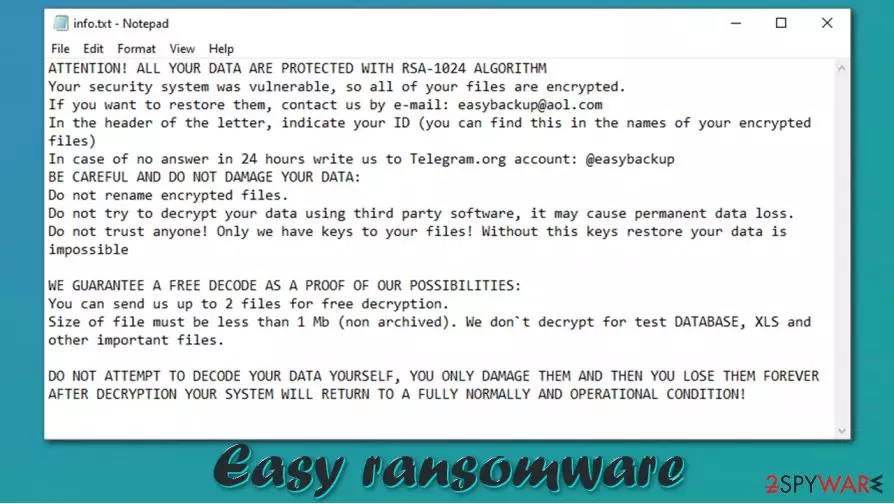
With ransom notes, ransomware developers try to intimidate and persuade their victims into meeting their demands by buying their decryption toolkits. Assailants try different techniques – by scaring their victims that they will never get their files back, offering free decryption of a couple of files, and so on. The culprit of this article send this message to its victims:
ATTENTION! ALL YOUR DATA ARE PROTECTED WITH RSA-1024 ALGORITHM
Your security system was vulnerable, so all of your files are encrypted.
If you want to restore them, contact us by e-mail: easybackup@aol.com
In the header of the letter, indicate your ID: –
In case of no answer in 24 hours write us to Telegram.org account: @easybackupBE CAREFUL AND DO NOT DAMAGE YOUR DATA:
Do not rename encrypted files.
Do not try to decrypt your data using third party software, it may cause permanent data loss.
Do not trust anyone! Only we have keys to your files! Without this keys restore your data is impossibleWE GUARANTEE A FREE DECODE AS A PROOF OF OUR POSSIBILITIES:
You can send us up to 5 files for free decryption.
Size of file must be less than 1 Mb (non archived). We don`t decrypt for test DATABASE, XLS and other important files.DO NOT ATTEMPT TO DECODE YOUR DATA YOURSELF, YOU ONLY DAMAGE THEM AND THEN YOU LOSE THEM FOREVER
AFTER DECRYPTION YOUR SYSTEM WILL RETURN TO A FULLY NORMALLY AND OPERATIONAL CONDITION!
As soon as users' anti-malware tool detects this computer virus, it should be eliminated immediately. If ransom notes appear, then the only right thing to do is to acquire a professional anti-malware tool like SpyHunterCombo Cleaner or MalwarebytesMalwarebytes and remove Easy ransomware ASAP.

Ransomware has the capability of spreading to other devices connected to a network or devices connected to the computer, so don't think twice before it's too late. Before proceeding with Easy ransomware removal, export all encrypted files to external offline storage because there's always hope that a decryption tool will be created in the near future.
Before doing any data recovery, either from backups or with deciphering tools, users should correct all issues with system settings and system files. Experts[2] recommend using powerful system repair tools such as the FortectIntego app or any similar software that would undo the sustained damage with a push of a button.
Avoiding ransomware spreading through spam emails
Cyberthieves are constantly developing new malicious software types and means to distribute them. Trojans, worms, and other kinds of malware can be delivered in many different ways, but one of the most common ways ransomware is spread is via spam email.
That's why when an email is received, users should be very attentive. The difference between a legitimate email and a spam email is in the details. Hover over the sender's name, check if the written name matches the original sender requisites. Look for grammatical errors and other inconsistencies.
Keep in mind that legit companies would never force you to visit their site immediately by clicking some link in their letter or send you “very important” information or updates within an unsolicited email attachment. These techniques are used to trick gullible people into opening these links/files and getting their devices infected.
Simple instructions for Easy ransomware removal from infected computers
VirusTotal research[3] shows that 60 out of 71 anti-virus engines have detected the virus and prevented computer systems from getting infected. This reaffirms the need for a trustworthy, professional anti-malware tool in all computers that are connected to the internet.
Here are a few examples of detection names that dependable anti-malware tools caught the cryptovirus:
- Trojan.Ransom.Phobos
- Gen:Variant.Ransom.Phobos.62 (B)
- Ransom.Phobos
- HEUR:Trojan.Win32.Generic
- Ransom:Win32/Phobos.PC!MTB

If you have an anti-malware tool, but it failed to prevent the infection, that could mean that either it's out of date or not good enough. We recommend using reliable tools like SpyHunterCombo Cleaner and MalwarebytesMalwarebytes not only for Easy ransomware removal but for overall cybersecurity level increasement.
Malware, especially cryptoviruses, tend to edit system settings such as the registry and other core files. Once victims remove Easy ransomware from their devices, it is highly recommended to use the FortectIntego tool or software alike to undo whatever modifications the infection did to prolong its unwelcomed visit.
Did this guide help?
Be the first to comment