

Coos ransomware – a file-locking parasite made for cryptocurrency extortion

Coos ransomware is a new cryptovirus with a sole purpose – to shake down money from infected device owners. It does that by encrypting all non-system files with an army-grade RSA coding algorithm that renders the files inaccessible until a necessary decryption tool is used.
At the time of encryption, malware renames all personal victim files by appending a .coos extension. Afterward, it creates ransom notes, titled _readme.txt, and places them in every folder containing affected files. With these notes, assailants urge to contact them via given emails – helpmanager@mail.ch and restoremanager@airmail.cc and lay down instructions on what to do to regain control of the locked data.
This virus belongs to the pervasive Djvu ransomware family. File-locking viruses from this lineage were first detected in December 2018, and since then, new versions are submitted each week or even more often, e.g., since the beginning of this year, our team already wrote about four new variants – Qlkm, Omfl, and Igal.
If you are wondering how to decrypt your files without paying the attackers, the situation is rather dire. However, there are several alternative methods that you could try – we list them below. Emsisoft's decryptor might help some victims to recover all the lost data, although it might not happen immediately.
| name | Coos ransomware |
|---|---|
| Type | Ransomware |
| Family | Djvu |
| Appended file extension | All personal victim data (documents, databases, archives, etc.) is appended with a .coos extension |
| Ransom note | _readme.txt can be found in all affected folders |
| Criminal contact details | To establish contact, victims would need to contact their assailants via two given emails – helpmanager@mail.ch and restoremanager@airmail.cc |
| Ransom amount | The original decryption tool price (or the ransom amount) is $980, but if victims contact the criminals within 72 hours of encryption, a 50% discount is offered to lower the sum to $490 |
| Virus removal | Professional anti-malware software has to be used to completely and safely eliminate the cyber infection |
| System repair | Cryptoviruses from this family makes modifications to the system registry, host files, and other core settings. To restore your device to normal, please use the FortectIntego system repair tool |
Ransom notes of cyber infections from the Djvu family are all the same. They differ very slightly. It begins with an explanation that all files were locked and that the only way to unlock them is by purchasing their decryption tool. And then the part to convince the victim to do it begins.
Hackers offer victims to send them one encrypted file from the infected machine so they could decrypt it and send it back. Thus trying to prove that such a tool exists. Then they provide a link to a video where the deciphering tool can be seen in action.
And lastly, the creators of malware are offering a 50% discount on the ransom amount for victims that contact them within 72 hours of the cyberattack. That lowers the buyout from the original price of $980 to $490. People who fail to reach out to the perpetrators within the given timeline would have to pay the whole amount.
In other words, the threat actors are bending over backward to persuade their victims to act quickly and meet their demands. The whole message from _readme.txt ransom note reads:
ATTENTION!
Don't worry, you can return all your files!
All your files like pictures, databases, documents and other important are encrypted with strongest encryption and unique key.
The only method of recovering files is to purchase decrypt tool and unique key for you.
This software will decrypt all your encrypted files.
What guarantees you have?
You can send one of your encrypted file from your PC and we decrypt it for free.
But we can decrypt only 1 file for free. File must not contain valuable information.
You can get and look video overview decrypt tool:
https://we.tl/t-EtT4dX8q3X
Price of private key and decrypt software is $980.
Discount 50% available if you contact us first 72 hours, that's price for you is $490.
Please note that you'll never restore your data without payment.
Check your e-mail “Spam” or “Junk” folder if you don't get answer more than 6 hours.To get this software you need write on our e-mail:
helpmanager@mail.chReserve e-mail address to contact us:
restoremanager@airmail.ccYour personal ID:
–
Please don't give in to the cybercriminals' demands, as the only way to stop ransomware attacks is to stop paying its creators. Money gained from the victims motivates hackers to develop new, more sophisticated malware and finances their research for improved delivery techniques.

Victims that had their devices infected should remove Coos ransomware immediately. The best way to do it is by entrusting this task to professional anti-malware software such as SpyHunterCombo Cleaner and MalwarebytesMalwarebytes. Only then people can rest assured that the infection is completely removed.
But before eliminating ransomware, users should consider exporting their encrypted files to an offline storage device, like a USB drive or other, because if there's no decryption software available now, it should be created sooner or later.
Once you get rid of the cryptovirus, it's time to take care of your device's overall health. Ransomware from the Djvu family is famous for making various alterations to the Windows registry, host files, and other important files/settings, so it's highly recommended to perform a system repair with a powerful system tune-up app like the FortectIntego.
Withhold from using file-sharing platforms to avoid cyber infections
Our research suggests that file-sharing platforms are a hotbed for Djvu family ransomware – it's the most popular spreading technique for file-locking parasites of this lineage. Torrent sites and other file-sharing platforms don't implement security measures to what people upload on their sites and what they're sharing.

Cybercriminals love to exploit that by disguising ransomware as anything that would lure their next victims. It could be a crack for the latest game or a fake installer for an expensive piece of software. The camouflaged payload file of a cryptovirus can come in many forms:
- Text file
- Zip/Rar archive
- MS Office file
- An executable file, or practically any other file type.
As soon as an infected file is downloaded, and if your default or licensed anti-malware fails to detect it – it starts its bidding. To avoid this nightmare, users are urged to stop choosing to use pirated software, illegal activation toolkits, and similar items.
Methods to restore .coos virus files
Statistically speaking, most of the victims who did get infected with ransomware never dealt with such an intrusion before. Therefore, there are many misconceptions about this type of malware in general. For example, it is widely perceived that ransomware elimination with security software would once again provide access to the encrypted files. Unfortunately, it is not the case at all – you will not regain control of your data just by performing a full system scan with a security tool. So, what options do you have?
The answer to this question is rather difficult, as it depends on many factors. For example, if the virus failed to eliminate Shadow Copies on the system, data recovery should be easily possible. Data recovery software might also be useful in some cases, although it is unlikely to bring all files back.
Your best bet is to try Emsisoft's decryptor for STOP Djvu. It is very important to note that it only works for users whose data was locked with an offline key (this happens when malware fails to communicate with the attackers' servers). Even then, somebody has to pay the criminals, retrieve the key, and then share it with security researchers for them to add it to the decryptor's database. Thus, it might take some time before you can recover .coos files using it.
Nonetheless, we recommend you download the tool and perform a scan to check whether the decryption with it is at all possible. Here's how to do it:
- Download the app from the official Emsisoft website
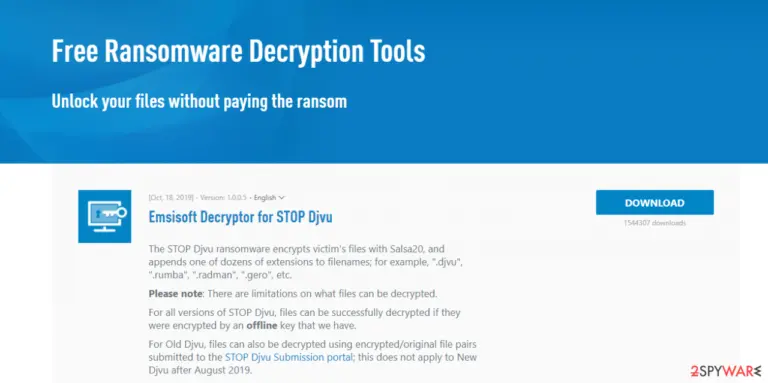
- After pressing Download button, a small pop-up at the bottom, titled decrypt_STOPDjvu.exe should show up – click it
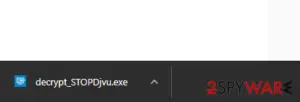
- If User Account Control (UAC) message shows up, press Yes
- Agree to License Terms by pressing Yes
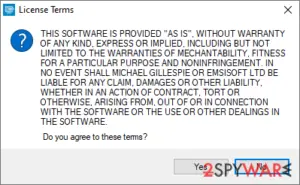
- After Disclaimer shows up, press OK
- The tool should automatically populate the affected folders, although you can also do it by pressing Add folder at the bottom
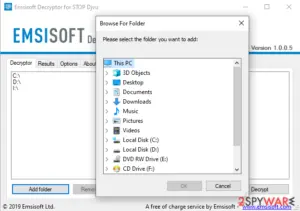
- Press Decrypt.


From here, there are three outcomes that are available:
- “Decrypted!” will be shown under files that were decrypted successfully – they are now usable again.
- “Error: Unable to decrypt file with ID:” means that the keys for this version of the virus have not yet been retrieved, so you should try later
- “This ID appears to be an online ID, decryption is impossible” – you are unable to decrypt locked files with this tool.
How to eliminate ransomware correctly
Ransomware attacks are on the rise, and they are not slowing down. Researchers predict,[1] that in 2021 this malware could cause more than $20 million in damages. So if you don't have a reliable anti-malware tool like SpyHunterCombo Cleaner or MalwarebytesMalwarebytes, the time has never been better to get one.
Professional anti-virus software is needed not only to remove Coos ransomware but to prevent it from infecting the device. Virus databases of these type of apps should be updated every day because cybercriminals are relentless and develop new file-locking parasites constantly.
But please don't try to remove malware until you copied the essential encrypted files from your device to offline storage. There's no decryptor available now, but companies are committed to helping ransomware victims by constantly updating their decryption tools.
Once the files are extracted and the the virus removed, it's time to repair your system. This type of malware encrypts only personal data, but it does extensive damage to various system settings and files, including the system registry, host files, etc., to establish persistence.
If left neglected, these modifications could cause various abnormal behavior such as the blue screen of death,[2] overheating, overall performance loss, and so on. To restore any alterations that the virus has accomplished, experts[3] recommend using the FortectIntego system repair tool.
Did this guide help?
Be the first to comment