

0l0lqq ransomware – a file-locker that blackmails its victims into paying or stolen data will be published
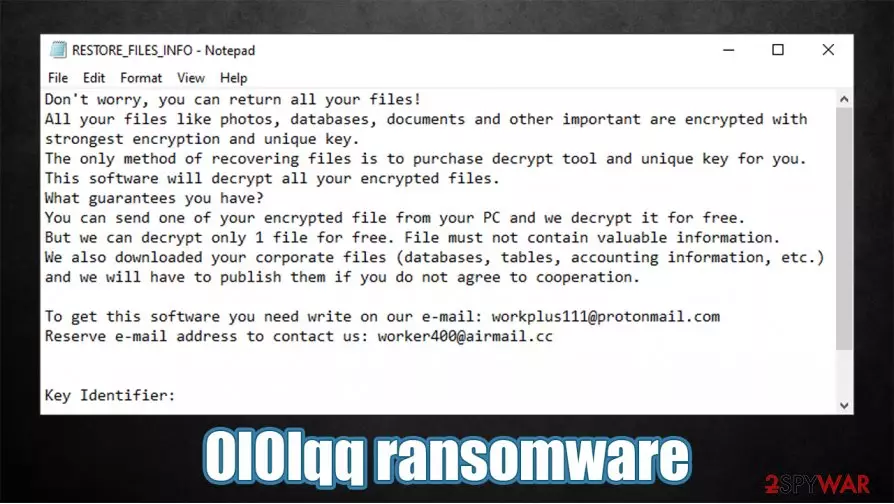
0l0lqq ransomware is a computer infection that encodes victim files and makes them inaccessible until a specific decryption key or software is used. All personal data (images, documents, audio/video files, etc.) is renamed by appending original filenames with a .0l0lqq extension. The contents of the files aren't changed, just their names.
0l0lqq ransomware virus also creates a ransom note that's named RESTORE_FILES_INFO.txt. Within it, cybercriminals portray their demands, where they claim that in addition to file encryption, some data was stolen and will be published if victims don't establish contact with them through either workplus111@protonmail.com or worker400@airmail.cc.
If you see any of the indications that your device might be infected with 0l0lqq virus, then you came to the right place. This article covers the specifications of this ransomware, its specific distribution methods, and last but not least – its removal options. Unfortunately, it's not decryptable at the moment, but paying the ransom is the worse thing any cyberattack victim can do.
| name | 0l0lqq ransomware |
|---|---|
| Type | Cryptovirus, file-locking parasite |
| Family | TeslaCrypt |
| Appended file extension | Original filenames are appended with .0l0lqq extension |
| Ransom note | RESTORE_FILES_INFO.txt |
| Distribution | Spam emails |
| Criminal contact details | workplus111@protonmail.com, worker400@airmail.cc |
| Detection names | Ransom.Thanatos, Trojan:Win32/Ymacco.AA8E, Win32:MalwareX-gen [Trj], Adware.GenericKD.36223462, TROJ_FRS.VSNTAM21[1] |
| Malware removal | To ensure the cyber infection is removed properly, users should do it with reliable anti-malware software |
| System Repair | System registry and other core files and settings get altered by the file-locker. That's why a system repair with the FortectIntego tune-up tool is in order |
0l0lqq virus derives from the TeslaCrypt ransomware family, which was first discovered in February of 2015. This family isn't as active as some other major players in ransomware development, but it still produces new versions every once in a while. The most pervasive variations are:
Ransom note of the 0l0lqq virus virus doesn't contain much information. The criminals claim that only they can decrypt the locked data, and as proof, they offer free decryption of one file. They also claim that apart from encrypting files, they've stolen some too and will publish them if their demands aren't met. Here's the whole ransom message found in the RESTORE_FILES_INFO.txt:
Don't worry, you can return all your files!
All your files like photos, databases, documents and other important are encrypted with strongest encryption and unique key.
The only method of recovering files is to purchase decrypt tool and unique key for you.
This software will decrypt all your encrypted files.
What guarantees you have?
You can send one of your encrypted file from your PC and we decrypt it for free.
But we can decrypt only 1 file for free. File must not contain valuable information.
We also downloaded your corporate files (databases, tables, accounting information, etc.) and we will have to publish them if you do not agree to cooperation.To get this software you need write on our e-mail: workplus111@protonmail.com
Reserve e-mail address to contact us: worker400@airmail.cc
Key Identifier:
–Number of files that were processed is: –

Our research team has concluded that 0l0lqq ransomware is spread exclusively through spam emails. To be even more specific – through NQ Supply email attachments camouflaged as MS Excel invoice documents. If that file is downloaded and macros are enabled, the infection begins immediately. Here's what the emails message looks like:
Subject: Payment Receipt 2201928
Good morning,
Here is your invoice INV_NQ
Supply for $AUD 225.30.The amount outstanding of $AUD 225.30 is due on 22 Jan 2021.
Password for xls: 2021Regards,
NQ Supply
Needless to say that if such an email finds its way to your inbox – delete it immediately. It would be best if you did the same with the computer infection – remove 0l0lqq ransomware. Because the only way to stop cybercriminals from distributing their creations is by cutting off their financing.
Manual 0l0lqq ransomware removal might be possible but is recommended only for highly experienced computer users, as it's a lengthy and complicated process. Automatic elimination is much easier and can be done with anti-malware software such as SpyHunterCombo Cleaner or MalwarebytesMalwarebytes.
File-lockers typically make changes to the system registry, host files, and other key settings/files that, for example, block security software, prevent victims from visiting any cybersecurity-related pages (including 2-spyware.com), etc. To restore your system back to normal, we highly advise using the FortectIntego system repair tool.
Threat actors use spam emails to deliver ransomware more often than not
As we've mentioned in the first chapter, 0l0lqq ransomware is delivered exclusively through NQ Supply spam emails. This company is an Australian-based wholesale supplier of food service packaging, hygiene, chemical products, etc. Spam emails were composed to look like legitimate emails that the company would send. But of course, there were some differences. But we'll get to that.
Malspam has become one of the most popular methods to distribute malware around. A few weeks ago, thousands of computers got infected when the IObit forum was hacked,[2] and its users received emails with what seemed like a wonderful offer – a one-year free license. Instead of the free software, those who got tricked got their devices infected with ransomware.
Please don't ever open an email or any of its contents (attachments, hyperlinks) if it looks at least a bit shady. Here are a few examples of how to identify a spam email (although it may look like a legitimate letter from a valid company):
- Not addressing clients/customers by their full name (as was with the NQ Supply emails)
- Urging to open unsolicited attachments
- Asking for private details over the email
- Grammatical mistakes
- Pushing to visit a site ASAP, and other.

Tutorial for 0l0lqq ransomware removal from Windows devices
Paying the ransom motivates cybercriminals to attack more innocent people and finances their whole operation, including the development of new malware and research of new ways to distribute it efficiently. That's why the best decision is to remove 0l0lqq ransomware from all affected devices.
You can do that by using professional anti-malware software. If you don't have any (or the one that you did let the infection through), we recommend using either SpyHunterCombo Cleaner or MalwarebytesMalwarebytes for this task. Please remember to keep virus databases constantly updated so you could avoid such nightmares in the future.
To get your device to a pre-contamination phase, cybersecurity experts from zondervirus.nl[3] recommend performing a full system scan with the FortectIntego system repair tool when 0l0lqq ransomware removal is finished. This app will take care of system files and settings that are crucial for normal system performance.
Did this guide help?
Be the first to comment