

Yulnedxmo ransomware – a hazardous file-locker that creates a HOW TO RESTORE YOUR FILES.TXT ransom note
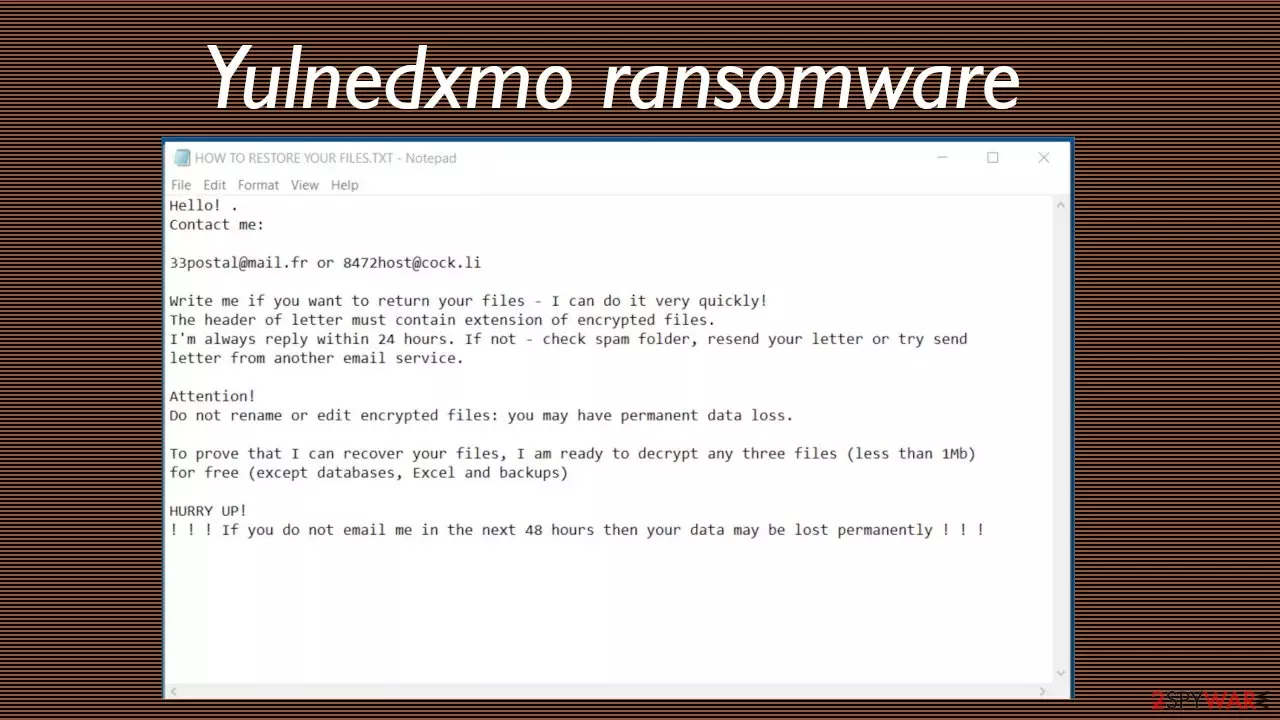
Yulnedxmo ransomware is a file-locking virus that encrypts non-system files on an infected Windows computer, alters system settings to invoke persistence, and demands to purchase a decryption tool necessary to regain access to the locked data. This cryptovirus belongs to the Snatch ransomware family.
During the encryption, all personal files, such as documents, databases, pictures, archives, etc., are renamed by appending a .yulnedxmo extension at the end. Through a generated ransom note, titled HOW TO RESTORE YOUR FILES.TXT, users are urged to contact their assailants by provided email address (33postal@mail.fr, 8472host@cock.li) and negotiate the ransom.
No malware victims should ever establish contact with the criminals or pay the demanded amount of money for a decryption tool, as there plenty of risks involved. This review will explain how the Yulnedxmo virus works, what techniques are used to spread it, how to remove it and provide alternative data recovery options
| name | Yulnedxmo ransomware |
|---|---|
| Type | Cryptovirus, file-locking parasite |
| Family | Snatch |
| appended file extension | .yulnedxmo |
| Encryption method | AES |
| Ransom note | HOW TO RESTORE YOUR FILES.TXT |
| Criminal contact details | 33postal@mail.fr, 8472host@cock.li |
| Distribution | File-sharing platforms, RDP attacks, malspam, deceptive ads, fake installers |
| Malware elimination | Victims should remove any malware infections immediately by using reliable anti-malware software |
| System health fix | Since malware infections mess up various system settings, it's recommended to perform a system tune-up with the FortectIntego system repair app or similar software |
Snatch ransomware family isn't as productive as other big families, but it still delivers new versions of its file-locking parasites practically every month. Members of this descent, like Nsemad virus, Cwkkbzomdxj virus, Zybvqxefmh virus, and others, bear many similarities.
They use AES coding algorithms to encrypt victim data, the names of the ransom notes are always the same, and their contents are very alike. In the HOW TO RESTORE YOUR FILES.TXT note, cybercriminals state that only they can restore the locked data and that the victims should get in touch with them within 48 hours, or the files may be lost forever.
Here's the whole message that Yulnedxmo virus developers send to their victims:
Hello! .
Contact me:33postal@mail.fr or 8472host@cock.li
Write me if you want to return your files – I can do it very quickly!
The header of letter must contain extension of encrypted files.
I'm always reply within 24 hours. If not – check spam folder, resend your letter or try send letter from another email service.Attention!
Do not rename or edit encrypted files: you may have permanent data loss.To prove that I can recover your files, I am ready to decrypt any three files (less than 1Mb) for free (except databases, Excel and backups)
HURRY UP!
! ! ! If you do not email me in the next 48 hours then your data may be lost permanently ! ! !

Victims of cyberattacks should never contact the threat actors behind the attacks, as the only way to stop these criminals is to stop paying them. If the money flow ends, cybercriminals would go broke and cease their illegal ventures. Besides, paying the hackers doesn't guarantee that the promised tool will be delivered and what's more, it could lead to any of these situations:
- they do not provide the decryption key at all, despite the payment being made,
- the provided tool doesn't work,
- criminals ask for more money,
- they deliver malware instead of a decryptor,
- hackers disappear altogether.
Therefore, we highly advise our readers to remove Yulnedxmo ransomware from their devices immediately. For that, you'll need a trustworthy anti-malware tool such as SpyHunterCombo Cleaner or MalwarebytesMalwarebytes. Keep in mind that if you had a security tool, it failed you by letting the cryptovirus through.
Launch the AV tool, scan the whole device, and stick to its recommendations. Once Yulnedxmo ransomware removal is completed, run system diagnostics with the FortectIntego system repair tool to restore any changes the infection might have made to system files and their settings.
Evade malware by identifying spam emails
More and more innocent people get their devices infected with various kinds of malware. It can be spread using many techniques, including deceptive ads, drive-by downloads,[1] file-sharing platforms, and so on. Malspam, however, remains one of the main channels for malware delivery.
Spam emails can look almost identical to those you'd receive from a bank, shopping company, legal authorities, and other instances. In some cases, they are done extremely well, so it is easy to fall for a scam like that. If you ever come across an email that contains any of the peculiarities shown below, please delete it immediately and never open any attachments or click on links:
- Urging to click on a given link right away.
- Pushing to download an unsolicited attachment with important details.
- Contains grammatical errors.
- Domain names don't exactly match senders' email.
- You're addressed impersonally.
- Private information is asked to provide via email.

Yulnedxmo ransomware removal options and system optimization
Nowadays, all computers that are regularly used to browse the internet should have professional anti-malware software, such as SpyHunterCombo Cleaner or MalwarebytesMalwarebytes, installed on them. Malware has become a huge illegal business, and it won't stop growing anytime soon. VirusTotal report shows,[2] that 44 out of 70 AV tools have identified the threat and prevented it from infecting the device. A few examples of Yulnedxmo virus detection names:
- Win64:Trojan-gen
- Ransom:Win64/Snatch.A!MTB
- Ransom.Snatch
- Artemis!3F1C123E7A80
- Trojan.Gen.MBT
If your device was infected and you want to prevent cybercriminals from attacking other innocent people, remove Yulnedxmo ransomware ASAP. Use security tools for this task, as they will take care of everything with a push of a button. And remember, the only way to stop ransomware from spreading is by not paying the criminals.
To make sure Yulnedxmo ransomware removal is completed, experts[3] recommend running a system repair with the powerful FortectIntego system optimizer. It will repair corrupted system files, restore modified settings, and ensure that infection renewal won't happen.
Did this guide help?
Be the first to comment