

Qmak ransomware causes a lot of damage for people who do not back up their files

Qmak virus is a ransomware-type threat that asks money directly from victims after locking their files with the help of powerful encryption algorithms. This file-locking virus is the newest version of the Djvu ransomware family. New malicious programs come out every week. We wrote about previous versions like Irfk, Palq, and Cool. They use complicated encryption algorithms to lock users' personal files like photos, videos, and documents. Ransomware rarely affects system files because the attackers want users to be able to use the same device to send the ransom. The encryption process starts immediately after the malicious files enter the system.
The affected files are marked with a .qmak extension. It is usually during this period that victims notice the infection. The file names look something like this – picture.jpg.qmak, video.mp4.qmak, and the icons turn to white pages. Victims cannot open or view the locked files, which can cause a lot of stress. Shortly after the file encryption process is done, a ransom note named _readme.txt is generated that informs users about their situation and what options they have.
Users are asked to pay $980 or $490 in Bitcoin if they want to get their files back. Cybercriminals use various scare tactics[1] to intimidate victims into paying the money. Among other things, the ransom note has the contact details of the attackers – manager@mailtemp.ch, supporthelp@airmail.cc
We always suggest our readers not to follow the instructions of the malware[2] developers because they cannot be trusted. Many ransomware victims report that they never heard back after they sent the payment. So be careful because you can not only lose your data forever but get scammed as well. Cryptocurrency transactions are impossible to reverse, so as soon as the coins leave your wallet, you can never get them back. By paying the attackers, you also support their activity, which leads to the rapid growth of this illegal industry.[3]
| NAME | Qmak ransomware |
| TYPE | File-locking malware; cryptovirus |
| MALWARE FAMILY | Djvu ransomware/STOP |
| SYMPTOMS | Personal user files like photos, videos, documents get encrypted and become impossible to open |
| FILE EXTENSION | .qmak |
| RANSOM NOTE | _readme.txt |
| RANSOM AMOUNT | $980/$490 |
| DISTRIBUTION | Installations of software cracks and keygens from pirated software platforms |
| FILE RECOVERY | It is almost impossible to recover the files if you do not have backups; you can try using third-party software that could restore the files which we talk about in this article |
| ELIMINATION | Scan your machine with anti-malware software to remove the malicious files (this will not recover them) |
| SYSTEM FIX | Windows reinstallation can be avoided with FortectIntego maintenance tool, which can fix damaged files |
The ransom note
As we mentioned before, the ransom note is placed in the system as soon as the encryption process is complete. You can read the full message from Qmak virus developers here:
ATTENTION!
Don't worry, you can return all your files!
All your files like pictures, databases, documents and other important are encrypted with
strongest encryption and unique key.
The only method of recovering files is to purchase decrypt tool and unique key for you.
This software will decrypt all your encrypted files.
What guarantees you have?
You can send one of your encrypted file from your PC and we decrypt it for free.
But we can decrypt only 1 file for free. File must not contain valuable information.
You can get and look video overview decrypt tool:
hxxps://we.tl/t-pk3SGFlmek
Price of private key and decrypt software is $980.
Discount 50% available if you contact us first 72 hours, that's price for you is $490.
Please note that you'll never restore your data without payment.
Check your e-mail “Spam” or “Junk” folder if you don't get answer more than 6 hours.To get this software you need write on our e-mail:
manager@mailtemp.chReserve e-mail address to contact us:
supporthelp@airmail.ccYour personal ID:
As you can see, attackers say that the only way to get your files back is to pay them. While this is true in most cases, decryption tools help some people to receive their files, so it is worth a try. Cybercriminals also try to rush victims and make them act without thinking by encouraging to contact them as soon as possible because they will need to pay less.
Fraudsters also try to establish trust with the victim by saying that they can send one file for decryption so users could see that they will actually return the files if they send them a transaction in BTC. But the ransomware industry has been growing rapidly in the past years as people spend more time on their screens.
Probably thousands of PCs get infected with one variant of the STOP ransomware, so there is no guarantee whatsoever that you will ever hear back from them. After you pay the money, the attackers get what they wanted. They have no obligation or moral code to do what they promised. You have much better changes trying to use the methods we provide. Sometimes the ransomware creators themselves release the decryption keys after some time, so you can wait for that also.

Use professional security tools to remove the malicious files
If you are a victim of the Qmak ransomware, you should employ anti-malware software for its removal. Some ransomware can self-destruct after the file encryption process is finished. Even in such cases, malware might leave various data-stealing modules or could operate in conjunction with other malicious programs on your device.
Manual removal is not recommended unless you have advanced skills in IT. Qmak crypto-malware can scatter its' malicious files across the system and hide them in different folders, making them difficult to locate for the average user. SpyHunterCombo Cleaner or MalwarebytesMalwarebytes can detect and eliminate all ransomware-related files, additional modules, along other viruses that could be hiding on your system. The security software is really easy to use and does not require any prior IT knowledge to succeed in the malware removal process.
Fix the damaged operating system
Once a computer is infected with the Qmak virus, its system is changed to operate differently. For example, an infection can alter the Windows registry database, damage vital bootup and other sections, delete or corrupt DLL files,[4] etc. Once a system file is damaged by malware, antivirus software is not capable of fixing it, leaving it just the way it is. Consequently, users might experience performance, stability, and usability issues, to the point where a full Windows reinstallation is required.
Therefore, we highly recommend using a one-of-a-kind tool FortectIntego for repair. Not only can it fix virus damage after the infection, but it can also remove malware that has already broken into the system thanks to several engines used by the program. Besides, the application can also fix various Windows-related issues that are not caused by malware infections, for example, Blue Screen errors, freezes, registry errors, damaged DLLs, etc.
- Download the application by clicking on the link above
- Click on the ReimageRepair.exe

- If User Account Control (UAC) shows up, select Yes
- Press Install and wait till the program finishes the installation process

- The analysis of your machine will begin immediately

- Once complete, check the results – they will be listed in the Summary
- You can now click on each of the issues and fix them manually
- If you see many problems that you find difficult to fix, we recommend you purchase the license and fix them automatically.


By employing this software, you would not have to worry about future computer issues, as most of them could be fixed quickly by performing a full system scan at any time. Most importantly, you could avoid the tedious process of Windows reinstallation if things go very wrong for one reason or another.
Decryption tools sometimes help victims to repair the files
Your success in decrypting the .Qmak files depend on which ID was given to you. IDs can be offline and online. Offline ID is used when ransomware cannot connect to its servers while encrypting your files. In this case, instead of a unique key, it uses an already built-in encryption key and built-in ID.
If your computer got infected with one of the Djvu variants, you should use Emsisoft decryptor for Djvu/STOP. It is important to mention that this tool will not work for everyone – it only works if data was locked with an offline ID due to malware failing to communicate with its remote servers.
Even if your case meets this condition, somebody from the victims has to pay criminals, retrieve an offline key, and then share it with security researchers at Emsisoft. As a result, you might not be able to restore the encrypted files immediately. Thus, if the decryptor says your data was locked with an offline ID but cannot be recovered currently, you should try later. You also need to upload a set of files – one encrypted and a healthy one to the company's servers before you proceed.
- Download the app from the official Emsisoft website.
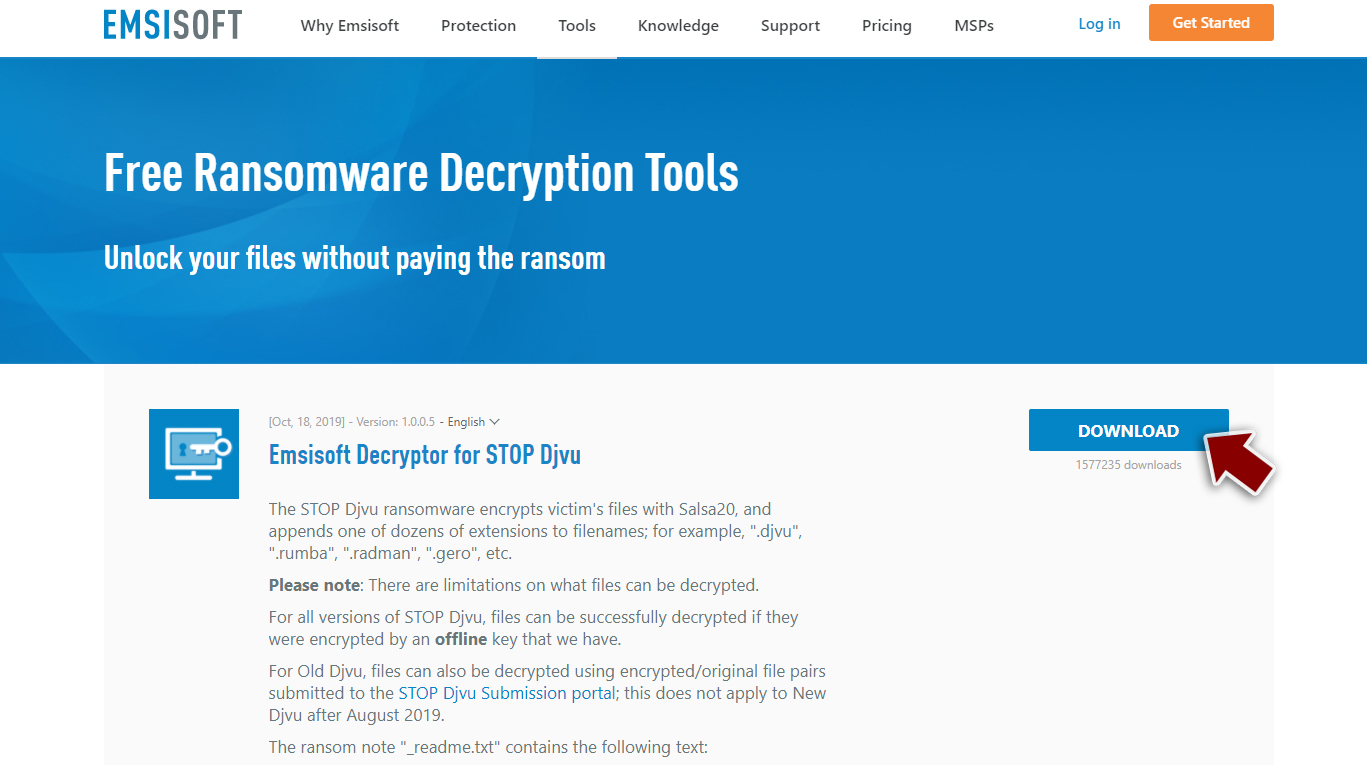
- After pressing Download button, a small pop-up at the bottom, titled decrypt_STOPDjvu.exe should show up – click it.
- If User Account Control (UAC) message shows up, press Yes.
- Agree to License Terms by pressing Yes.
- After Disclaimer shows up, press OK.
- The tool should automatically populate the affected folders, although you can also do it by pressing Add folder at the bottom.

- Press Decrypt.



From here, there are three available outcomes:
- “Decrypted!” will be shown under files that were decrypted successfully – they are now usable again.
- “Error: Unable to decrypt file with ID:” means that the keys for this version of the virus have not yet been retrieved, so you should try later.
- “This ID appears to be an online ID, decryption is impossible” – you are unable to decrypt files with this tool.
Third-party recovery software can be useful in retrieving the lost data
Since many users do not prepare proper data backups before being attacked by ransomware, they might often lose access to their files permanently. Paying criminals is also very risky, as they might not fulfill the promises and never send back the required decryption tool.
While this might sound terrible, not all is lost – data recovery software might be able to help you in some situations (it highly depends on the encryption algorithm[5] used, whether Qmak ransomware managed to complete the programmed tasks, etc.). Since there are thousands of different ransomware strains, it is immediately impossible to tell whether third-party software will work for you.

Therefore, we suggest trying regardless of which ransomware attacked your computer. Before you begin, several pointers are important while dealing with this situation:
- Since the encrypted data on your computer might permanently be damaged by security or data recovery software, you should first make backups of it – use a USB flash drive or another storage.
- Only attempt to recover your files using this method after you perform a scan with anti-malware software.
Install data recovery software
- Download Data Recovery Pro.
- Double-click the installer to launch it.
- Follow on-screen instructions to install the software.

- As soon as you press Finish, you can use the app.
- Select Everything or pick individual folders where you want the files to be recovered from.
- Press Next.
- At the bottom, enable Deep scan and pick which Disks you want to be scanned.

- Press Scan and wait till it is complete.
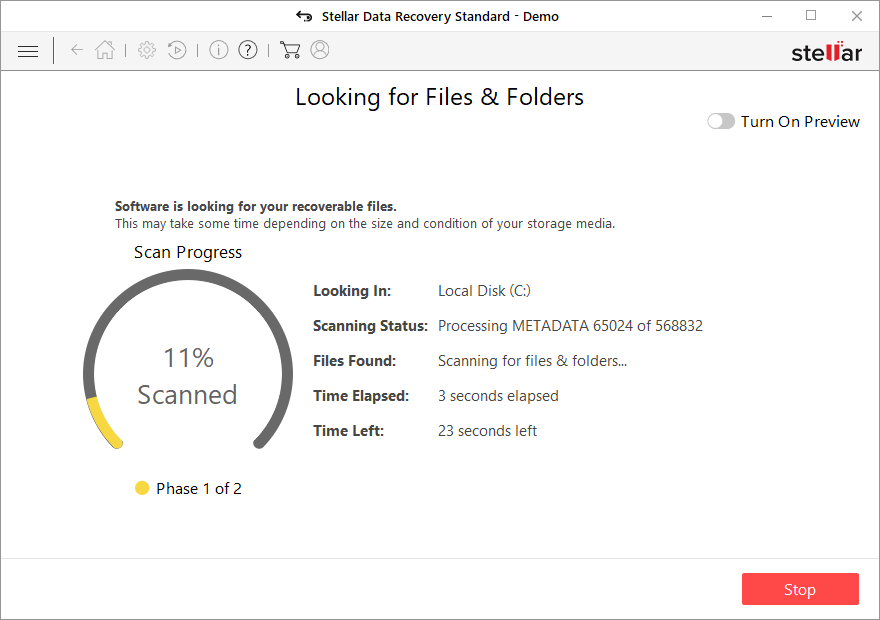
- You can now pick which folders/files to recover – don't forget you also have the option to search by the file name!
- Press Recover to retrieve your files.



Qmak file virus is one of many threats delivered this month alone. The list goes on and on and this is the 348th version of the particular family. There are fewer options for the removal and file decryption, unfortunately. It is possible that some of the victims get their files encrypted with the version supporting offline IDs, but this method is not giving results nowadays.
You can rely on particular applications like SpyHunterCombo Cleaner or MalwarebytesMalwarebytes and clear the infection fully from the machine, so the system is safe for further actions. Do not forget about the fact that virus removal is not the same as decryption. You still need additional solutions for those encrypted and marked .Qmak files.
Before you move on to any file restoring options, make sure to clear the virus damage too. Ransomware is powerful and can still be running particular processes on the machine even when the main infection is terminated. This is why you should take care of the affected files and altered pieces with FortectIntego. Then it is safe to add any file copies or use third-party software that helps with data recovery.
Did this guide help?
Be the first to comment