

Baseball Start is a browser hijacker pretending to be all-things-sports

Baseball Start is a browser extension that has plenty of characteristics common to browser-hijacking programs. It is known to be mostly designed for Google Chrome, but other browsers compatible with Chrome extensions can also be affected, including the Chromium-based MS Edge.
The app usually shows up on users' computers without their knowledge – they do not install the hijacker intentionally since its main distribution method is software bundling, where several optional components might be injected into a freeware[1] installer downloaded from third-party sources.
Once established, Baseball Start would change the browser's homepage and new tab address to nstart.online, which takes over the browsing sessions immediately. The provided search box would redirect through several other addresses, only to land on an alternative search provider, such as Bing or nearbyme.io. These results would also be accompanied by sponsored links ads, inserted at the very top, which makes users more likely to click them.
| Name | Baseball Start |
| Type | Browser hijacker, potentially unwanted browser extension |
| Distribution | Bundled software, third-party websites, fake ads |
| Symptoms | New extension installed on the browser; homepage and new tab set to nstart.online; redirects searches to another provider and inserts ads |
| Risks | Due to information tracking, users might be subjected to privacy risks. Also, since PUPs are distributed via software bundles, there is a chance of other infections |
| Removal | You can remove any unnecessary programs by following the instructions below or by running a scan with reliable anti-malware software |
| Other tips | After removing all potentially unwanted applications, we recommend you employ the FortectIntego utility to clean your web browsers and repair any damaged system files |
Baseball Start: why not trust it
Browser hijackers are not inherently malicious – they would hardly redirect you to websites filled with malware or filled with exploit kits.[2] However, there's typically quite a lot of deception when it comes to their distribution and operation, as the main motive of the developers is not to satisfy users but to monetize advertisements that are shoved in everywhere where the opportunity is there.
One of the main traits of a browser hijacker is an alteration of the browser settings without permission (although, if you are using a modern web browser such as Chrome, you are likely to be warned about these changes). By doing this, the app can redirect users to alternative providers they are affiliated with and insert ads, presenting them as legitimate search results, which is not true. These promo links can show inaccurate or misleading information and may even lead to the installation of additional potentially unwanted programs.[3]
Browser hijackers also often pretend to be extremely useful and often pick a theme to attract a particular audience. For example, Baseball Start uses plenty of links to various baseball-related sites on its homepage. However, this is just a facade in order to make people install and keep it, as the main goal is to promote various ads during searches.
We have previously talked about nStart Football – another browser extension by the same developer, although it is focusing on various sports this time. Keep in mind that you can make up your own links on the front page of any browser, hence there is no need to resort to browser hijackers doing it for you.

The top results of the browser hijacker are always altered and are actually advertisements. This guarantees the flow of cash to its creators. Meanwhile, users need to deal with inaccurate results and potentially dangerous links.
To top it all off, Baseball Start would track user data whenever they are using the browser with the extension installed. This means that websites they visit, links they click, or their technical information, such as IP address, would also be collected automatically.
How to effectively remove Baseball Start hijack
If you frequently install programs without paying attention or visit unsafe websites, Baseball Start removal might be the least of your worries. This is especially true if there is no security software installed on your computer. In this case, you should immediately install SpyHunterCombo Cleaner or MalwarebytesMalwarebytes anti-malware and scan your entire system.
If you suspect that other malicious programs have breached your computer without your consent, you may use the procedures outlined below to search for them manually. PUPs, on the other hand, are generally detectable and removed by the most sophisticated security solutions.
Google Chrome
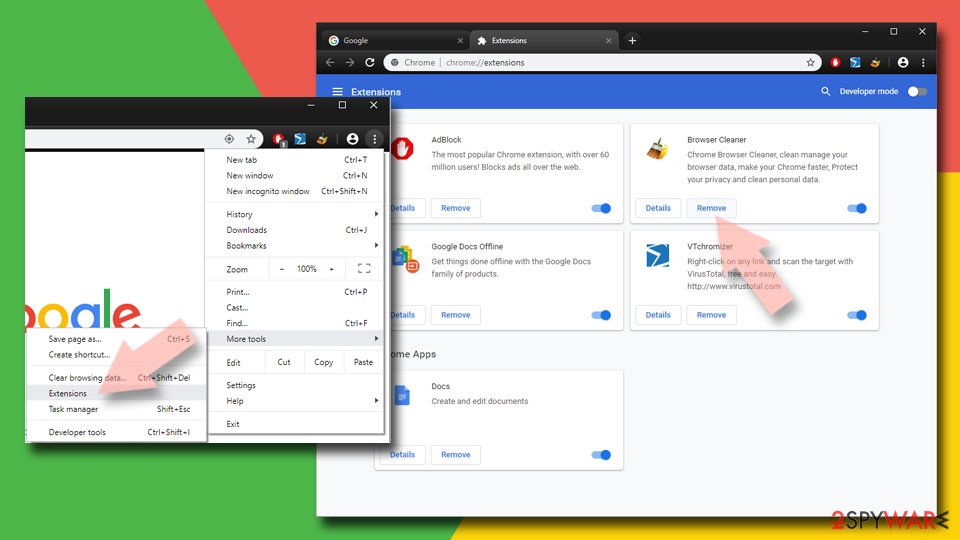
- Open Google Chrome, click on the Menu (three vertical dots at the top-right corner) and select More tools > Extensions.
- In the newly opened window, you will see all the installed extensions. Uninstall all the suspicious plugins that might be related to the unwanted program by clicking Remove.

Mozilla Firefox
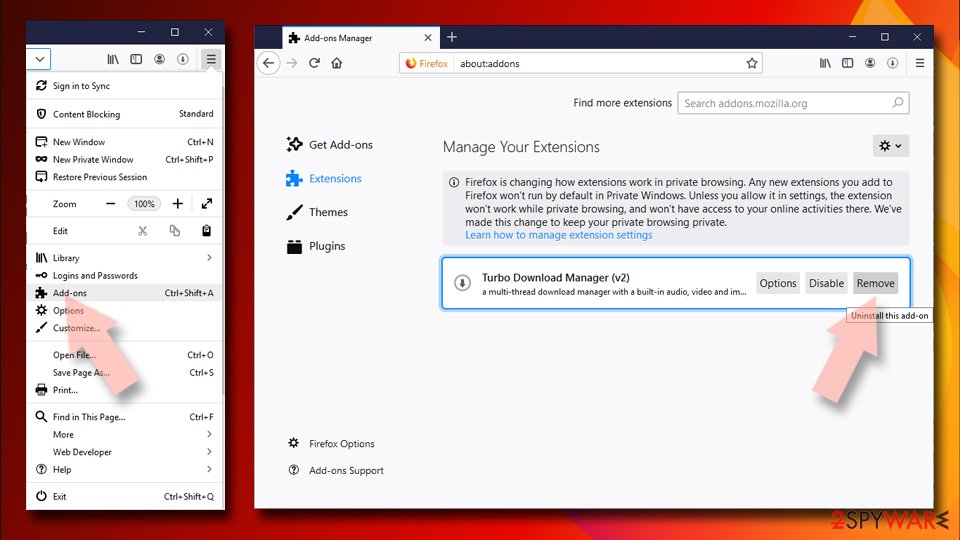
- Open Mozilla Firefox browser and click on the Menu (three horizontal lines at the top-right of the window).
- Select Add-ons.
- In here, select unwanted plugin and click Remove.

MS Edge
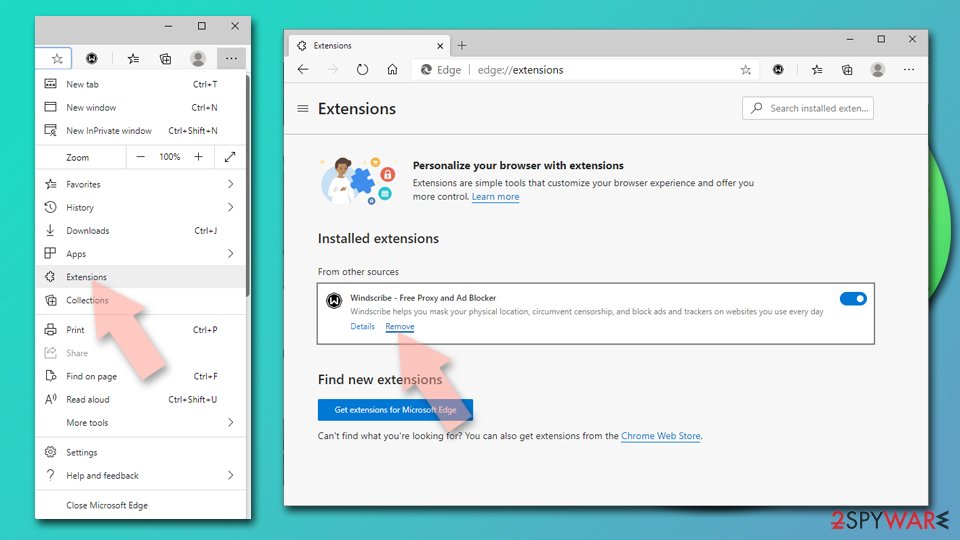
- Open Edge and click select Settings > Extensions.
- Delete unwanted extensions by clicking Remove.

MS Edge (legacy)
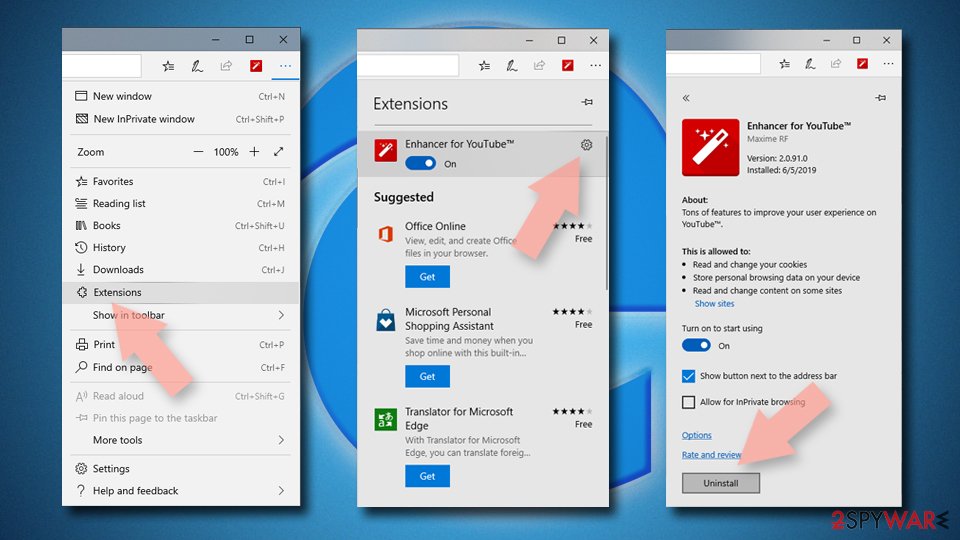
- Select Menu (three horizontal dots at the top-right of the browser window) and pick Extensions.
- From the list, pick the extension and click on the Gear icon.
- Click on Uninstall at the bottom.

Safari
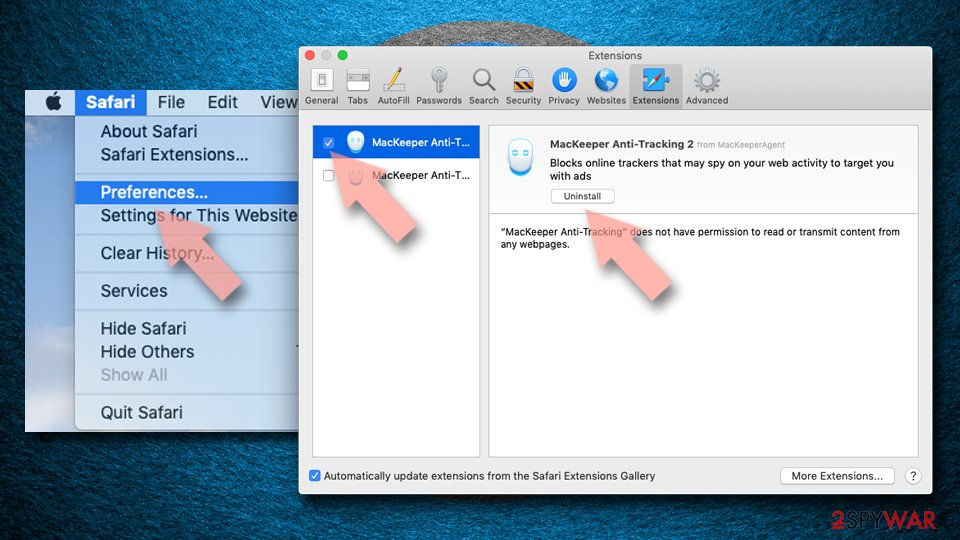
- Click Safari > Preferences…
- In the new window, pick Extensions.
- Select the unwanted extension and select Uninstall.

As previously mentioned, browser hijackers are known for their data-gathering practices, which is done in order to share it with other parties for more profits. In order to succeed in this task, the app authors place various trackers on users' machines, which continue operating even if the extension is removed. Therefore, you should make sure that cookies and other web data are eliminated from your system – you can do that automatically with FortectIntego or follow the instructions for a manual approach below:
Google Chrome
- Click on Menu and pick Settings.
- Under Privacy and security, select Clear browsing data.
- Select Browsing history, Cookies and other site data, as well as Cached images and files.
- Click Clear data.


Mozilla Firefox
- Click Menu and pick Options.
- Go to Privacy & Security section.
- Scroll down to locate Cookies and Site Data.
- Click on Clear Data…
- Select Cookies and Site Data, as well as Cached Web Content, and press Clear.


MS Edge (Chromium)
- Click on Menu and go to Settings.
- Select Privacy and services.
- Under Clear browsing data, pick Choose what to clear.
- Under Time range, pick All time.
- Select Clear now.


MS Edge (legacy)
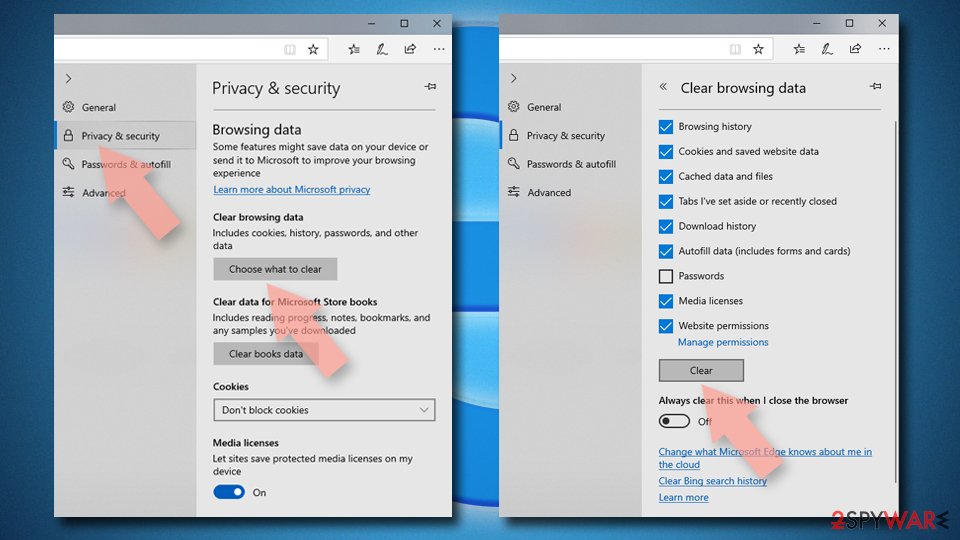
- Click on the Menu (three horizontal dots at the top-right of the browser window) and select Privacy & security.
- Under Clear browsing data, pick Choose what to clear.
- Select everything (apart from passwords, although you might want to include Media licenses as well, if applicable) and click on Clear.

Safari
- Click Safari > Clear History…
- From the drop-down menu under Clear, pick all history.
- Confirm with Clear History.


Did this guide help?
Be the first to comment