

Cring ransomware – malicious program that targets companies but might also infect regular users
Cring virus is a type of malware that aims at users' files located on Windows computers and then locks them with a strong encryption algorithm.[1] During this process, all pictures, videos, documents, and other files are appended with .cring extension and are no longer accessible.
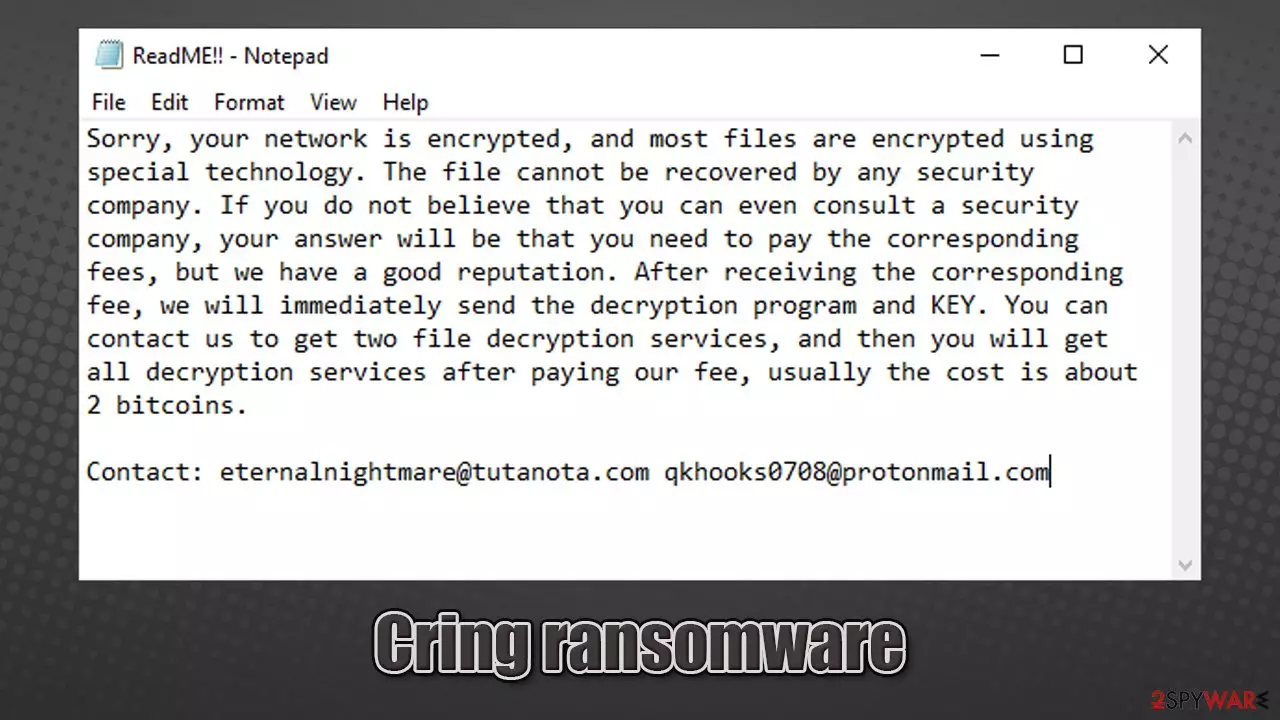
The virus also provides a message from its authors, included in a ReadME!!.txt file, delivered to the desktop. It claims that a “special technology” is used to encrypt all files on the network and that victims have to pay 2 bitcoins in order to return access to the locked files. They also provide two contact emails:
- ternalnightmare@tutanota.com
- qkhooks0708@protonmail.com.
This virus was first discovered to be spread in the first half of January 2020, and there is little information that surfaced about it yet. However, in this article, we will try to help you with the correct Cring ransomware removal process, as well as offer free instructions for file recovery, which might work for you.
| Name | Cring ransomware |
|---|---|
| Type | Ransomware, data locking malware, cryptovirus |
| File extension | .cring. Example of an encrypted file: “picture.jpg.cring” |
| Ransom note | ReadME!!.txt |
| Contact | ternalnightmare@tutanota.com or qkhooks0708@protonmail.com |
| File Recovery | If no backups are available, recovering data is almost impossible. Nonetheless, we suggest you try the alternative methods that could help you in some cases – we list them below |
| Malware removal | Disconnect the computer from the network and then perform a full system scan with powerful security software |
| System fix | Malware can seriously tamper with Windows systems, causing errors, crashes, lag, and other stability issues after it is terminated. To remediate the OS and avoid its reinstallation, we recommend scanning it with the FortectIntego repair tool |
Ransomware is one of the most lucrative illegal businesses in the cybercriminal world,[2] hence new strains surface regularly. At the same time, extortion techniques are commonly applied to regular computer users (for example, Wbxd, Coos, or Qlkm), although companies are also huge targets for cybercriminals.
In this instance, Cring ransomware authors seem to be aiming at companies and businesses, although regular users reported that they had been affected by this ransomware as well. Based on this, it is likely that the attackers are not using targeted attacks for selective targets but instead use distribution techniques aimed at random targets, such as spam emails or drive-by downloads.[3]
Once installed, malware would fundamentally change the way Windows operates. It might also install other viruses on your computer. Therefore, it is vital to remove Cring ransomware using a powerful anti-malware tool – we recommend SpyHunterCombo Cleaner for the job.
Before performing elimination, you should make copies of the encrypted files (if you have no backups) and disconnect the device from all networks. To ensure that your computer runs well after the elimination and that system file damage is fixed automatically, we highly advise performing a scan with FortectIntego.
Possible ways to recover .cring virus files
Cring ransomware virus targets the most common file types to cause maximum damage to victims. For example, Excel sheets are often used to store important work or school documents extremely valuable to users. Hence, ransomware encrypts files with the following extensions, as well as others:
- doc
- rar
- xlsx
- txt, etc.
Here is a ransom note that the infected users receive soon after the encryption process is finished:
Sorry, your network is encrypted, and most files are encrypted using special technology. The file cannot be recovered by any security company. If you do not believe that you can even consult a security company, your answer will be that you need to pay the corresponding fees, but we have a good reputation. After receiving the corresponding fee, we will immediately send the decryption program and KEY. You can contact us to get two file decryption services, and then you will get all decryption services after paying our fee, usually the cost is about 2 bitcoins.
Contact: eternalnightmare@tutanota.com qkhooks0708@protonmail.com
As evident, the attackers are actively discouraging their victims from relying on alternative solutions, such as security companies. If you are a regular computer user, a security company might just cost way too much. If you decide to pay cybercriminals, keep in mind that your might get scammed and never recover .cring files, even after you pay the 2 bitcoins.

Unfortunately, cybercriminals are right when they say that only they have access to a unique key that can unlock your files. During the encryption process, a unique key is generated to each of the users and then sent to a remote server, which is only accessible to the attackers.
However, there are a few other ways that might be successful when trying to remove .cring extension from your files. For example, using third-party recovery tools or employing automatic Windows backups if Shadow Copies were not deleted. Thus, do not pay the attackers, but instead, rely on the file recovery methods we provide below.
Remove Cring ransomware virus from your PC
If you were infected with ransomware, you are in a tough spot. However, you should not give up, as several methods, depending on your particular case, could work for you, and you might be able to recover your data.
Ransomware removal is an important step but should not be initiated immediately. The handling of the situation depends on your particular circumstances. For example, if your computer is connected to a network, you need to disconnect it first and only then proceed with the next steps.
Additionally, as we already mentioned before, you should copy all the locked files if you have no backups available before you remove Cring ransomware from your system/network. For more details, please check the instructions below.
Did this guide help?
Be the first to comment