

CryptoMeister ransomware is on a prey for French-speaking victims
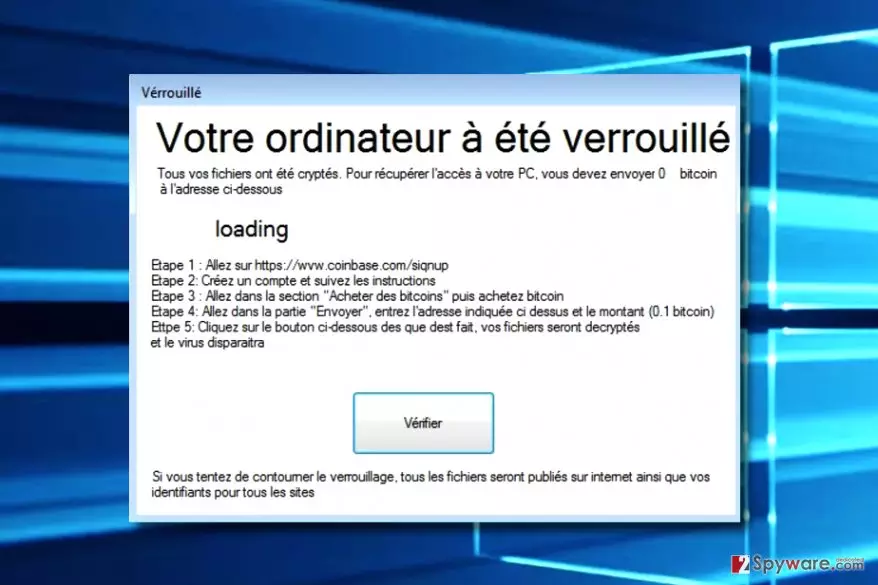
CryptoMeister is a malicious computer program that falls into the large ransomware category on our site. It is clearly a ransomware that targets French-speaking computer users, as it provides the ransom note in this language only.
After encrypting all files, the ransomware launches a program window called Verrouillé (translates to Locked). This program provides a ransom-demanding message that says:
Your computer has been locked.
All your files were crypted. To recover access to your PC, you must send 0.1 Bitcoin to the address below.
CryptoMeister ransomware demands buying Bitcoins[1] on Coinbase site and transferring 0.1 BTC to criminal’s virtual wallet. According to the message, the virus should allow the victim access the computer again as soon as the victim pays the required sum of money.
The virus also displays an alert on the compromised computer’s screen, promising to delete some files every 10 minutes until the ransom is paid. Such technique reminds us of JigSaw ransomware that first introduced such trick that pushes the victims to pay up sooner[2].
However, instead of paying, we suggest you remove CryptoMeister virus with a powerful anti-malware software and restore your files using data recovery instructions given below this article. By the way, do not be scared of threats of this virus – although it says that it will publish your files and logins online if you try to recover your files using third-party tools, we are positive that it won’t do so if you remove it properly.
Ransomware like this one is considered to be poorly programmed viruses; however, some of them get improved over time. For this reason, you shouldn’t think that ransomware is not a dangerous program.
Although the future of this particular extortion tool can be questioned, viruses like Cerber keep infecting more and more computers on a daily basis and no one can find an antidote for it.

Due to this reason, you must perform CryptoMeister removal and install a decent security program to keep malicious programs at bay. For the removal of this ransomware, you should install and use professional spyware and malware removal software. For instance, you can try using the FortectIntego software.
Tricks that accelerate ransomware distribution
Ransomware viruses are programs that mainly infect computers after tricking the victim to open their executables. In the past, ransomware viruses used to be distributed in the form of malicious executables, but nowadays scammers can conceal the malicious payload in the form of almost any file – mostly Word documents.
Surely, such malicious file is proliferated with the help of spam, tricking the victim to open it by naming it as Invoice, Subpoena, Resume, or another legitimate-looking document. Therefore, the only advice we can give you if you’re trying to avoid such malware is to stay clear of emails sent by strangers.
Advanced ransomware crooks can use far more sophisticated tricks to distribute their creations. Techniques that they usually rely on are related to malvertising, exploit kits, trojans, and other illegal means. To ensure that you won’t lose files due to a ransomware attack, we suggest creating a data backup in advance.
Quick CryptoMeister removal guide
Do not waste any more time on ransomware and remove CryptoMeister virus right now. This suspicious virus might seem dangerous; however, cyber security experts evaluated it and decided that there are chances to create a decryption tool for it. Therefore, you should stock up some patience and in the meantime take care of CryptoMeister removal.
Did this guide help?
Be the first to comment