

Eking ransomware – file-encrypting virus that asks for a quick ransom within 24 hours

Eking ransomware is malware that you might encounter if you are unlucky enough and are not using sufficient security measures such as anti-malware software. Initially, this Phobos variant was discovered in May 2020, although it continues its attacks to this day.
According to the research[1], the virus spreads mainly via torrent websites and is commonly disguised as a crack for Adobe Products. Once the malicious payload is launched, the Eking starts the first phase of the attack, i.e., inject malicious processes and gains administrative privileges on the system. The second phase is related to file encryption. For locking up victim's files, criminals behind this ransomware uses AES encryption and id.[decphob@tuta.io].eking appendix.
The virus genealogically stems from the infamous ransomware family, which has over 20 members, including Mamba, Phoenix, and ISO ransomware. Just like the predecessors, it mimics the notorious file-encrypting viruses from the Dharma family.
It uses an identical style for a ransom note and provides word-to-word the same instructions on it. At the moment, the virus creates a pop-up window info.hta or a text file info.txt in every folder that contains locked files. The file contains two emails for contacts: decphob@tuta.io and decphob@protonmail.com. However, neither contacting criminals nor paying the ransom is recommended.
| Name | Eking |
| Geneology | The virus belongs to the Phobos ransomware family |
| Classification | Ransomware / File-encrypting virus |
| Encryption | AES |
| File extension | The ransomware uses .eking extension to mark locked files. Typically the extension is preceded by a victim's ID and decphob@tuta.io email in the square brackets |
| Ransom note | The ransom note looks identical to the one used by Dharma variants. It manifests in a form of a pop-up window named info.hta or a text file info.txt |
| Contact emails | decphob@tuta.io, decphob@protonmail.com |
| Distribution | At the moment, the virus is most actively distributed via torrent websites bundled with Adobe Acrobat crack. However, ransomware managers can also exploit open RDPs or spread the payload via malicious spam attachments |
| Elimination | The only possibility to remove the ransomware from the system is a thorough scan with a professional AV engine |
| File decryption | There's no working decryptor. You can try alternative data recovery solutions that we have listed below this article or try to contact reputable ransomware researchers for help |
| Fix tool | The damage that the ransomware does to the system is huge and leading to Windows system errors. To fix such damage, use tools like FortectIntego repair software |
The user who is considered to be the first victim of this ransomware reported that he's downloaded some software, a crack for Adobe Acrobat[2] specifically, and soon after that files, such as photos, videos, documents, etc. get locked with the affix that manifests on of their titles.
The virus also displays a ransom note, which, as we have already pointed out able, is similar to the one displayed by Dharma. Victims may see a pop-up info.hta, which states the fact of an attack, provides contact information, ID number, and instructions on how to purchase Bitcoins. In addition, it may generate an info.txt file in every folder that contains encrypted data. The ransom note contains the following information:
Your PC has been infected by a ransomware. If you want to restore them, contact the following address below.
E – Mail contact – decphob@tuta.io / decphob@protonmail.com
If there is no answer in 24 hours. Try to contact us via Sonar.
Download TOR browser
hxxps://www.torproject.org/download/
While using your TOR browser copy and paste the URL below:
hxxp://kcxb2moqaw76xrhv.onion/
Register an account and message us in our ID : decphob
If the TOR link is not working go to hxxps://onion.live
NEVER RENAME ENCRYPTED FILES THIS MAY CAUSE DAMAGE TO YOUR FILES PERMANENTLY
The size of the redemption is not clear, though it may vary from $300 to $5000 in Bitcoins. However, paying the ransom is not recommended due to identity theft and other harm that hackers can cause. Instead, render the most powerful AV tool and remove Eking ransomware from your PC. Based on the VirusTotal[3] information, 47 AV engines out of 72 detect ransomware files a malicious. These are examples of AV detections:
- Trojan.GenericKD.33855769
- Malware@#jur7x0zvg9ce
- A Variant Of MSIL/Kryptik.VYW
- HEUR:Trojan-PSW.MSIL.Agensla.gen
- ML.Attribute.HighConfidence
- Win32:PWSX-gen [Trj]
- Gen:NN.ZemsilF.34110.vm0@aOGvnLi
- Trojan.GenericKD.33855769 (B), etc.
The ransomware is extremely dangerous not only because of the aggressive comptonization of personal files. Before running the cipher, the virus includes a malicious module into the Windows Task Manager and injects intrusive entries into the Windows Registry. Moreover, it alters the Windows boot sequence and provides itself administrative privileges. This way, criminals weaken the system's security, diminishes its performance, and can misuse the breach as a backdoor for other malicious viruses (trojan, RAT, or spyware).
Moreover, the Eking virus might initiate alterations on the security system, thus preventing AV programs from detecting it. In this case, the removal of the virus requires rebooting the system into Safe Mode with Networking or enabling System Restore. While in Safe Mode, use reliable antivirus software, for instance, MalwarebytesMalwarebytes or SpyHunterCombo Cleaner to scan the machine and delete all malicious entries.
Once you remove the ransomware from the system, investigate all the methods that could be applied for data encryption. If you have backups, then a ransomware attack is not a big deal for you. If unfortunately, there are no backups, you can try third-party data recovery software or contact the ransomware researchers and ask them for help because there's no free decryptor developed, at least not yet.

Finally, do not leave the system vulnerable after the ransomware removal. As we have pointed before, the virus initiates many malicious activities on the system, which can lead to BSODs, errors, slowdowns, or infiltration of other malware. Optimize the system with FortectIntego to restore its stability.
First thing's first: remove malware from your Windows machine
Ransomware should be removed from the system as soon as you notice a suspicious extension appended to your files. Don't forget that ransomware viruses are often supplemented with multiple payloads, so the longer it stays on the system, the more risk arises to get a trojan or spyware infection in the background.
Also, upon Eking removal, scan the system with FortectIntego to restore its technical side to the state prior to the attack. Only after that take action to retrieve data that the virus encrypted. For that, you can use a decryption tutorial submitted by our security experts. If you struggle to get rid of malware in normal mode, access Safe Mode with Networking and use a security scanner:
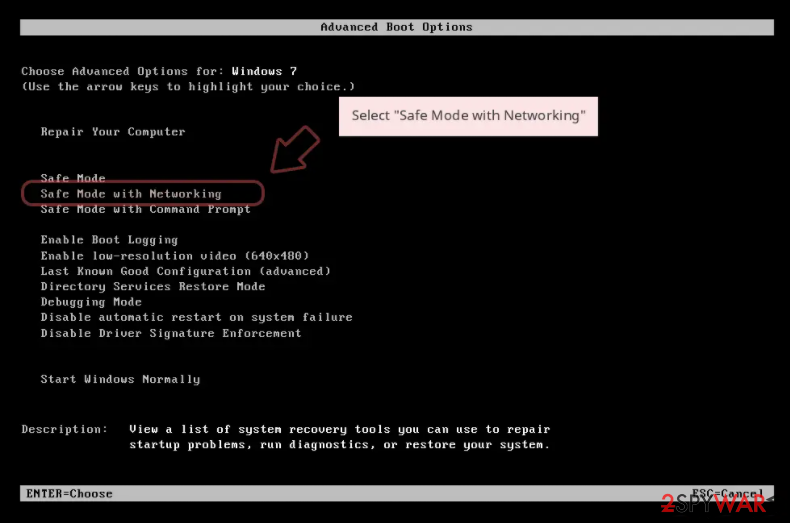
Windows 7 / Vista / XP
- Click Start > Shutdown > Restart > OK.
- When your computer becomes active, start pressing F8 button (if that does not work, try F2, F12, Del, etc. – it all depends on your motherboard model) multiple times until you see the Advanced Boot Options window.
- Select Safe Mode with Networking from the list.

Windows 10 / Windows 8
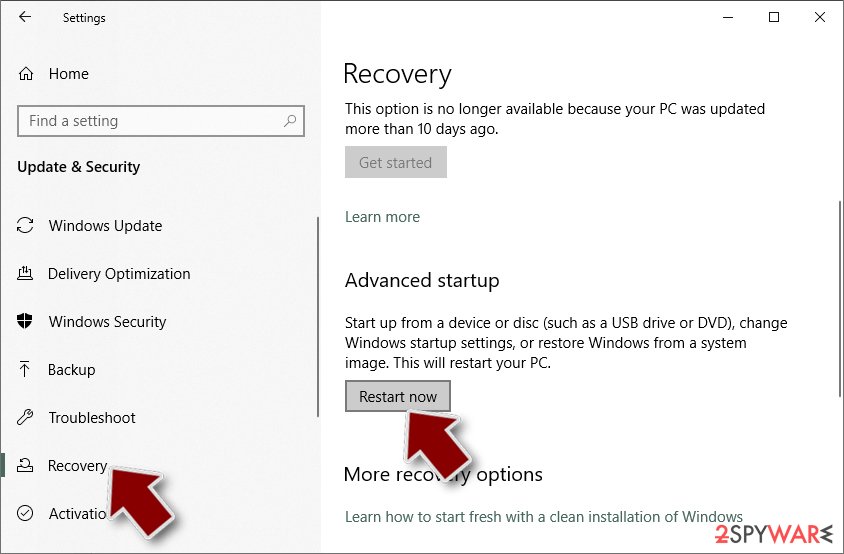
- Right-click on Start button and select Settings.
- Scroll down to pick Update & Security.
- On the left side of the window, pick Recovery.
- Now scroll down to find Advanced Startup section.
- Click Restart now.
- Select Troubleshoot.
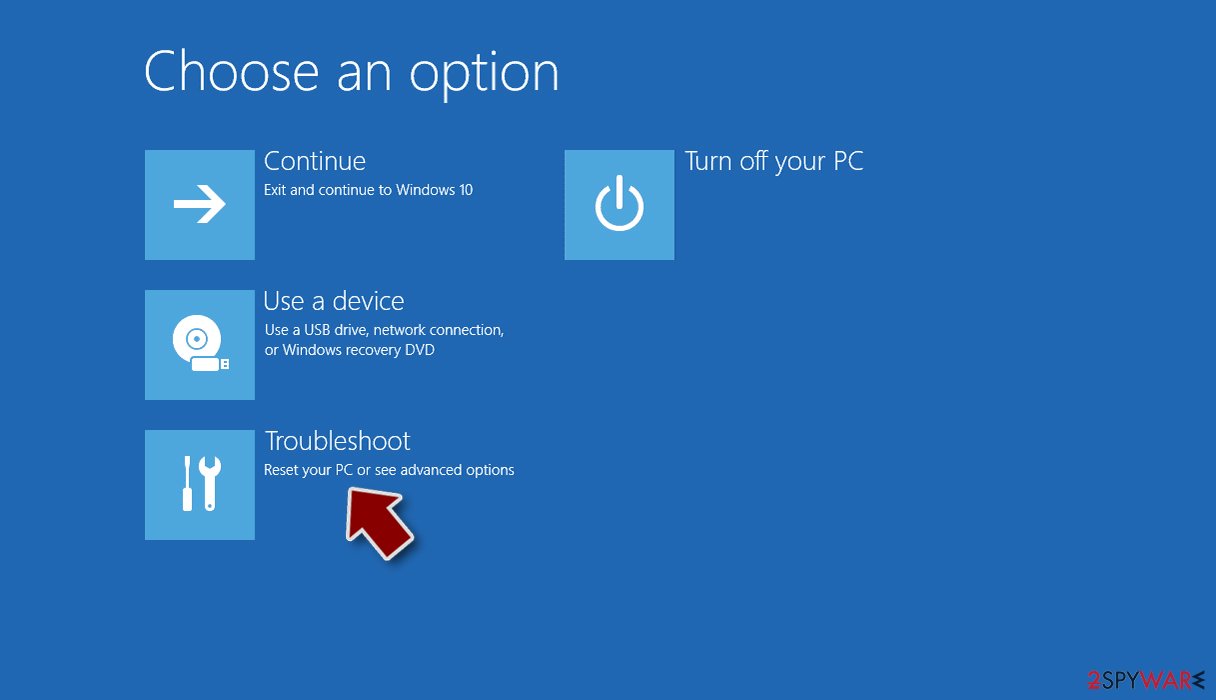
- Go to Advanced options.
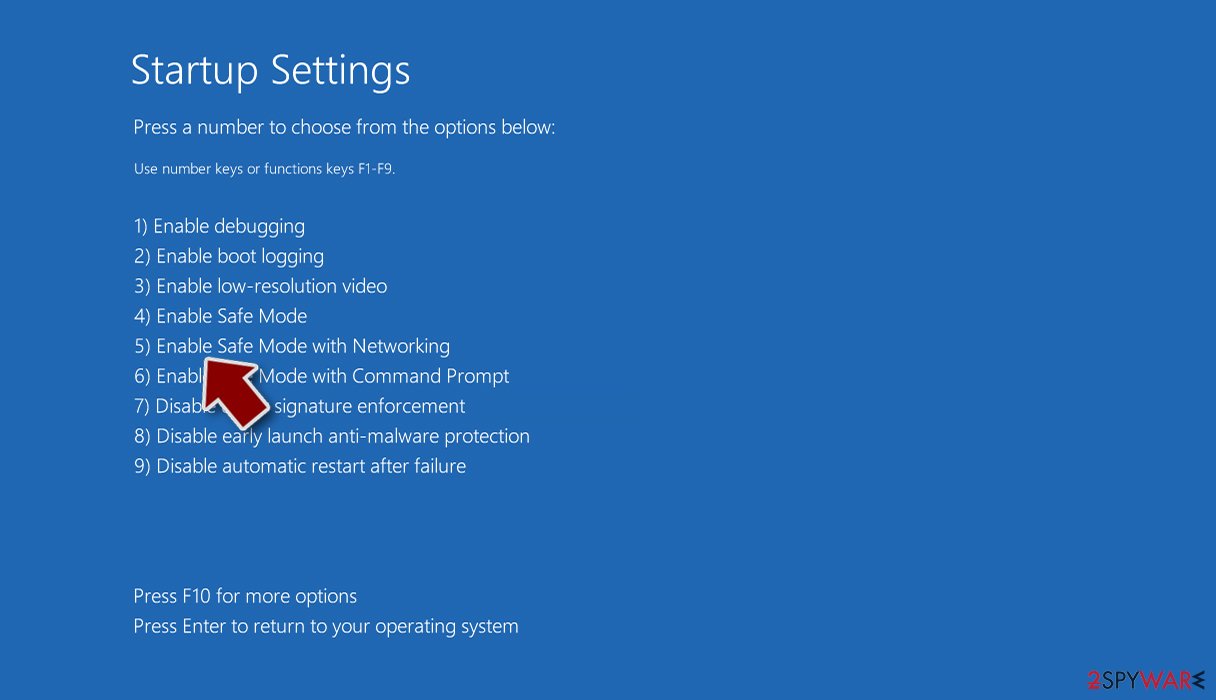
- Select Startup Settings.
- Click Restart.
- Press 5 or click 5) Enable Safe Mode with Networking.


Besides, it's important to remove the virus before any attempts to recover locked files. Otherwise, the ransomware may strike again and re-encrypt the data. Elimination of this virus requires purchasing a full package of a professional anti-virus program. We recommend using these MalwarebytesMalwarebytes. After you clean your system, use the methods below to attempt to restore data for free.
Do not pay the attackers: alternative methods to restore files
Cybercriminals behind ransomware are commonly using various persuasion techniques in order to make victims pay ransoms; usually, as soon as possible. To create a sense of urgency, they offer discounts or threaten to delete the decryption key if the payment is not made within a certain amount of time.
However, trusting cybercriminals might be your biggest mistake. Remember, they are not your friends, and they do not care about you or your files. All they want is money. Hence, there have been many reports about users paying the ransom and never receiving the promised decryption software. Instead, we recommend you try using alternative methods.
Try third-party recovery software
- Download Data Recovery Pro.
- Double-click the installer to launch it.

- Follow on-screen instructions to install the software.

- As soon as you press Finish, you can use the app.
- Select Everything or pick individual folders where you want the files to be recovered from.
- Press Next.
- At the bottom, enable Deep scan and pick which Disks you want to be scanned.

- Press Scan and wait till it is complete.
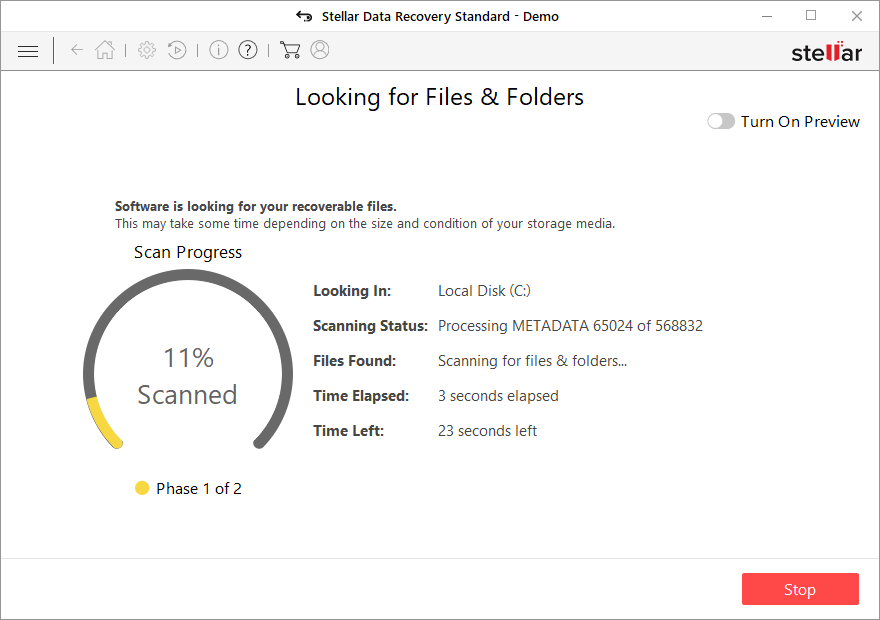
- You can now pick which folders/files to recover – don't forget you also have the option to search by the file name!
- Press Recover to retrieve your files.


Look for decryption tools
Security researchers and law enforcement agencies are working hard to dismantle the illegal operations of cybercrime. There have been many successful operations where gangs were broken down, servers seized, and the responsible arrested. In such a case, all the encryption keys are released to victims, and they can restore their data for free.
Additionally, security researchers can sometimes find flaws in ransomware's code and create a working decryptor that would help victims recover their data. As always, it is best to avoid being infected in the first place.
Here is the list of various useful websites and security teams that specialize in decryption tools:
- No More Ransom Project
- Free Ransomware Decryptors by Kaspersky
- Free Ransomware Decryption Tools from Emsisoft
- Avast decryptors

Tricky techniques used to disseminate ransomware viruses across the globe
Cybersecurity experts from Dieviren.de[4] claim that the bulk of ransomware infections steam from phishing emails and their malicious attachments (macros). These attachments are usually non-suspicious looking PDF files, Microsoft Office documents, and similar. The content of the message may mimic reputable banking, shipping, or healthcare companies. However, each time when the inbox gets a new message with an attachment, it's advisable to do the following:
- look for mistakes (grammar, typo, logic, etc.)
- double-check the sender
- scan the attachment with an anti-virus program
However, phishing emails are not the only way to transmit malware. In many cases, computers get infected after downloaded software from peer-to-peer networks. This applies to software, such as cracks, keygens, and similar illicit content. Therefore, it's important to very cautiously when using third-party torrenting services, such as The Pirate Bay. Also, do not forget to protect RDP configuration if you are using such service because remote desktop apps are also frequently exploited by criminals. Make sure to password protect the RDP and use it as a strong password as you can come up with.

Did this guide help?
Be the first to comment