

Emotet virus is a well-known banking trojan employed by numerous cybercriminal groups
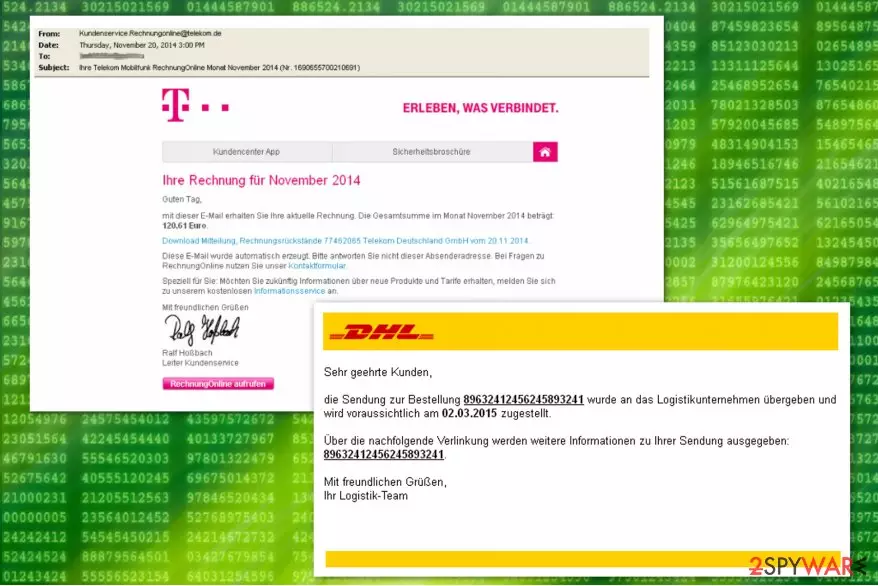
Emotet virus is one of the most prolific modular banking Trojans that first made an appearance back in 2014. Despite its relatively old age, security researchers at Malwarebytes reported [1] that this threat, along with TrickBot , is the most prevalent data-stealing malware in the wild. It is employed by many criminal groups and never stops being distributed around the globe.
Emotet is actively attacking the government, healthcare, education, and manufacturing sectors while spreading via exploits, credential brute-forcing, or a botnet. Previously, the malware used to rely on phishing emails embedded with malicious URLs – these led to a document boobytrapped with macro commands that would install the malicious payload. Nonetheless, attack vectors remain broad, and different criminal gangs take different approach.
Emotet is a data stealer, so its main goal is to copy and send out sensitive information to a remote server, and malware uses a variety of techniques for that. Despite that, it is also equipped with numerous other functions, such as malware delivery and worm-like functionality to spread laterally within the infected company. On top of these destructive traits, the Trojan can also use evasion techniques to avoid detection by some security solutions.
| Summary of the Trojan | |
|---|---|
| Name | Emotet virus / Emotet Trojan |
| Type | Banking trojan, network worm |
| Release date | 2014 |
| Mostly affected countries | Germany, Austria, Switzerland, United States[2] |
| Danger level | High. Spreads via networks and affects all connected computers; steals banking information and might install other malware to the system |
| AV detection | Mal/Emotet-E, Troj/Inject-CRI, Troj/Agent-AWUQ, Troj/Wonton-ABA, Mal/Generic-S, C2/Generic-B, Mal/Emotet-*, HPmal/Emotet-A, HPmal/Emotet-B, Troj/EmotMem-A, Mal/EncPk-ACW |
| Distribution method | Malware is usually delivered via malicious spam email (malspam) attachments, embedded links, or a malicious script. Once present on a network, it can also break into other machines with the help of a brute-forcing technique |
| Elimination | In case the infected computer is connected to a network, you should disconnect it and run a full system scan with reputable anti-malware software such as MalwarebytesMalwarebytes |
| System fix | Malware can root itself into the system and affect various vital Windows files. To remediate the computer and avoid reinstalling the OS, we recommend using a PC repair kit FortectIntego |
Emotet virus takes advantage of weak admin passwords and system vulnerabilities that it uses to distribute itself on the computer network. This advanced cyber threat is used for dropping malware on the targeted computers in order to steal financial and banking information.
On the affected machine Emotet Trojan tries to get admin privileges. If it fails to do that, then it runs itself through other system processes. It also makes various changes to the system in order to boot with system startup, collect system information, encrypt it, and send it to its Command & Control server.
Emotet removal is quite complicated due to its specific functionality. The worm is designed to avoid detection. For instance, malware might hide under processes with random or legitimately-looking names, for instance, wingroup.exe or servicelog.exe.

Emotet-related files are usually placed in the following directories:
- C:\Windows\
- C:\windows\system32\
- C:\Windows\Syswow64\
- C:\Users\\AppData\Local\Temp\
However, we do not recommend checking these locations and deleting malicious files manually. It is not an effective way to remove Emotet virus from the device. The worm spreads via the network, so it can re-install itself again.
For this reason, it’s important that all computers connected to the affected network have a powerful antivirus installed. Only powerful malware removal tools can terminate this cyber threat entirely. We highly recommend using well-known anti-virus tools that are known to be capable of eliminating trojan from the system.
It is important to uninstall Emotet immediately because malware is capable of bringing other cyber infections to the system. Security specialists from Viruss.lv[3] report that this banking worm can bring Dridex[4] or Qakbot[5] viruses to the affected systems too.
The most common Emotet variants
| Win32/Emotet Win64/Emotet Mal/Emotet-E Mal/Emotet-* HPmal/Emotet-A HPmal/Emotet-B Troj/EmotMem-A Mal/EncPk-ACW Trojan:Win32/Emotet.PEH!MTB Trojan:Win32/Emotet.CT Trojan:Win32/Emotet.AX Trojan:Win32/Emotet.BE!rfn Trojan:Win32/Emotet.SK!MTB Trojan:Win32/Emotet.AER!MTB Trojan:Win64/Emotet.PDA!MTB Trojan:Win32/Emotet.PED!MTB Trojan:Win32/Emotet.DCV!MTB Trojan:Win32/Emotet.PSM!MTB Trojan:Win32/Emotet.DDM!MTB Trojan:Win32/Emotet.VSB!MTB Trojan:Win32/Emotet.DFJ!MTB Trojan:Win32/Emotet.PEM!MTB Trojan.W97M.EMOTET.UAJS Trojan.W97M.EMOTET.JKAG Trojan.W97M.EMOTET.AFKT Trojan.W97M.EMOTET.TIOIBELH Trojan.W97M.EMOTET.SMBA |
TrojanDropper:JS/Emotet.A TrojanDownloader:Win32/Emotet TrojanDownloader:O97M/Emotet.CSK!MTB TrojanDownloader:O97M/Emotet.TV!MTB TrojanDownloader:O97M/Emotet.ABR!MTB TrojanDownloader:O97M/Emotet.VT!MTB TrojanDownloader:O97M/Emotet.UJ!rfn TrojanDownloader:O97M/Emotet.KAQ!MTB TrojanDownloader:O97M/Emotet.BBZ!MTB TrojanDownloader:O97M/Emotet.LAD!MTB TrojanDownloader:O97M/Emotet.TM!rfn TrojanDownloader:O97M/Emotet.PAF!MTB TrojanDownloader:O97M/Emotet.AAS!MTB TrojanDownloader:O97M/Emotet.FAO!MTB TrojanDownloader:O97M/Emotet.KAB!MTB TrojanDownloader:O97M/Emotet.NAN!MTB TrojanDownloader:O97M/Emotet.IAN!MTB TrojanDownloader:O97M/Emotet.VI!MTB TrojanDownloader:O97M/Emotet.PAM!MTB TrojanDownloader:O97M/Emotet.MAF!MTB TrojanDownloader:O97M/Emotet.JAT!MTB TrojanDownloader:O97M/Emotet.MAM!MTB TrojanDownloader:O97M/Emotet.KAI!MTB TrojanDownloader:O97M/Emotet.IAE!MTB TrojanDownloader:O97M/Emotet.JAI!MTB TrojanDownloader:O97M/Emotet.PAK!MTB TrojanDownloader:O97M/Emotet.CAT!MTB |

Six years after its creation, Emotet virus is still active – was spotted attacking various organizations throughout 2020
According to the report published by security researchers,[1] the last quarter of 2019 saw a decline in crypto-malware attacks, which totaled 7% year-over-year- increase. Instead, the data-stealing viruses were on the rise and attacked users even more on the end of 2019/ beginning of 2020.
In particular, banking trojan Emotet affected many organizations and firms around the world, but mostly focusing on the US institutions, as it is typical for most malware due to strong economic factors. Emotet and TrickBot were targeting a variety of sectors, including governmental, hospitality, healthcare, manufacturing, and others.
Emotet distribution has been attributed to the TA542 group, which delivers the payload of malware via malicious spam email attachments. The gang took a break for over five months but returned in mid-summer 2020 and delivered booby-trapped emails on an enormous scale (up to one million a day). The contents of emails include both generic themes and trending ones, e.g., COVID-19-related messages are being actively spread, also adapting to local languages.[6]

Emotet is also included in a massive botnet. Once the user clicks on the malicious link in the spam email, the malware takes over his or her inbox and can start sending out malspam, and recipients do not suspect that the email is malicious, due to the trusted source.
After that, Emotet exploits EternalBlue to exploit vulnerable systems on the network. The affected computers then spread the virus laterally with the help of brute-forcing. Due to such a complicated scheme, Emotet still manages to rise to the top when it comes to infection rates, and it does not seem that it is stopping any time soon.
Infiltration and operation peculiarities of the Emotet banking Trojan
Authors of this malware have been spreading this malware via malicious spam emails. The phishing email arrives as a spam invoice e-mail or notification to make a payment to lure gullible computer users into opening the malicious link attached to the letter.
The link redirects to the specific URL address which triggers a download of an infected document that includes a malicious macro command. This macro embedded in the document prompts cmd.exe and PowerShell to download malware payload from the malicious website.

The list of discovered URL links used to distribute Emotet banking trojan:
- hxxp://vanguardatlantic[.]com/Invoice-number-7121315833-issue/;
- hxxp://abbeykurtz[.]com/VZZQNZJIZD9113942;
- hxxp://charly-bass[.]de/Copy-Invoice-0954/;
- hxxp://aplacetogrowtherapy[.]com/CNNKIAPGEP3572621.
After the installation the copies of the malware are stored in the following folders:
- System%\{string 1}{string 2}.exe;
- %AppDataLocal%\Microsoft\Windows\{string 1}{string 2}.exe.
Besides, IT analysts say that the malicious program deletes the Alternate Data Stream (also known as Zone identifier)[7] which determines the source of the file you attempt to download from Internet Explorer. Thus, it is almost impossible to detect trojan by yourself.
Shortly after, the trojan circumvents the system by registering as system service and modifies Windows Registry entries to enable an autostart mechanism. In other terms, Emotet virus sets itself to launch every time you turn on your computer.

Instructions on how to eliminate Emotet from the affected computer
As mentioned above, this malicious virus can infect other computers connected to the network. If you delay Emotet removal, you risk not only your own safety but other’s as well. Be aware that this is a very dangerous program that is programmed to hide its presence and traces. Trying to get rid of it by yourself might lead to irreversible damage to your system.
We advise you to remove Emotet virus as soon as possible by employing a robust anti-malware program. However, this banking trojan might block the installation of the security software. Thus, you have to reboot your computer to Safe Mode and download it afterward. Shortly after, you will be able to run a full system scan and eliminate the malware.
Keep in mind that you have to remove Emotet from all computers that are connected to the same affected network. If you run a system scan a couple of times and you still find malicious components, it means that some of the machines are still connected. So, trojan removal is a complex task and requires cleaning all connected machines immediately. Finally, fix virus damage with FortectIntego.
Did this guide help?
Be the first to comment