

GarrantyDecrypt is the cryptovirus that releases the newest variant In February 2019 which pretends to be the alert from the Proton security team
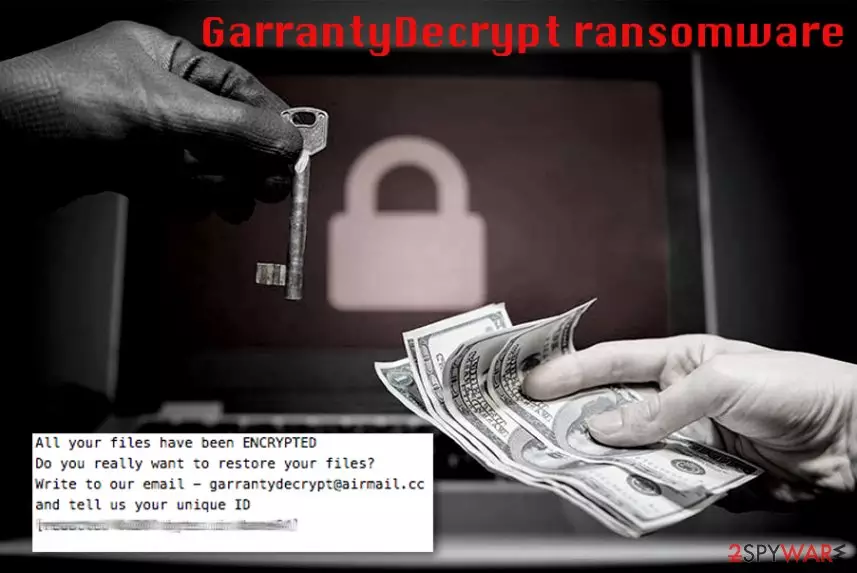
GarrantyDecrypt ransomware is a crypto malware that was first spotted back in October 2018 and releases new versions every few months. The virus is distributed with the help of malicious spam email attachments or links, via the repacked or hacked installers, fake updates, brute-force attacks, and similar methods. It uses RSA encryption algorithm to encrypt databases, documents, videos, music, etc., and appends a .garrantydecrypt extension. Also, GarrantyDecrypt drops a ransom note #RECOVERY_FILES#.txt that contains a message from the virus authors. The malware was re-released, adding .cosanostra, .decryptgarranty, and .NOSTRO appendixes to each of the affected files. According to cybersecurity analyst Demonslay, if present, the malware terminates other infections (cryptominer Rarog or data-stealer Arkei) before starting the encoding process.[1] The most recent versions in this particular family are Cammora ransomware and another version that encrypts files without marking them with the particular extensions. However, this latter variant demands victims $780 for the Proton's service because developers pretend to be the security team for Proton and even creates files with “PROTON SECURE-SERVER SYSTEMS (c) 2019” copyright mark.[2]
| Name | GarrantyDecrypt |
|---|---|
| Type | Ransomware/Cryptovirus |
| File extension | .garrantydecrypt, .decryptgarranty, .NOSTRO, .cosanostra, .cammora |
| Ransom note | #RECOVERY_FILES#.txt |
| Known since | October 2018 |
| Encryption method | RSA |
| Contact email | garrantydecrypt@airmail.cc, decryptgaranty@airmail.cc, cammora19@protonmail.com |
| Decryption | Not possible |
| Elimination | Use FortectIntego for GarrantyDecrypt ransomware removal |
As soon as GarrantyDecrypt virus enters the system, it performs several changes to increase persistence. Malware focuses on the data encryption process and seeks to make every user's file or its copy unavailable for the use. That's because cybercriminals who are working behind the ransomware seek to earn money by making their victims to pay the requested ransom fee. However, no matter how much crooks ask for, do not pay or even contact them.
Before encrypting data, the malicious code disables any malware that might be already present on the system and starts encrypting files. GarrantyDecrypt ransomware uses RSA-348 algorithm first and then opts for RSA-4096 encryption method to make your data useless. The encryption process is fairly quick[3], and you cannot notice the activity in the background.
After the successful encryption, the malware creates a ransom note called #RECOVERY_FILES#.txt which reads the following:
All your files have been ENCRYPTED
Do you really want to restore your files?
Write to our email – garrantydecrypt@airmail.cc
and tell us your unique ID
The hackers behind GarrantyDecrypt ransomware might encourage you to pay the ransom if you want to get your data back. In exchange for your payment, they typically promise to send their victims a special code which is saved on their remote servers and can't be guessed. However, you need to avoid contacting these people because it may lead to permanent data or money loss.
At first, focus on GarrantyDecrypt ransomware removal to make sure that the system is clear from malware. Additionally, restore your files from an external drive, cloud or a simple USB stick. If you don't have backups, try our tips given at the end of this article. Researchers[4] note that it is highly recommended to create a few different versions (three at least) of the file to keep it safe. Store your data on external devices and a cloud service remotely.
You can remove GarrantyDecrypt ransomware using reputable anti-malware tools like FortectIntego. Automatic virus elimination is the most helpful in this case because any additional viruses hiding on your computer can be removed during the full system scan. Follow the actions your anti-malware tool suggests after the full system scan.

GarrantyDecrypt authors keep renewing the cyberthreat
Just as many other ransomware viruses, GarrantyDecrypt is also being renewed by its authors. The first new variant was spotted at the end of November, almost two months after the original virus release.
The new variants encrypted files with similar extensions – .decryptgarranty and .cosanostra. However, the name of the ransom note hasn't changed. Cybercriminals are now demanding to use confirmation@secmail.pro, confirmprotect@protonmail.com or decryptgarranty@airmail.cc as the contact email addresses. A new version of the ransom note reads the following:
File protector Ultimate license error.
Or HACKED SOFTWARE VERSION DETECTED.
All your files is safe! Dont worry.
You only need to update subscription to unblock your protected files *.prl or become a legal user.
Send 0.25 Bitcoins to 19zbUWvkcYjPvg1ri5XprRR56z8KUkjtbj with MAX fee only! Or if you want transactions will lost in network or returned to you, and you may lost your files.
Only after you send btc and recive 1 confirmation, send email to
confirmation@secmail.pro or confirmprotect@protonmail.com
With this information below:
Bitcoin Transaction ID (no links)
Your %e@mail% (System will send to it legal copy of software with actiovation key)
######And just copy and past text below.
License payment confirmation agree
The most recent version of the virus showed up at the end of December 2018. GarrantyDecrypt authors now use .NOSTRO or .nostro file extension and ask victims to email crooks via the nostro19@protonmail.com email address.

In February 2019, the same Michael Gillespie that discovered this ransomware in the first place releases information about the latest GarrantyCrypt ransomware versions. One of them is Cammora ransomware. This intruder is not significantly changed from other members in the family and still delivers #RECOVERY_FILES#.txt as the ransom note when data gets locked and marked with .cammora extension.
However, another more recent version is different than every other member of the family because cryptovirus pretends to distribute security alerts from the Proton Technologies team.
SECURITY-ISSUE-INFO.txt is the file containing the ransom note and the statement about the attack by the third-party and encrypted files. According to these hackers, Secure-Server encrypted your files to protect them from the malware during the attack. However, developers who mark their texts using PROTON SECURE-SERVER SYSTEMS (c) 2019 copyright statement demand victims to pay $780 for the service.
The legitimacy is created to trick people into thinking this is an email from Proton secure service. Unfortunately, this is a ransomware attack, not the Proton service and you shouldn't consider paying these people. Remove GarrantyCrypt using FortectIntego, as detection rate for multiple samples shows it can be indicated as malicious by many AV engines.[5]

Malicious file attachments spread ransomware payload directly on your device
In the cyber world, the most common method used to spread malicious programs is spam. When you get a questionable email with an attached document, pay more attention because it is possible that safe-looking MS Word or Excel files contain malicious macros or spread malware directly on your device.
Any email with the subject line “Invoice” or “Order information” sent from the service or company you do not use can be malicious and spread various threats on the system of your computer. Make sure to scan the file before downloading and opening on the system. You can also delete spam email box more frequently.
Unfortunately, malicious actors disguise their products behind known names, so be aware that companies do not send emails with typos, grammar mistakes and financial information documents attached for ransom people. If you get PayPal or FedEx email when you do not use the service – delete it.
Proceed with GarrantyDecrypt elimination as soon as possible
When you find your files encrypted by the cryptovirus, don't waste your time because every minute counts as ransomware can try to encrypt more files on your computer. Better scan your system by using a reputable anti-malware or antivirus program to remove GarrantyDecrypt or any additional malware from your computer. Use FortectIntego, SpyHunterCombo Cleaner or MalwarebytesMalwarebytes and make sure to double check if the system is clear before plugging in any external devices.
GarrantyDecrypt ransomware removal needs to be done before you start recovering your locked files. The thorough system scan is nothing but beneficial for the system because, during the process, various PUPs and additional intruders will be removed from the system.
If you have files' backups, you can restore encrypted files with safe ones after GarrantyDecrypt ransomware termination. However, if you do not have the habit of backing your data, try our data recovery methods listed below.
Did this guide help?
Be the first to comment