

Gerosan ransomware is a file locking threat that demands $980 payment for the decryption tool in hackers' possession
Gerosan ransomware is a crypto-malware that first started attacking users in mid-June 2019. The virus belongs to STOP–Djvu family – one of the most prominent ransomware strings currently, and new variants are released regularly.
As soon as Gerosan ransomware enters the machine, it starts looking for files to encrypt. All the detected pictures, videos, images, documents, and others get locked with a secure encryption algorithm, such as AES and receive a .gerosan extension. While the data is not damaged, being able to use it again does require a specific key that is stored on a remote server that is controlled by hackers.
Due to the Gerosan virus infection, threat actors can then blackmail users into making them pay $980 or $490 in Bitcoin for the unique decryptor that would be able to unlock all the encrypted files. Hackers also provide contact information (gorentos@bitmessage.ch, gorentos@firemail.cc or @datarestore Telegram account) inside the ransom note _readme.txt, which is dropped into each affected folder.
| Name | Gerosan |
| Type | Ransomware, cryptovirus |
| Infiltration | Spam emails, exploits, cracked software, fake updates, web injects, etc. |
| Malware family | STOP-Djvu |
| Cipher | AES, RSA, or other |
| Contact | gorentos@bitmessage.ch, gorentos@firemail.cc or @datarestore |
| Ransom note | _readme.txt |
| Ransom size | $980 or $490 in Bitcoin |
| Virus removal | Use reputable anti-malware software like SpyHunterCombo Cleaner or MalwarebytesMalwarebytes |
| Recovery | Scan your computer with FortectIntego to fix virus damage |
| File decryption | Might be possible with the help of STOPDecrypter [download link]. Otherwise, third-party recovery software can be used |
Before Gerosan ransomware encrypts files, it performs a variety of the operating system modifications, including:
- Downloading and extracting a variety of files to ensure smooth operation of the virus;
- Loading Runtime modules;
- Deleting Shadow Volume Copies[1] to prevent data restore;
- Modifying Windows registry to increase persistence;
- Elevating privileges to those of admin account, etc.
These changes can sometimes complicate Gerosan ransomware removal. However, entering Safe Mode can temporarily disable malware's functions and allow the security software to delete it without interruptions. Additionally, users should also scan their device with FortectIntego for prompt system file recovery.
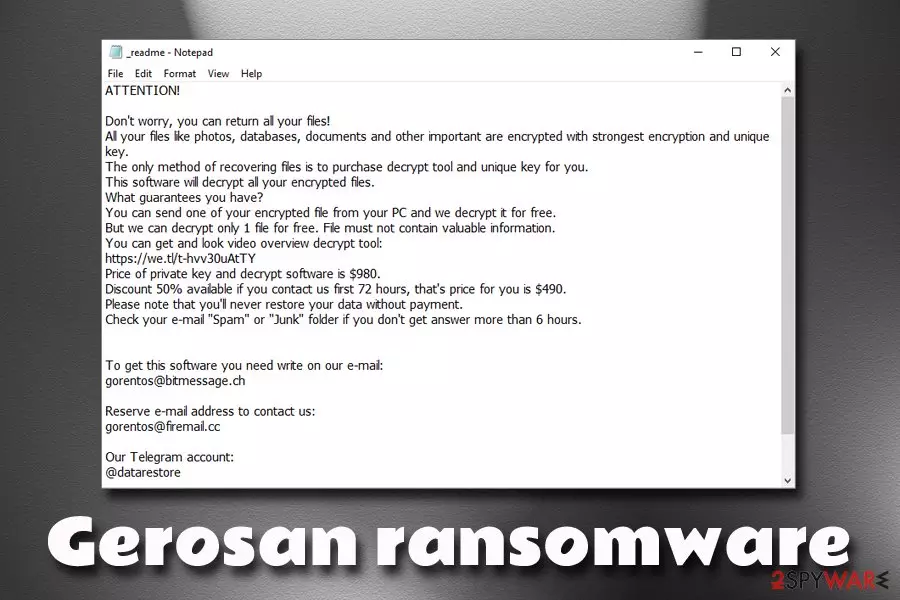
As soon as Gerosan ransomware virus encrypts all personal files, it drops a ransom note which reads:
ATTENTION!
Don't worry, you can return all your files!
All your files like photos, databases, documents and other important are encrypted with strongest encryption and unique key.
The only method of recovering files is to purchase decrypt tool and unique key for you.
This software will decrypt all your encrypted files.
What guarantees you have?
You can send one of your encrypted file from your PC and we decrypt it for free.
But we can decrypt only 1 file for free. File must not contain valuable information.
You can get and look video overview decrypt tool:
https://we.tl/t-hvv30uAtTY
Price of private key and decrypt software is $980.
Discount 50% available if you contact us first 72 hours, that's price for you is $490.
Please note that you'll never restore your data without payment.
Check your e-mail “Spam” or “Junk” folder if you don't get answer more than 6 hours.To get this software you need write on our e-mail:
gorentos@bitmessage.chReserve e-mail address to contact us:
gorentos@firemail.ccOur Telegram account:
@datarestore
Do not be convinced by cybercriminals, as them offering a free test decryption does not make it any less risky when paying the ransom, and they might simply take your money and never send you the decryption key.
Instead, remove Gerosan ransomware using anti-malware software and then use alternative data recovery methods we described below if you had no backups prepared. Additionally, experts[2] recommend using repair software like FortectIntego to fix altered Windows registry and remediate infected Windows system files.

Ways you could avoid ransomware virus infections
Ransomware viruses are among the most dangerous malware families out there, as the damage done by them might be tremendous. Losing the irreplaceable pictures, losing hours spent on the working document is pretty devastating. Nevertheless, ransomware also managed to wreak havoc in high-profile organizations and cause millions of dollars of damages in IT system restoration costs.[3]
Additionally, while some ransomware viruses are decryptable due to security experts' research, some viruses might lock your files forever, and you will never get them back. If you have a backup, however, you can negate most of the negative impact on the system.
While no method would protect you 100%, you can reduce the probability of ransomware infection to a minimum if you follow these tips:
- Install anti-malware software and enable the Firewall;
- Update your system and all the installed programs regularly;
- Install ad-blocker (however, do not forget to add exclusions to sites you want to support);
- Do not download pirated software and its cracks;
- Stay away from spam email attachments and hyperlinks;
- Adequately protect your Remote Desktop connection when using (do not use a default port);
- Backup your files!
Remove Gerosan ransomware by using anti-malware software and only then attempt file recovery
Gerosan ransomware removal might be easy, as long as anti-malware software you are using is capable of recognizing the threat. Nevertheless, even the potent software might fail due to ransomware interfering with its operation. For that reason, you should enter Safe Mode with Networking – this environment will temporarily disable the process of the virus.
Once you remove Gerosan virus from your computer entirely, you can connect your backup device to recover your files or upload them from Google Drive or similar virtual storage. If you had no backups prepared, you can make use of third-party recovery applications or try using STOPDecrypter, a special tool that was crafted by security researcher Michael Gillespie. If nothing works, you should make a copy of your files and wait for other tools to be created for this particular version of STOP ransomware.
Did this guide help?
Be the first to comment