

greenreed007@qq.com ransomware is a virus that can be associated with various families due to the wide use of this contact email
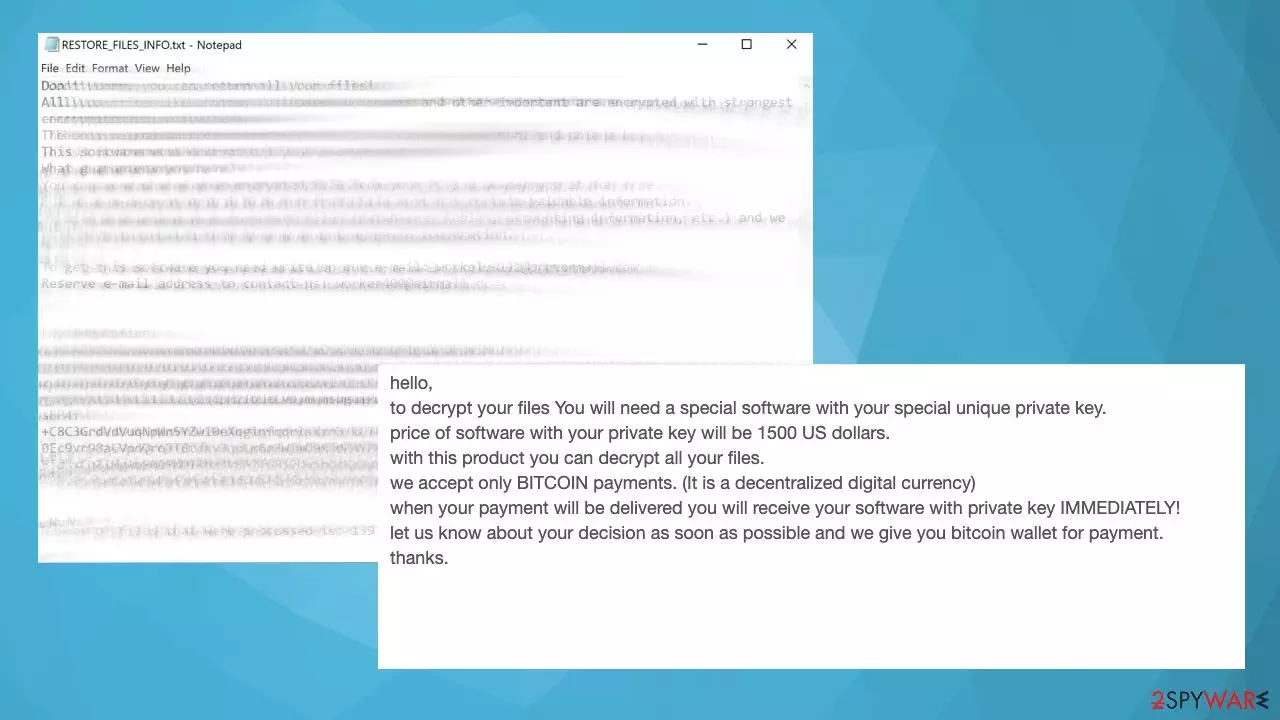
The particular greenreed007@qq.com email is used to either mark files when the ransomware encodes them or to include the email as an option for contacting criminals. There may be complaints about different extensions, including this email address and other infections related to the email. Some researchers state that this email is related to the Makop ransomware family and was used as the contact email. Also, Dharma researchers list this particular address as related to that cryptovirus infection. There are particular pieces that can help indicate which ransomware gang the infection belongs to. However, with this virus, there are too many possible options.
The particular ransom note text file that users[1] report getting -RESTORE_FILES_INFO.txt is identical to some TeslaCrypt versions like 0l0lqq virus, but the particular file content can be different, and other actors can use this filename. This particular file called ransom note is used to inform people about the encryption and instruct victims on further actions. The specific greenreed007@qq.com ransomware file extensions, according to users, can include the full form of the email or just contain .com, .secure appendix coming after the original filename and type.
| Name | greenreed007@qq.com ransomware |
|---|---|
| Type | File locker, cryptovirus |
| Symptoms | The email appears added to files in the pattern of appendixes, listed as the contact email |
| File marker | Depends on the particular threat campaign. In most cases – .secure[greenreed007@qq.com] |
| Distribution | Common ways to spread ransomware include spam emails, malicious attachments, pirating services, downloading software cracks, game cheats |
| Demanded sum | 1500$ in the form of Bitcoin |
| Decryption? | Not possible for the version, but files can be restored with third-party apps or the help from your backups |
| Removal | Elimination is the best when anti-malware tools get used |
| Repair | Restore data altered by the threat and recover functions with FortectIntego |
For now, it is not particularly known what encryption methods[2] the infection uses or how it distributes. Luckily, the threat is common and cannot be very unique or different from other cryptocurrency-extortion-based pieces. The encoding happens pretty quickly after the infiltration, so the ransom note is noticed at the same time as the file extension gets placed at the end of the affected pieces.
People state that this is the message sent from particular greenreed007@qq.com file virus creators:
hello,to decrypt your files You will need a special software with your special unique private key.price of software with your private key will be 1500 US dollars.with this product you can decrypt all your files.we accept only BITCOIN payments. (It is a decentralized digital currency)when your payment will be delivered you will receive your software with private key IMMEDIATELY!let us know about your decision as soon as possible and we give you bitcoin wallet for payment.thanks.
Based on the reports from people, the message can be received when the victim emails criminals directly. Unfortunately, that is not recommended. Experts[3] always note that paying as well as contacting criminals cannot give any positive value after the infection. You must remove greenreed007@qq.com ransomware instead of paying the ransom.
Because of the lucrative nature of ransomware, cybercriminals are creating new ransomware versions in the hopes of establishing themselves in this illegal business. Ransomware often uses different extensions, ransom notes, and other attributes that it can be identified by.

However, this information can often overlap or simply not be available, so identifying the threat might be difficult. In order to deal with ransomware infection effectively, you must first identify it. Here are a few examples of how to determine the precise ransomware you are dealing with:
File extension
Almost all modern ransomware viruses are using extensions that are appended at the end of the original filenames. However, this is not a rule. In some cases, cybercriminals change the name by replacing it with randomly generated characters, add the marker before the file name, or do not visually change the file's name at all.
Here you can see an example of a unique extension .hhmgzyl that belongs to the Snatch ransomware family:

If your files are appended with .exe, .locked, .encrypted, or other broadly-used extensions that are difficult to identify, proceed with the next step.
Ransom note
The Ransomware family might sometimes be identified by the ransom note it uses. In most cases, cybercriminals create a simple .txt file and place it on users' desktops or other easily reachable places (typically, where the encrypted data is located). Other times, a pop-up window can also be used, which is launched as soon as the encryption is complete. In some cases, threat actors name the ransomware within this note:

In some cases, it is possible to identify ransomware by its ransom note name, but they are typically very generic (e.g., FILES ENCRYPTED.txt, _readme.txt) and used by different cybercriminals groups.
Free ID Ransomware service
ID Ransomware is a free service that can easily let users identify the precise malware they are dealing with. All you have to do is upload the ransom note that can be found on the desktop and within folders where encrypted files are located and the sample of an encrypted file.
Soon after uploading the required files, you will be provided with all the relevant information, including what family ransomware belongs to and whether or not it is possible to decrypt files.
If none of the above helped you to identify which ransomware you are dealing with, you should use keywords (extension, contact email, ransom note contents, crypto-wallet address, etc.) to find the information on the internet.
This particular ransom sum is pretty normal and common, but it is very rare when the promised decryption software is received after the transfer. Cleaning the machine is the way to go because any interaction with criminals can lead to data and money losses. You do not need to pay the ransom to get files recovered. Especially if you have the data backups stored on external devices or the cloud.
Removing the virus is a crucial step before any file recovery
The threat is active until all files and processes related to the virus get removed properly. That can be difficult if the program blocks some functions and antivirus apps to keep the infection more persistent. But the detection-based tools like SpyHunterCombo Cleaner or MalwarebytesMalwarebytes can remove the infection like the greenreed007@qq.com ransomware virus because all pieces related to the virus get detected and deleted properly.
You need to run the full system scan using this program, so all the files related to malicious activities get terminated and deleted. If your ad any files on the machine that still have the active ransomware running on the system, it can lead to additional encryption processes and permanent damage to data.
The virus is capable of encrypting any newly detected files on the system, so as soon as you add backup copies on the computer, the threat runs its algorithm and encodes those documents, images, PDF, Excel files, or different data. Your machine, however, can get further damaged when a virus like this attacks. File-lockers are most dangerous for a reason. Any leftovers or changes that the greenreed007@qq.com ransomware virus made on the machine can lead to damaged files and functions.
We highly recommend using a one-of-a-kind, patented technology of FortectIntego repair. Not only can it fix virus damage after the infection, but it can also remove malware that has already broken into the system thanks to several engines used by the program. Besides, the application can also fix various Windows-related issues that are not caused by malware infections, for example, Blue Screen errors, freezes, registry errors, damaged DLLs, etc.
- Download the application by clicking on the link above
- Click on the ReimageRepair.exe

- If User Account Control (UAC) shows up, select Yes
- Press Install and wait till the program finishes the installation process
- The analysis of your machine will begin immediately

- Once complete, check the results – they will be listed in the Summary
- You can now click on each of the issues and fix them manually
- If you see many problems that you find difficult to fix, we recommend you purchase the license and fix them automatically.


You can restore your files when the machine is properly recovered and the system is fully restored to a safe state. That is possible with some apps designed to recover files. We list some below. However, do not trust any random person online or these criminals that can claim to have decryption tools. It is too difficult to make the decryption tool so soon after the virus release.
Keynotes that can help avoid future ransomware infection
These infections focused on financial gain and file-locking can be distributed with the help of other threats, including trojans, malware. You should know that Trojan horses are silent and unnoticed until the system is damaged already. These pieces can act as vectors and spread the ransomware by initiating a quick drop of the payload file.
The virus can spread quickly, and straight up, go for the encryption option. The greenreed007@qq.com ransomware virus can also be delivered via email. Unfortunately, that is the method used for trojan delivery too. Your email box gets filled with various emails, and some of them include file attachments with documents, PDFs, Excel files. Those can include macro viruses that only need a few clicks and can drop the payload of the malware on the machine.
Pay attention to any emails from random addresses, messages that state about orders, invoices, shipping details that are not related to your situation. Those deceptive emails can include malicious attachments and lead to issues with security. You can remove such emails or scan the attachment with an anti-malware tool before downloading or opening it.
The problem with such infections as the greenreed007@qq.com ransomware virus is the quick encryption process. File-locking can happen in minutes, and you receive the ransom message before noticing that you added an insecure file on the OS. Make sure to keep tools like SpyHunterCombo Cleaner or MalwarebytesMalwarebytes, so you can catch the infection before it damaged the machine and possibly keep the system safe when any intruder attempts to infiltrate the computer.
By employing FortectIntego, you would not have to worry about future computer issues, as most of them could be fixed quickly by performing a full system scan at any time. Most importantly, you could avoid the tedious process of Windows reinstallation if things go very wrong for one reason or another.
Did this guide help?
Be the first to comment