

Helpermcp virus is the application causing random error pop-ups that push PUPs to users
However, there are not many details about possible reasons or ways to solve the problem besides the close relation to Mac Cleanup Pro and updates to Catalina from Mojave. Some of the sources list more problems regarding the macOS Catalina update and possible reasons to avoid the upgrade entirely.[2] Since there are many files added to the system and processes that run in the background, we recommend terminating the tasks manually and running a thorough anti-malware scan that can clean all the traces left behind automatically, including rogue system tools installed without your permissions.
| Name | Helpermcp virus |
|---|---|
| Type | Mac malware/ potentially unwanted program |
| Symptoms | It causes the slowness of the device and unwanted pop-ups, advertising material that redirects to other sites. Various error messages and alerts falsely claim about damage or malware infections |
| Associated | Mac Cleanup Pro is the tool that gets promoted on those pop-up ads and even loads other unwanted programs |
| Possible damage | These background processes interfere with the speed and performance of the device that further affects the time on the computer. Unwanted content can also lead to installations of tools, applications, and even malware which leads to data loss and privacy issues |
| Distribution | This application/file comes on the machine as a part of the installer setup or with freeware that you install from an unreliable source. Also, other deceptive third-party sites, unwanted programs can deliver this application as in-browser content |
| Elimination | You should scan the machine using FortectIntego. The program should eliminate damaged files that were affected by the PUP. To get rid of the virus, follow the guide at the end of this post |
Helpermcp virus is quite similar/ almost identical to Helperamc program. This is the type of MacOS affecting threat, that shows up out of nowhere and keeps users puzzled since it is extremely difficult to eliminate from the machine. All the similar shady programs come via deceptive techniques and include adware features that involve data tracking and processes affecting the computer without users' knowledge.
The release of the questionable pop-up messages originates through the installation of macOS cleanup tools. In most cases, those programs are not downloaded willingly because this is the issue of potentially unwanted applications that infiltrate the computer to affect the system in various ways.
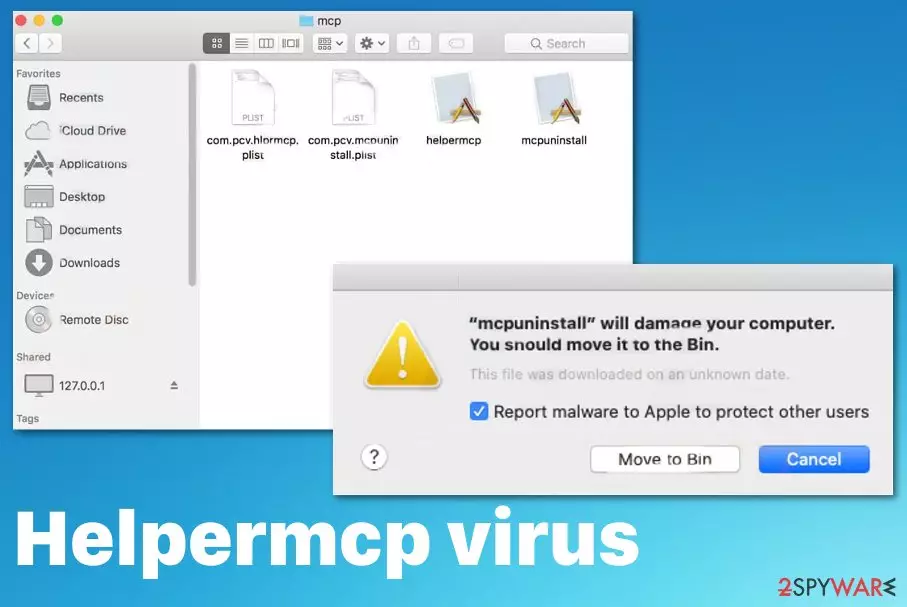
Helpermcp pop-up virus shows the following and many other similar messages as errors or alerts from the system:
“mcpuninstall” will damage your computer.
You should move it to the Bin.
This file was downloaded on an unknown date.
Report malware to apple to protect other users
Since the unwanted application can be set to perform as an adware-type intruder, it is more likely going to deliver redirects to shady services, commercial pages and even cause installations of other programs. There are a lot more issues regarding this program than it seems.
You need to remove Helpermcp virus from the system as soon as you notice those pop-ups, other unwanted files, applications, and especially when shady processes run in the background affecting the general performance. Also, you can disable all virus components via Activity Monitor. Once done with the removal, fix the system thoroughly by fixing damaged files. For the system clearing, use FortectIntego, SpyHunterCombo Cleaner, MalwarebytesMalwarebytes or a similar tool.

The PUP loads various files on the system and plants them all over the system folders. Once you remove all core files and programs associated with the intruder, you can be sure that PUP is terminated. You can find some files in these folders:
- /Library/Application Support/mcp/helpermcp
- /Library/Application Support/mcp/mcpuninstall
- /Library/Application Support/mcp/com.pcv.mcpuninstall.plist
- /Library/Application Support/mcp/com.pcv.hlprmcp.plist
- /Library/LaunchAgents/com.pcv.hlprmcp.plist
If you try to remove Helpermcp virus without eliminating those processes and the application itself, some of the tasks can be started again and further damage the machine. You must run a proper system scan to make sure that all those files and tasks get terminated alongside the program and other tools. For your advantage, we have a few tips below helpful for browser resetting.
If you leave the intrusive program up and running, you may end up tricked into purchasing or installing something directly. Such tools or applications get to be promoted and advertised online as useful additions even though they cause problems. Experts[3] also note that such commercial material collects information and uses various ad-tracking techniques to obtain details about users for the later advertising campaigns.

Pay attention to sites that push random programs and stay away from such installations
Sometimes operating system updates cause some issues with applications and files on the machine, even third-party applications can interfere with applications that run on the machine. To fight that, you can stay away from the first updates and wait for the more recent version once all possible bugs get patched and fixed.
However, this issue is not that common as problems with freeware installations and potentially unwanted programs. When you download and install programs, tools, in-browser applications from unreliable online sources, you risk getting such apps that cause problems with the processes and speed.
You should avoid getting programs from the internet when the source is not an official developer or provider. Pop-ups, promotional pages, and pop-ups are not the best sources for such things. Another tip is to choose Advanced or Custom installation options every time you get anything installed. This way, you control all those extra offers and can uncheck them from the list.
Get rid of the Helpermcp virus and avoid the drop of any questionable program
You may need to remove the intruder properly to stop those errors and pop-ups because the program is the one that causes issues with the performance or speed of the machine. Intrusive adware-type threat symptoms are the ones that annoy people, but the main issue with this application is all the files and processes loaded on the device and running in the background.
The best tip for this Helpermcp virus removal is to rely on automatic tools that can eliminate threats of this type. Professional anti-malware programs can run a full system check and find intruders in various forms like infected files, malicious scripts, and direct software that is dangerous or damaging. Then the only thing you as a user need is to double-check before coming back to using the computer as normal.
Delete from macOS
Remove the unwanted application:
- From the menu bar, select Go > Applications.
- In the Applications folder, look for any suspicious entries, then drag them to Trash (or right-click and pick Move to Trash).


Delete leftover files and folders:
- Select Go > Go to Folder.
- Enter /Library/Application Support and remove any suspicious folders related to the unwanted program.
- Repeat the same check in the /Library/LaunchAgents and /Library/LaunchDaemons folders, deleting any suspicious entries.

- Finally, empty the Trash to permanently remove the leftovers.

Remove from Mozilla Firefox (FF)
Remove dangerous extensions:
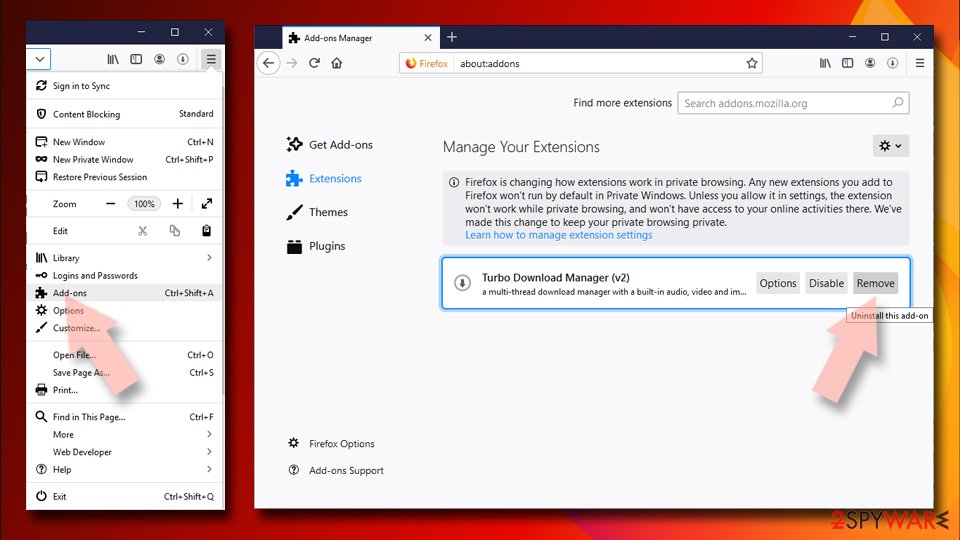
- Open Mozilla Firefox browser and click on the Menu (three horizontal lines at the top-right of the window).
- Select Add-ons.
- In here, select the unwanted extension and click Remove.

Reset the homepage:
- Click three horizontal lines at the top right corner to open the menu.
- Choose Settings.
- Under Home, set your preferred homepage and new tab settings.
Clear cookies and site data:
- Click Menu and pick Settings.
- Go to Privacy & Security section.
- Scroll down to locate Cookies and Site Data.
- Click on Clear Data...
- Select Cookies and Site Data and Temporary cached files and pages, then click Clear.


Reset Mozilla Firefox
If clearing the browser as explained above did not help, reset Mozilla Firefox:
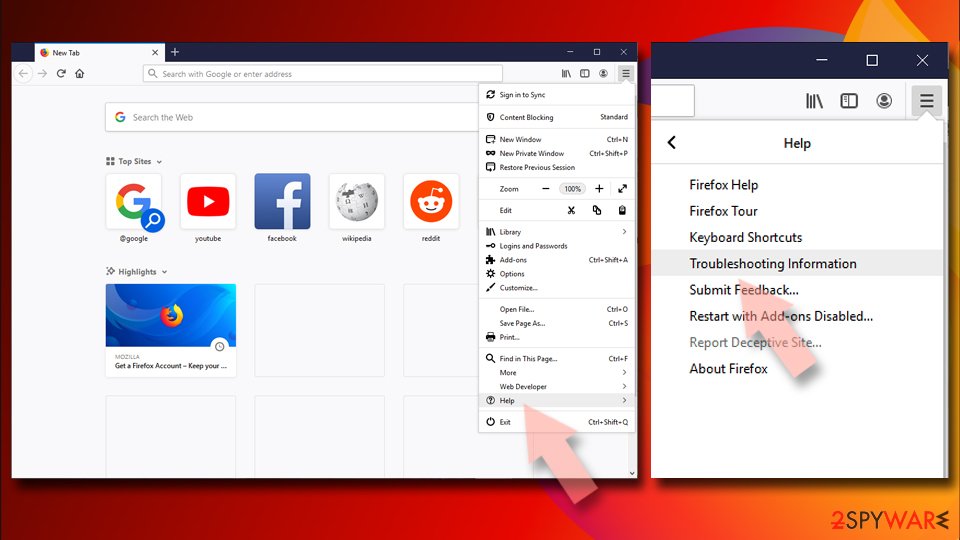
- Open Mozilla Firefox browser and click the Menu.
- Go to Help and then choose Troubleshooting Information.
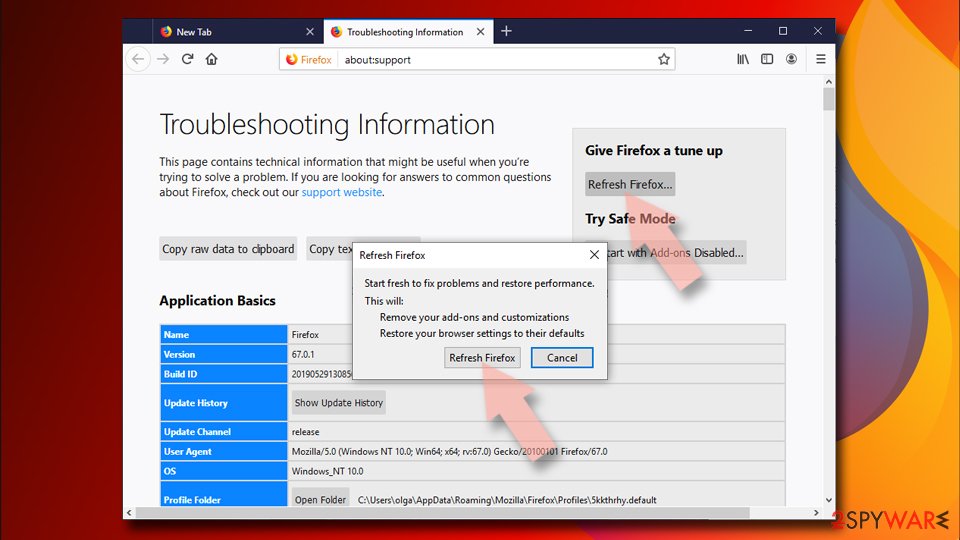
- Under Give Firefox a tune up section, click on Refresh Firefox...
- Once the pop-up shows up, confirm the action by pressing on Refresh Firefox.


Remove from Google Chrome
Delete malicious extensions from Google Chrome:
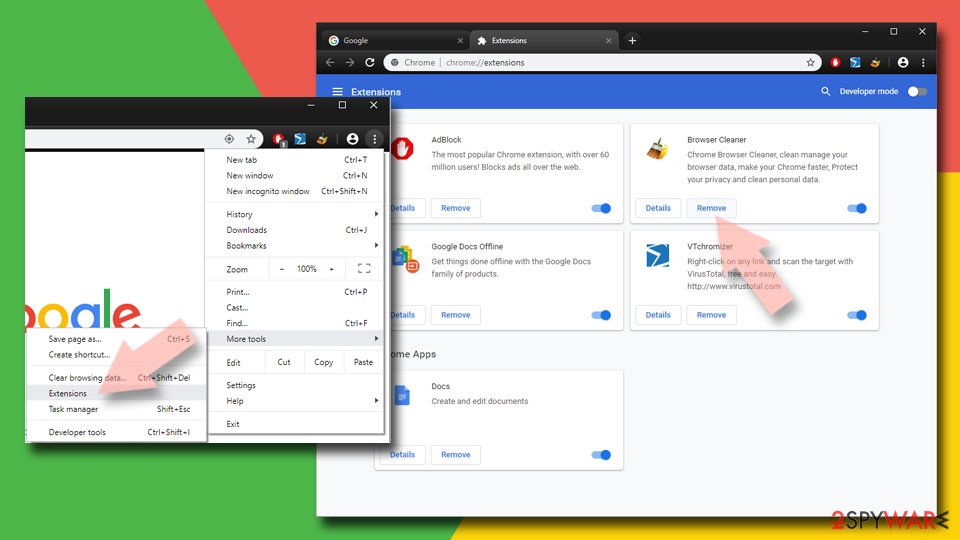
- Open Google Chrome, click on the Menu (three vertical dots at the top-right corner) and select More tools > Extensions.
- In the newly opened window, you will see all the installed extensions. Uninstall all suspicious extensions related to the unwanted program by clicking Remove.

Clear cache and web data from Chrome:
- Click on Menu and pick Settings.
- Under Privacy and security, select Clear browsing data.
- Select Browsing history, Cookies and other site data, as well as Cached images and files.
- Click Clear data.


Change your homepage:
- Click menu and choose Settings.
- Look for a suspicious site in the On startup section.
- Click on Open a specific or set of pages and click on three dots to find the Remove option.
Reset Google Chrome:
If the previous methods did not help you, reset Google Chrome to eliminate all the unwanted components:
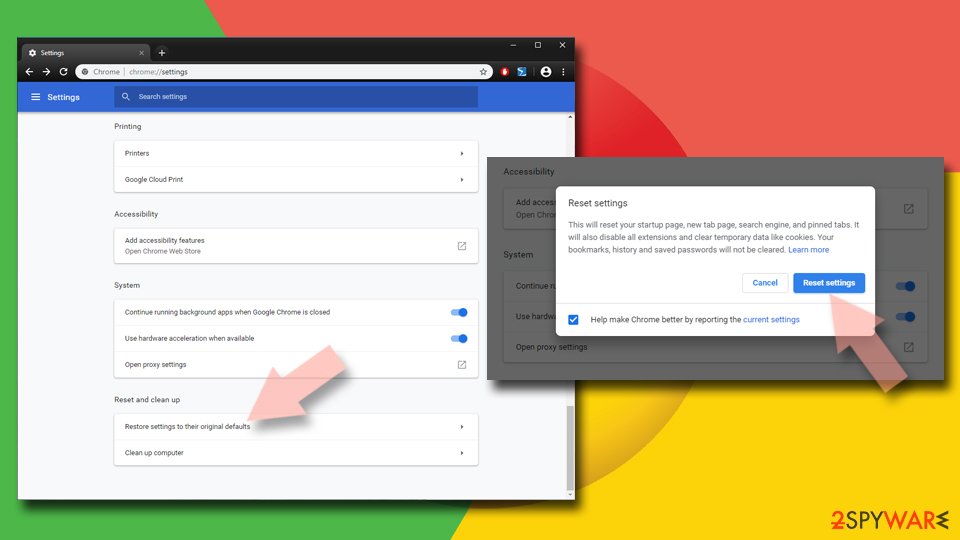
- Click on Menu and select Settings.
- In the Settings, scroll down and click Advanced.
- Scroll down and locate Reset and clean up section.
- Now click Restore settings to their original defaults.
- Confirm with Reset settings.

Delete from Safari
Remove dangerous extensions:
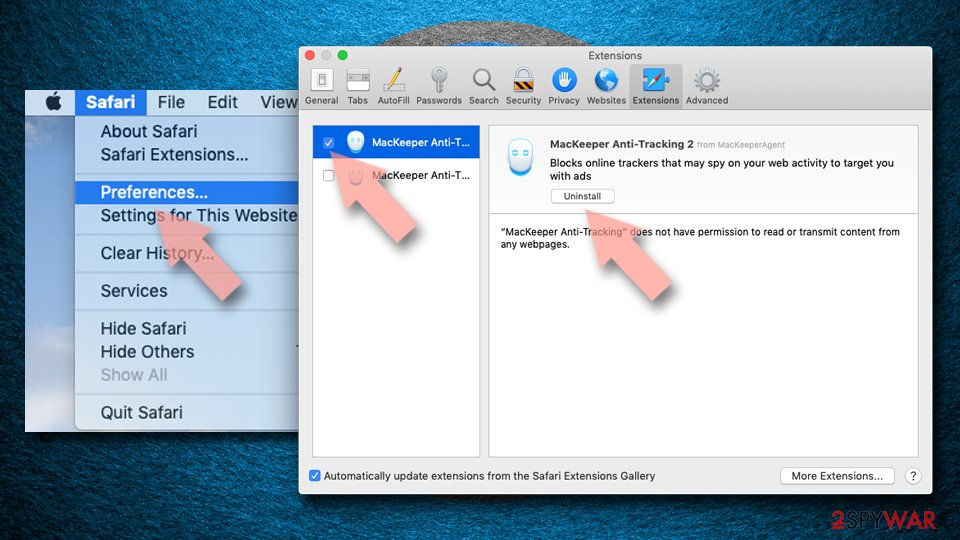
- Open Safari, click Safari in the menu at the top-left of the screen, and select Preferences.
- Go to the Extensions tab, look for any suspicious entries, and click Uninstall to remove them.

Clear history and website data:
- Click Safari in the menu and pick Clear History.
- Set Clear to all history and confirm with Clear History.


Reset Safari:
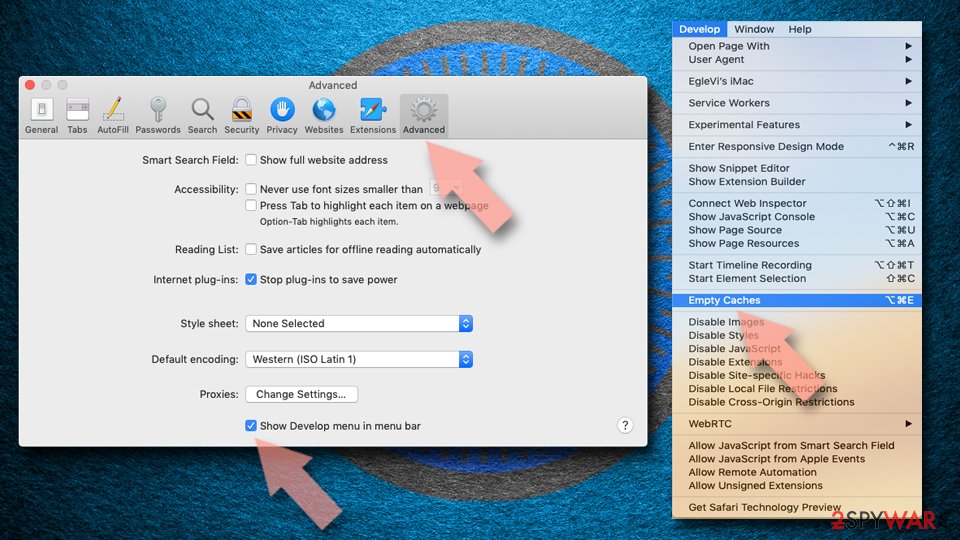
- Click Safari in the menu and select Preferences > Advanced.
- Enable Show Develop menu in menu bar.
- From the menu bar, click Develop and select Empty Caches.

Did this guide help?
Be the first to comment