

Popcorn Time virus – ransomware that offers to decrypt your files in exchange for infecting two other victims
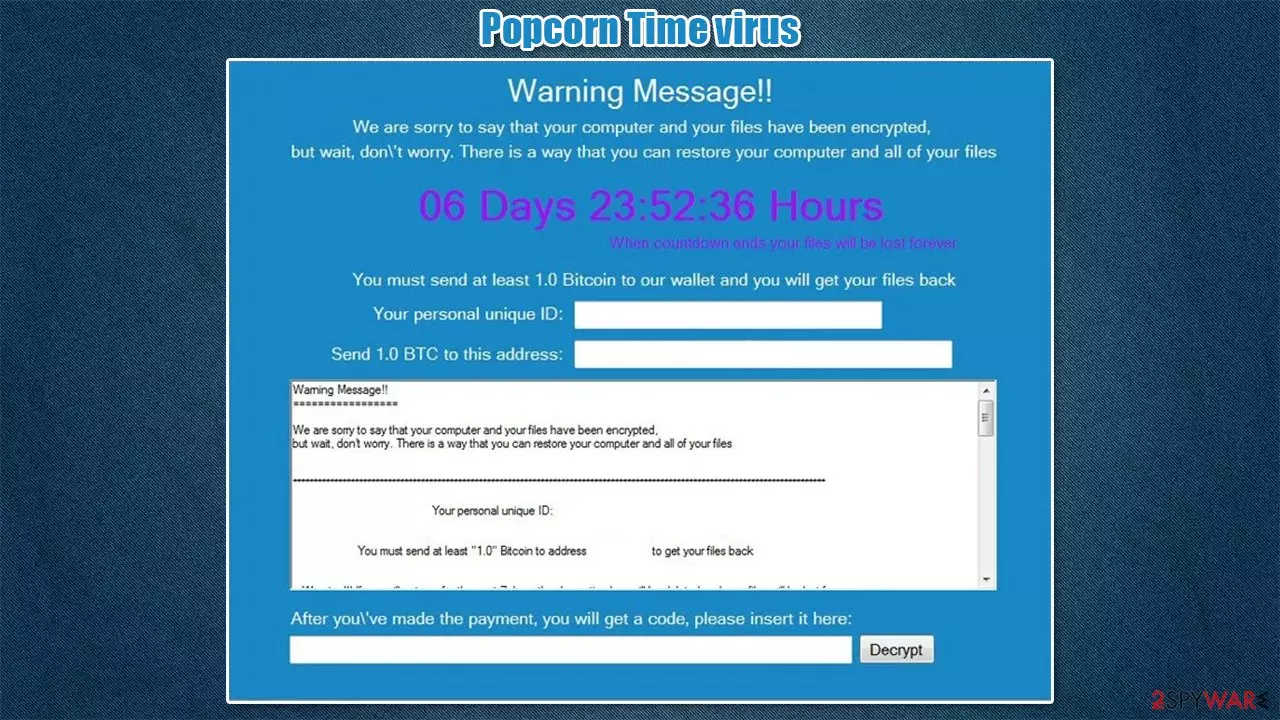
Popcorn Time virus is a ransomware-type computer infection that renames all personal data, encrypts it with a strong crypto-algorithm, and demands a ransom for unlocking them. All non-system files are renamed by appointing either .kok or .filock extension.
Following successful encryption, ransomware generates two ransom notes – a pop-up window and an HTML file titled restore_your_files.html. Cybercriminals behind this malicious software send identical messages to their victims in both ransom notes. One of the more unique features about the ransom note is that criminals offer to decrypt users' files if they agree to infect two more victims. They also back their malicious activities with a horrendous situation in Syria (where they claim to be from).
The purpose of these notes is to convince ransomware victims to pay the ransom. In this case, forward 1 Bitcoin (preferred cryptocurrency of cyberthieves) to their crypto-wallet – 1LEiPgvh6S9VEXWV2dZTytSRd7e9B1bWt3. Today (January 14, 2020), that would cost the victim around $38,000.
| name | Popcorn Time ransomware |
|---|---|
| type | Malware, ransomware, crypto virus |
| Appended file extension | All personal files, such as documents, archives, videos, and other files, are appended with either .kok extension or .filock extension |
| Ransom note | Pop-up window and restore_your_files.html file, both bearing the same message |
| Ransom amount | 1 Bitcoin |
| Criminal crypto-wallet | 1LEiPgvh6S9VEXWV2dZTytSRd7e9B1bWt3 |
| Distribution | File-sharing platforms, RDP attacks, spam emails |
| Virus removal | Remove the computer infection by running a full system scan with dependable anti-malware software that would find, isolate, and delete all virus-related files |
| System Repair | Computer viruses tend to make serious alterations to system files and settings. Run the FortectIntego system repair tool to fix any system-related issues |
Having a computer with all its files encrypted is a nightmare, but that doesn't mean that victims of such crimes should take the easy way out by paying the ransom. In fact, that's the worse option of all, as it only motivates the threat actors to infect more computers, look for other distribution methods, and develop new malicious software.
Meeting the assailants demands might get victims into a lose-lose situation, where they lose their data and their money because either of these scenarios is more than possible:
- Criminals ask for more money
- Criminals disappear
- No decryption toolkit is ever sent
- The delivered decryption key doesn't work
- More malware is sent instead of the decryption tool to infect the device further
If a victim doesn't pay the demanded ransom, it doesn't mean that the files will be lost forever. There might be other ways to recover your data encrypted by Popcorn Time ransomware. There might be no decryption software available now, but it might be created in the near future. So copy your encrypted files to an offline storage device and keep your fingers crossed.
Now back to the culprit of this article. Its ransom note is very long, unlike other recent ransomware, such as 14x virus, Coos virus, yoAD virus, or others. To sum it up, the cybercriminals ask to send them 1 Bitcoin to a specified crypto-wallet within a week, or the decryption tool will be deleted from their servers.

This is a common scare tactic used by threat actors to push their victims into jumping to rash decisions. Also, they are appealing to the victims' kind hearts by claiming that they are poor Syrian people who lost their relatives. The whole message from the developers of Popcorn Time ransomware states:
Warning Message!!
We are sorry to say that your computer and your files have been encrypted, but wait, don’t worry. There is a way that can restore your computer and all of your files. When countdown ends your files will be lost forever.
You must send at least [AMOUNT] Bitcoin to our wallet and your will get your files back.
Your personal unique ID: –
Send 1 BTC to this address: 1LEiPgvh6S9VEXWV2dZTytSRd7e9B1bWt3
Warning Message!!
********************
We are sorry to say that your computer and your files have been encrypted,
but wait, don’t worry. There is a way that you can restore your computer and all of your files.
****************************************************************************************************
Your personal unique ID: –
You must send at least – Bitcoin to address – to get your files back
Warning! ! ! If you will not pay for the next 7 days, the decryption key will be deleted and your files will be lost forever.
****************************************************************************************************
Restoring your files – The fast and easy way
To get your files fast, please transfer – Bitcoin, to our wallet -. When we will get the money we will immediately give your your private decryption key. Payment should be confirmed in about 2 hours after payment made.
Restoring your files – The nasty way
Send the link – below to other people, if two or more people will install this files and pay, we will decrypt your files for free.
What we did?
We had encrypted all of your important images, document, videos and all other files on your computer. We used a very strong encryption algorithm that used by all governments all over the world. We store your personal decryption code to your files on our servers and we are the only ones that can decrypt your files. Please don’t try to be smart, anything other than payment will cause damage to your files and the files will be lost forever! ! ! If you will not pay for the next 7 days, the decryption key will be deleted and your files will be lost forever.
What we do that?
We are a group of computer science students from Syria, as you probably know Syria is having bad time for the last five years. Since 2011 we have more the half million people died and over 5 million refugees. Each member of our team has lost a dear from his family. I personally have lost both my parents and my little sister in 2015. The sad part is that the world remained silent and no one helping us so we decided to take an action.
How to buy Bitcoins?
If you aren’t familiar with Bitcoin and don’t know what is it. Please visit the official Bitcoin website (https://bitcoin.org/en/getting-started), follow the steps and you’ll get your Bitcoins. To understand more you can check also on the FAQ page (https://bitcoin.org/en/faq). Please check this website (https://coinatmradar.com) where you can find Bitcoin ATM all over the world.
List of encrypted files on your computer –
Whether the attackers are poor refugees or lost their relatives, that doesn't give them the right to use extortion on innocent people, and thus they shouldn't be paid. Remove Popcorn Time virus from the affected device with trustworthy anti-malware software such as SpyHunterCombo Cleaner or MalwarebytesMalwarebytes to ensure it's completely abolished.
Also, crypto viruses are known for making various changes in system files/settings to prolong their unwelcome stay. That's why we highly recommend performing a system repair with the FortectIntego tool after ransomware removal to fix any system issues that could lead to (if unattended) various system performance irregularities or even infection renewal.
Prevent cyberattacks by increasing your cybersecurity level
Researchers are predicting[1] that ransomware damages will hit $20 billion in 20201. So various tech giants, like Google, Microsoft, and others, are constantly trying to make the internet a safer place. Still, it's hard to keep up with cybercriminals, as thousands of them are developing new means to get a profit from their victims each day.
That's why everyday computer users should take care of increasing their cybersecurity level by themselves. Our cybersecurity experts compiled a list of guidelines that would help to do that and possibly evade cyber infections that are on the rise:
- Learn the basic techniques of malware spread to avoid them. You can find tons of info on our page, or you can google it
- Acquire a trustworthy anti-malware tool and update its virus databases regularly so it could prevent malware from infecting your device
- Maintain system settings and file by frequently using system repair tools
- Install new updates to your operating system and other software as soon as they are released
- Keep backups of your essential files on at least two separate devices, such as a USB drive, cloud, etc.

Use anti-malware tools for ransomware removal
If you have anti-malware software, but it failed to detect, isolate, and remove Popcorn Time ransomware, that means you should upgrade it. We recommend acquiring reliable tools like SpyHunterCombo Cleaner or MalwarebytesMalwarebytes that would properly safeguard your devices from various types of malware.[2]
Before eliminating ransomware virus, victims should copy all their essential encrypted files to an offline storage device. There's no decryption software available at this time, but companies are working on helping ransomware victims, so it could be developed sooner or later.
Then you're ready, launch the anti-malware software and perform a full system scan. Eliminate any files that the tool will suggest. Close the app but don't restart the computer, as the next step is to fix the system registry and other core system settings and files.
Experts[3] recommend using the FortectIntego system repair tool for this task. So download and install it. Afterward, select the full system scan and wait until it's completed. Then agree with whatever repairs that it suggests fixing the device's system. And that's it, enjoy your computer anew.
Did this guide help?
Be the first to comment