

Reha ransomware is the cryptovirus that encrypts commonly used files and erases other data possibly needed for file recovery and security functions
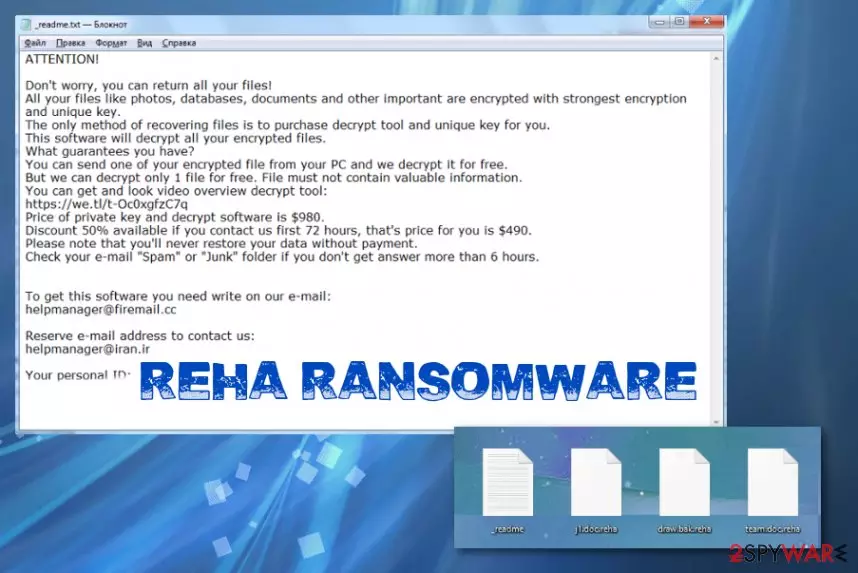
Since Reha ransomware virus belongs to this family, there are many features identical to previous versions. Besides the already mentioned ransom note file name, the message itself is the same, the amount that malware creators demand from victims also is not changed for a while. Criminals also ask to be contacted via email addresses that have already been indicated. However, the thing that changes is the encryption method and algorithms that criminals use. Previously, this family had versions of decryptable malware, so victims were able to get their files back using StopDecrypter. Since August 2019, coding got changed and now all the new versions come out altered and more powerful than before, so decryption tools that have helped are no longer supported. You can still find a few options for your files, but don't stress about decryption, remove the malware first.
| Name | Reha ransomware |
|---|---|
| Family | Djvu virus |
| File marker | .reha file extension marks all the encrypted files. It comes after the original name and file type appendix |
| Ransom note | _readme.txt file contains information about encryption process, possible test decryption and ways that victim can contact criminals to pay the demanded $980 amount |
| Contact emails | helpmanager@firemail.cc, helpmanager@iran.ir |
| Distribution | Malware payload gets delivered on the system via email attachment with infected files, pirated software, or by the serious malware designed to infect devices further[1] |
| Damage | This virus can access various places on the device and damage system files, alter functions, disable programs and delete particular files needed for the victim to recover encoded data. This threat also can inject additional malware on the infected computer to steal valuable information. Ransomware is dangerous because it involves blackmailing and direct contact between victims and criminals |
| Elimination | Remove Reha ransomware using proper anti-malware tools because such software can run on the machine and fully check for virus-related files and programs to delete them |
| Possible decryption |
|
| Repair | System functions that get affected cannot be restored during decryption or virus removal processes, so get a PC repair tool and fix issues with the performance by running a tool like FortectIntego |
Reha ransomware attack begins with the infiltration, and once the payload is launched on the targeted machine, encryption is employed. This is the main process that cryptovirus runs and focuses on, so files get tracked immediately, and photos, videos, documents, archives become unreadable and useless when the original code is affected.
Once those files get encrypted and marked using .reha extension, Reha ransomware places the ransom note on the desktop and in other folders. The text file contains a brief message from criminals to victims that encourages people to believe that their files can only be restored with the decryption key that costs $980.
However, the first step that you should do when encountered the infection like the Reha ransomware virus is deleting the malware. You can also store executable files or affected tada, encrypted files, other potentially related applications on an external device if you believe that it is possible to receive a decryption tool in the future.
If not, remove Reha ransomware as soon as possible and with proper tools like anti-malware tools that can detect threats based on malicious behavior. Most anti-virus engines can detect such types of viruses, but make sure to choose a trustworthy tool and run all the suggested steps. Unfortunately, these tools cannot remove virus damage or restore your files. For improving the system performance get FortectIntego or a PC optimizer and rely on file recovery software when you lack data backups. 
Unfortunately, when you don't have reputable data backups, you may need to search for alternate methods of encrypted file recovery. Some third-party options are listed below the Reha ransomware termination guide.
Key features of Reha ransomware
Besides encoding the common types of files, this malicious software can directly cause damage to your machine by interfering system folders and functions. Reha ransomware can:
- delete Shadow Volume Copies;
- modify registry;
- execute other commands;
- inject malware;
- creates host files to clock security sites;
- connect to remote servers
- install programs and disable system functions.
These processes happen as a secondary attack when all the chosen files get encrypted, and ransom gets demanded. Reha ransomware asks for payment in the ransom note file that reads the following:
ATTENTION!
Don’t worry, you can return all your files!
All your files like photos, databases, documents and other important are encrypted with strongest encryption and unique key.
The only method of recovering files is to purchase decrypt tool and unique key for you.
This software will decrypt all your encrypted files.
What guarantees you have?
You can send one of your encrypted file from your PC and we decrypt it for free.
But we can decrypt only 1 file for free. File must not contain valuable information.
You can get and look video overview decrypt tool:
https://we.tl/t-7YSRbcuaMa
Price of private key and decrypt software is $980.
Discount 50% available if you contact us first 72 hours, that’s price for you is $490.
Please note that you’ll never restore your data without payment.
Check your e-mail “Spam” or “Junk” folder if you don’t get answer more than 6 hours.
Additionally, the message includes particular contact emails and sometimes other sources where you can buy Bitcoins for paying. However, do not consider paying Reha ransomware developers. It cannot lead to anywhere positive.[2] Experts[3] always work on getting alternative options to your attention, so rely on cleaning the machine and save your money for a proper AV tool instead, to avoid such infections in the future. You can try to use the Emsisoft decryption tool that can restore files encoded by versions that use offline keys. If your victims' ID ends in t1 you are one those lucky ones. 
The internet is filled with malicious content
Such malware can be injected into the machine without your knowledge because distribution methods include software cracks, illegal freeware distributors, and maliciously infected emails, other malware. When users download licensed program activators, game cheats, or cracks they have no idea what else may be included in the setup of installation.
Malware creators rely on popular games and software and fake such packages or pre-bundles them with payload droppers and direct malware. In most cases, users cannot notice the drop because underlining codes automatically executes the threat during the install in the background.
Using cracking tools or keygens can be more dangerous. You need to avoid such services, sites and even pay attention to suspicious emails with attachments that can be infected too. Keep anti-malware tools and check any suspicious file before loading on the machine with it.
Clean the machine off of Reha ransomware virus traces
To fully remove Reha ransomware from the machine you need a bit more than luck or cleanup tool. You need a system optimization utility like FortectIntego for virus damage termination and to fix anything that got altered behind your back, but AV tools are required if you want to clean the system thoroughly before you restore those files from scratch.
Get an anti-malware program and run a full system scan that can help to achieve the best Reha ransomware removal results. Follow steps leading to the cleaner machine and double-check to be sure that the virus is no longer on the computer. Try SpyHunterCombo Cleaner, or MalwarebytesMalwarebytes for that.
When the Reha ransomware virus is fully deleted from the system, you can add files on the machine without any worries and restore important documents, photos completely.
Did this guide help?
Be the first to comment