

SkyStars ransomware – a newly discovered threat that comes from the ransomware family and brings the .SKYSTARS extension
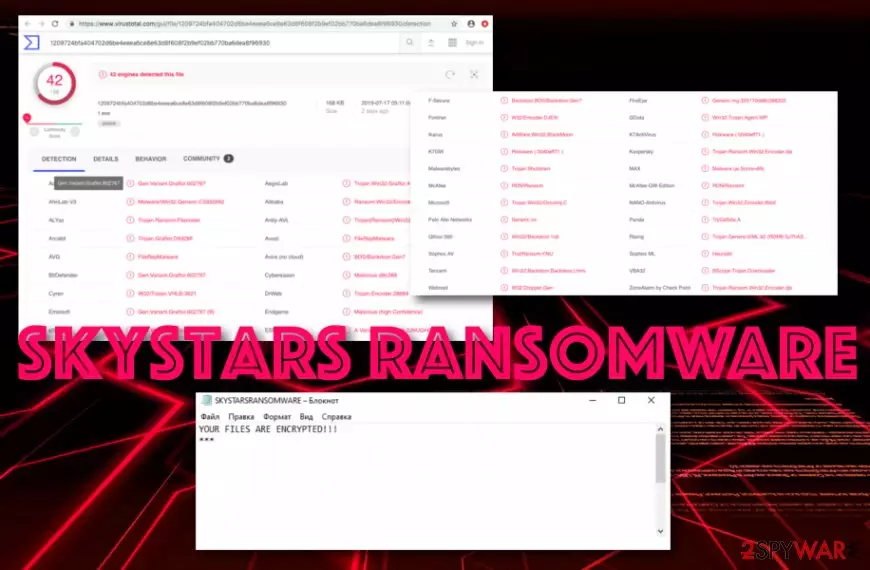
SkyStars ransomware is a recent discovery in the malware field. This notorious threat has been discussed also on the well-known network Twitter.[1] Continuously, SkyStars virus executable file has been detected as malicious by 42 engines in VirusTotal.[2] The detection names refer to FileRepMalware, Trojan.Encoder.28884, Trojan-Ransom.Win32.Encoder.dje, Trojan.Shutdown, RDN/Ransom, etc. Once the cyber threat reaches the Windows computer system, it locks every object with the .SKYSTARS file extension and displays a short message named YOUR FILES ARE ENCRYPTED !!.
| Name | SkyStars |
|---|---|
| Type | Ransomware |
| Category | Malware |
| Extension | .SKYSTARS |
| Detections | FileRepMalware, Trojan.Encoder.28884, Trojan-Ransom.Win32.Encoder.dje, Trojan.Shutdown, RDN/Ransom, etc. |
| Ransom message | YOUR FILES ARE ENCRYPTED !! |
| Price | No particular details are given but the price is believed to vary from $100 to $2000 |
| Target | English-speaking people |
| Distribution | The malware gets delivered through email spam campaigns, piracy networks, exploit kits, etc. |
| Removal tip | Detect malicious objects with FortectIntego and continue with the ransomware removal process automatically |
SkyStars ransomware successfully locks files with the help of Advanced Encryption Standard (one of the possible cipher variants). Continuously, the ransom note it displays comes with just one sentence and contains none information only a statement about encrypted files:
YOUR FILES ARE ENCRYPTED !!!
***
SkyStars ransomware supposedly targets English-speaking users as the content it provides is all written in the English language. However, we cannot say anything about the ransom demands as there are none written. Usually, crooks lock up documents/files to urge a ransom price for unlocking encrypted data.
The demanded ransom often differs but mostly varies between $100 and $2000. Also, this type of price is usually urged to be transferred in Bitcoin or another cryptocurrency to ensure the secrecy of the payment process. We guess that SkyStars ransomware might also demand a price between the above- mentioned numbers.

The fact that no particular information is provided about the threat does not mean that SkyStars ransomware is not dangerous. It still attacks random users and encrypts data by using strong algorithms. Furthermore, these types of file-encrypting threats are known for opening backdoors to let in other malware infections.
By postponing SkyStars ransomware removal you might allow a different form of malware to slip into your system. It is known that ransomware sometimes pushes Trojan horses straight on the targeted system. For example, various versions of STOP ransomware are known to be distributing the AZORult Trojan virus.
You should remove SkyStars ransomware before something similar happens. For full completion of this process, you need to scan locations such as Windows Registry and Task Manager in your computer and check for possibly-malicious files. Our recommendation would be to opt for software such as FortectIntego.
SkyStars ransomware is a cyber threat that can start running in the background of your machine and initiating various malicious processes. The malware can bring other malware-laden modules to the system and perform activities such as deletion of Shadow Volume copies, disabling of antivirus software, program corruption, and similar.

Take notice that ransomware-related payload comes in forms of Word or Excel docs
Dealing with ransomware is definitely not a pleasure to experience and you should try avoiding it at any cost possible. The malware often resides in legitimate-looking Word or Excel documents that come attached to a rogue email message. Also, the malicious payload can come inserted in a hyperlink.
Avoid entering this type of content before performing a full antivirus scan. Using an anti-malware tool on received files is a necessity as this software will alert if something malicious is hiding there. However, it is even better to send all spam emails straightly to the trash section and avoid opening them at all.
Continuously, the hazardous payload can be delivered through secondary downloading processes, exploit kits, fake Flash Player updates, piracy networks, porn websites, online gaming, and gambling networks. In spite of this fact, you should continue visiting only original websites for your online activities and avoid any types of third-party sources.
SkyStars ransomware should be terminated only automatically
To avoid the risk of accidental system damage, you should choose to get rid of the cyber threat only with the help of reputable security software. Besides, you need to get a program which will allow you to detect all malicious components that belong to SkyStars virus. You can try using one of these tools: FortectIntego, SpyHunterCombo Cleaner, or MalwarebytesMalwarebytes.
After you perform a full system check-up, you can opt for SkyStars ransomware removal. Complete the process as soon as the first symptoms show up or it might be too late to save some system components. According to specialists from LosVirus.es,[3] the elimination needs to be the first priority of yours rather than the data recovery.
If you do not remove SkyStars ransomware before you take actions towards encrypted data, you might end up with zero results. If the infection still remains on the system, it might just repeat the encryption process all over. However, if you have already dealt with the malware, take a look down below and choose a file recovery technique.
Did this guide help?
Be the first to comment