

Trojan-IM.Win32.Faker.a – a name used by scamware to threaten users
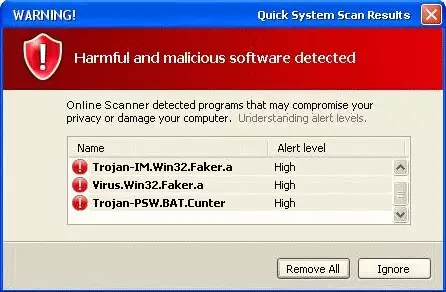
Trojan-IM.Win32.Faker.a is not a real name of a malicious program but rather an invented one by scammers. Rogue antispyware is a type of software that usually gains access to users' machines by using deception and then begins showing fake scan results. The main goal of such applications is to convince users that they need to purchase the full license of the app in order to eliminate alleged viruses from the system. Do not give in to a scam, and do not waste your money.
However, if you saw this name in some type of warning on your PC or a random website while browsing the internet, you should not trust it at all. You should also immediately scan your machine with powerful anti-malware software instead.
| Name | Trojan-IM.Win32.Faker.a |
| Type | Rogue antispyware, scam |
| Distribution | Fake online scanners, drive-by downloads, fake updates, deceptive ads |
| Dangers | When seeing fake infection results, users might be inclined to purchase the “full version” of the rogue antispyware software, resulting in monetary loss. Also, other malware could be installed in the process, and personal information leaked to cybercriminals |
| Removal | Access Safe Mode and run a scan with anti-malware software to eliminate all malware from your PC |
| System fix | Rogue antispyware programs can seriously damage Windows system files in order to perform their malicious actions. As a result, users may suffer from system crashes and errors. To address that, fix virus damage automatically with a repair tool FortectIntego |
It is important to note that Trojan-IM.Win32.Faker.a was a legitimate threat name that was used for malware in around 2006. The virus was a real Trojan designed to steal passwords of MSN instant messenger users and then use that information for malicious deeds.
As evident, this threat is no longer active, and it is very unlikely that this parasite will infect your computer nowadays. If security alerts warn you about this infection, the alerts are most likely loaded by a fraudulent program. Rogue anti-spyware and anti-virus applications often report imaginary trojans and viruses to scare people and push them into paying money to remove non-existent threats.
Many older viruses, such as Zeus, are also used in various scam schemes. If you happen to download fake antivirus software such as PC Antivirus Pro, Smart Guard Protection, or Windows Police Pro, you are likely to see such notifications displayed in various ways, including taskbar alerts or pop-ups on your desktop.
Rogue antispyware apps are known to take over users' computers in various ways; for example, they might block users' access to the internet, meddle with the hosts file, change Windows registry keys, and much more. Due to this, an infected system becomes unstable – victims are bombarded with virus alerts and requests to purchase the full version of the program to allegedly fix everything.
However, you should never trust such programs to remove malware from your device, as they are parasites themselves. The best thing you can do is install a real antivirus, such as SpyHunterCombo Cleaner, and perform a full system scan. In case your browsers were compromised, or system files damaged, use FortectIntego.
How to avoid being scammed by fake notifications
Rogue antispyware software still exists today, but it is much less prevalent than it was ten years ago, thanks to various security measures and advanced anti-malware engines that are used today. Nowadays, you are more likely to see fake notifications that claim virus infections upon accessing a scam website after being redirected from somewhere else. Most commonly, such redirects happen on illegal software distribution sites, YouTube video converting sites, and similar high-risk places.
Therefore, if your browsers suddenly took you to a location you did not intend to visit, you should always view the information displayed critically. In the best-case scenario, you could subscribe to unwanted notifications, while in the worst case, software vulnerabilities present on your device could be exploited to install malware on your PC automatically.
To avoid these scenarios, install a security application with a web protection feature – it would warn you about potential danger. Note that not all websites can be detected, however, so you should never trust notifications that claim some software is out of date or that your computer is infected with malware.
Do not ignore fake virus alerts on your device
First of all, you should not panic when you see a notification flashing in red, claiming that your passwords being leaked and your credit card information is stolen. These claims are nothing but fiction, so you should not be too concern about those. The true scope of the infection, however, can only be identified by real anti-malware software.
Thus, although Trojan-IM.Win32.Faker.a is not a real threat to your computer. It indicates that the program warning you about this fake infection is malicious. Remove any program that spawns such fake pop-ups and messages. This trojan is usually “detected” by an Internet Antivirus rogue application, so you should look for that. However, the best way to eliminate rogue antispyware is by performing a full system scan with SpyHunterCombo Cleaner or MalwarebytesMalwarebytes.
Note that malware might prevent you from launching real security tools. In such a case, access Safe Mode with Networking and perform a scan from there. Once finished, follow up with a scan with FortectIntego to ensure that Windows system files were not damaged by the virus.
Did this guide help?
Be the first to comment