

TuneupMyMac is the supposed macOS optimizer that is detected as potentially dangerous at least
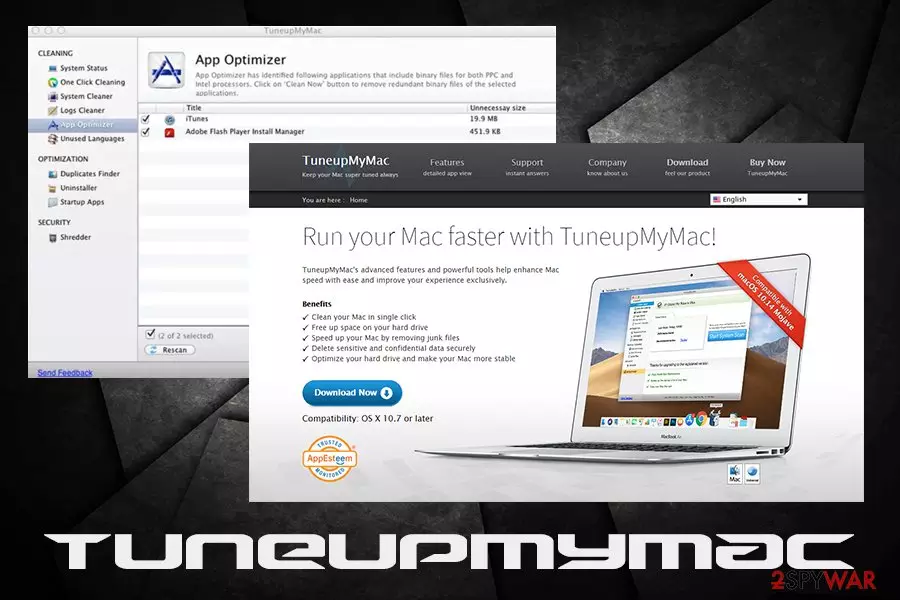
TuneupMyMac is a potentially unwanted application[1] that was designed by Systweak Software for Mac operating systems. The fake system optimizing utility claims to clean, free up space, speed up, and maximize macOS performance in just one click. However, this shady app is known to be spread via software bundling and deliberately misleading people into believing that their systems are damaged in order to make them purchase the license of the tool.
After the installation, the application will initiate a scan and show a variety of problems that are displayed in a manner that would make many users worried – especially those who are not that familiar with computing technologies and their operation. However, most of the issues found are insignificant or downright harmless. Nevertheless, because such entries are presented to users as serious problems, they might get lured and buy the full version of the program – that is the precise goal of these PUP developers.
| Name | TuneupMyMac |
| Category | Potentially unwanted application |
| Type | Fake system optimizer |
| Developer | Systweak Software |
| Operating system | OS X 10.7 or later |
| Distribution | Third-party websites, software bundles, official site |
| Risk factors | Money loss, installation of other bogus programs |
| Removal | Use anti-virus software or check the manual guide below |
| Repair | Your system can be affected by the threat and additional processes it triggers. Rely on FortectIntego or a similar tool and check for virus damage and altered pieces |
Tuneup My Mac, just as many other fake system optimizers (Auto Mac Booster, Mac Tweak, Mac Cleanup Pro, etc.) relies on not so apparent scam tactic: it shows fake scan results in order to frighten to end-user and make him or her to pay for the full version of the application. While it is not as treacherous behavior of those tech support scam crooks, users are constantly complaining about difficulty contacting support when problems arise or even when trying to perform the proper PUP and another intruder removal.

Users even referred to the app as TuneupMyMac malware and fraud.[2] It comes as no surprise, as the deceptive behavior of the program sparks concerns among AV vendors, as it is recognized under the following names and anti-malware apps:[3]
- Application.MAC.Tunenup.C (Arcabit)
- MacOS:TuneUpMyMac-A [PUP] (Avast)
- MacOS:TuneUpMyMac-A [PUP] (AVG)
- Adware.MAC.Generic.13044 (BitDefender)
- Program.Unwanted.4475 (Dr. Web)
- Adware.MAC.Generic.13044 (B) (Emsisoft)
- A Variant Of OSX/TuneupMyMac.C Potentially (ESET-NOD32)
- Adware.MAC.Generic.13044 (FireEye)
- Application.MAC.Tunenup.C (GData)
- Trojan.Malware.9713651.susgen (MaxSecure)
- Win32/Application.bb8 (Qihoo-360)
Besides luring users' money away, might also create problems on the Mac operating system. For example, it might delete entries that are vital for other application operations. To warrant themselves from possible troubles, app developers present the “No performance warranty” statement in the EULA, which reads:[4]
TuneupMyMac specifically disclaims any representation or warranty for the amount of performance increase or utility provided by TMM. TMM will not necessarily increase performance or provide a utility benefit on your computer, and TuneupMyMac makes no claim of specific deficiency, defect, or underperformance with respect to your computer.
Despite that, the app continually shows pop-ups that ask users to buy its full license to “keep your mac running at peak performance,” all while stating in the EULA that no guarantees are given. The main problem with utilities like TuneupMyMac is that the representation of what is a threat to the Mac machine and what is not clearly defined, and the scan results are deliberately exaggerated to affect the users psychologically.

If you follow our instructions below, you should be able to remove the deceptive program without too many troubles. If you want to recover from the PUP infection promptly and speed up the operation of your Mac, download reputable software like FortectIntego.
Avoid installing questionable applications from third-party sites
It is a well-known fact that all third-party websites that host free software take up software bundling schemes. It is an alternative way to monetize and allow users to use the applications for free. Unfortunately, such a business model raised the eyebrows of many security experts,[5] as optional applications are often hidden out of sight from users.
Tricks like fine print, misleading descriptions, grayed-out Skip buttons, and similar techniques are used to make users install potentially unwanted programs. In fact, the pay-per-install method rewards both parties – freeware authors and third-party owners.
Therefore, it is vital to be able to distinguish between legitimate apps and those that do not care about the end-user experience, but instead spam them with ads, display fake scan results, and apply similar deceptive tactics. If you are installing an app, you never heard of before, read online reviews or forum posts – those are usually a great giveaway.
Additionally, when performing the installation of any type of software (even if you paid for it), make sure you pick Advanced/Custom settings to make sure that no optional programs are inserted into the installer. In fact, Recommended mode is one of the biggest reasons why users end up installing PUPs on their systems.
Terminate TuneupMyMac from macOS and use reputable applications instead
As we already mentioned, a simple Google search will quickly show you if the application is trustworthy. However, if the unwanted app entered without you noticing, you should take care of the PUP removal, as it is not going to disappear, as it will be launched every single time you boot your computer.
To remove TuneupMyMac manually, please follow these steps:
- Click on Finder and select Go
- Pick Go to Folder…
- In the new window, type in /Library/LaunchAgents and click on Go
- Check for any dubious entries by TuneupMyMac and move them to trash
- Now go to /Library/Application Support and /Library/LaunchDaemons and do the same
- Then go to the installed Applications folder and move the app to Trash.
Alternatively, you can terminate all the unwanted applications with the help of a reputable security application that focuses on potentially unwanted programs – we recommend anti-malware tools.

Visually check out the termination process of TuneupMyMac
During the prolonged operation of the computer, it gets cramped up with various data, consequently slowing down its speed. Besides, such machines might start crashing and prevent regular operation of the software. Thus, if the knowledge of in-depth IT is lacking, users tend to implement automated tools in order to deal with the problem.
Unfortunately, the industry if full of fake optimization programs like TuneupMyMac, which show fake scan results in order to make users believe that they are in need of buying the license. However, it is just a hoax, and users should not trust such bogus tools, as they will lose the money to a cleverly engineered scam.
Delete from macOS
Remove the unwanted application:
- From the menu bar, select Go > Applications.
- In the Applications folder, look for any suspicious entries, then drag them to Trash (or right-click and pick Move to Trash).


Delete leftover files and folders:
- Select Go > Go to Folder.
- Enter /Library/Application Support and remove any suspicious folders related to the unwanted program.
- Repeat the same check in the /Library/LaunchAgents and /Library/LaunchDaemons folders, deleting any suspicious entries.

- Finally, empty the Trash to permanently remove the leftovers.

Did this guide help?
Be the first to comment