

XinFrams ransomware – a cryptovirus that locks the computer screen and demands $250 to regain access to the device
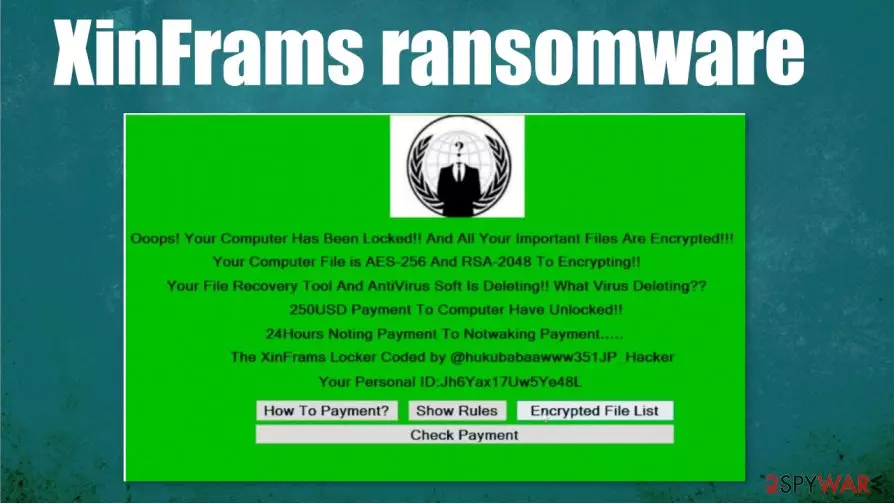
XinFrams ransomware is a computer virus that locks the screen of the infected device so all that the victim sees is a ransom note. Unlike all other ransomware, like NORD, Weui, LANDSLIDE, this cryptovirus doesn't encrypt non-system files on a targeted computer, it locks the device itself, thus preventing users from logging in.
Message in the ransom screen states that XinFrams ransomware virus uses a combination of government-based AES-256 and RSA-2048[1] algorithms to encrypt the device. To regain access to their computers, victims of this cyberattack would have to pay a ransom of $250 via a TOR website.
The whole ransom screen note of XinFrams computer virus is written with a bunch of grammatical mistakes and is really hard to understand what its developers are trying to say. A personal ID is issued and there are four buttons – “How To Payment”, “Show Rules”, “Encrypted File List” and “Check Payment”.
| name | XinFrams ransomware |
|---|---|
| type | Ransomware |
| Ransom amount | $250 |
| Ransom note | Can be seen on the screen of a locked computer |
| Additional info | The data on the computer is not encrypted, the computer itself is locked |
| Distribution | Infected spam email attachments, torrent websites |
| Virus removal | Users should try to eliminate this virus in Safe Mode with Networking (see guidelines on how to do it at the bottom of this article) |
| System overall health | After XinFrams ransomware removal, a system tune-up is in order with system repair tools like the FortectIntego app |
Contacting the criminals and meeting their demands might seem like the most convenient way out of this sticky situation, but it's actually the worst thing that victims of XinFrams ransomware could do. Paid ransoms motivate and finance hackers to increase their attacks and research new, more sophisticated malware.
Based on a report from VirusTotal[2], 33 out of 69 anti-virus engines detected XinFrams ransomware and prevented it from infecting devices. That just reiterates the need for a trustworthy anti-malware application on all devices that have access to the internet.
Since this computer virus prevents users from logging in it might seem impossible to remove XinFrams ransomware. But we're here to help so go to the bottom of this article where we display detailed instructions on how to do it with your device in Safe Mode with Networking.
The text displayed on a lockscreen:
Ooops! Your Computer Has Been Locked!! And All Your Important Files Are Encrypted!!!
Your Computer File is AES-256 And RSA-2048 To Encrypting!!
Your File Recovery Tool And AntiVirus SOft Is Deleting!! What Virus Deleting??
250USD Payment To Computer Have Unlocked!!
24Hours Noting Payment To Notwaking Payment…..
The XinFrams Locker Coded by @hukubabaawww351JP_Hacker
Your Personal ID:
[How To Payment?] [Show Rules] [Encrypted File List] [Check Payment]

Nevertheless, XinFrams ransomware removal should be done with a powerful and reliable anti-malware application, that will locate every little bit of the virus and remove it immediately. We recommend using apps like SpyHunterCombo Cleaner or MalwarebytesMalwarebytes for such dirty work.
Malware, like XinFrams ransomware, tends to modify system files and settings during infections. So it is wise to use a system repair tool when the malware is eliminated. Experts[3] recommend using a powerful FortectIntego tool to run a full system scan and fix any system irregularities.
Avoid one of the most common ransomware spreading methods – file-sharing platforms
There are various ways that cybercriminals could infect someone's computer, from freeware bundles to remote desktop protocol attacks. But one of the most beloved methods of the hackers is the file-sharing platforms, like torrent websites, such as The Pirate Bay, BitTorrent, and others.
Cybercriminals name their created ransomware whatever they think will catch the eyes of the soon to be victims and upload it. It could be an illegal activation tool for a brand new game, of some expensive pirated software. As soon as it's downloaded the infection starts immediately.

The payload files of the ransomware could come in many forms, i.e. almost any file type. The computer viruses could be disguised as .exe, .jpeg, .txt, Microsoft Office documents, archives, and so on. Please refrain from using such sites. Support the developers of your desired software by purchasing it directly from them or official distributors.
Guidelines to remove XinFrams ransomware from affected devices
As we stated before, all malware should be eliminated from computers ASAP. It doesn't matter whether it's pesky adware or XinFrams ransomware virus, all malware present a threat and everyday computer users (not to mention companies) should deal with it accordingly.
XinFrams ransomware removal isn't an easy process because the device is inaccessible due to the locked screen. We have detailed instructions on how to overcome this issue posted at the bottom of this article, be sure to check them out and try them.
Every piece of malware should be deleted with proper anti-malware software. We advise using SpyHunterCombo Cleaner or MalwarebytesMalwarebytes time-proven apps. Keep them updated and you could evade becoming a cyberattack victim. Also, use system repair tools like the FortectIntego app to always have your system at top-notch settings and crispy clean.
Did this guide help?
Be the first to comment