

Gcahvv ransomware – a cryptovirus that encrypts victims' files and holds them hostage until ransom is paid
Gcahvv ransomware is a file-locking virus that demands a ransom after it encrypts all victims' personal data. This malware derives from the Snatch ransomware family. The ransomware was first detected in December of 2018. All family members use the same coding algorithm – AES[1]. All of them have crazy names that seem like random sequences of characters (Zybvqxefmh, Qensvlcbymk, Mhcadd, etc.). The virus got his name from the appendix that it adds to all encrypted files – .gcahvv.
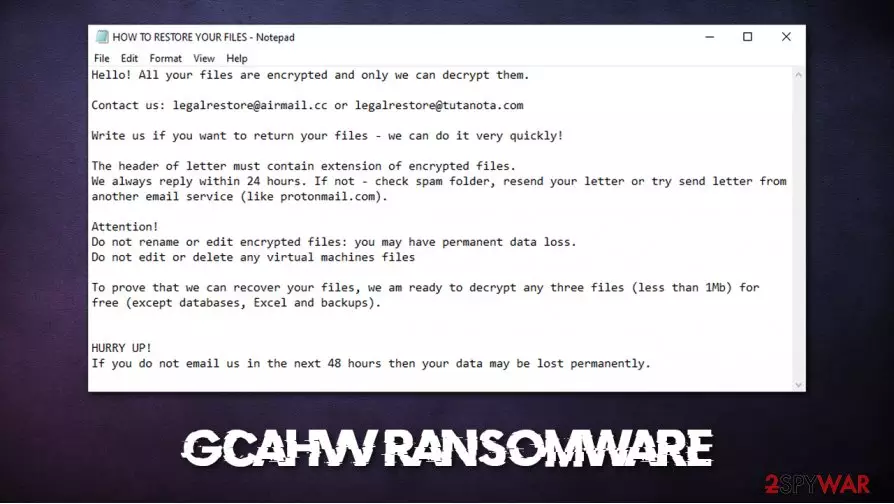
After the virus is done with the encryption, a ransom note named “HOW TO RESTORE YOUR FILES.TXT” is created and placed in all affected folders. The same goes for Gcahvv virus . In that note, cybercriminals explain that only they can decrypt victim files and that they shouldn't rename or edit the files because that could lead to permanent data loss. To prove that the necessary decryption tool exists, creators of the Gcahvv file virus offer to send them three files for test decryption. They provide two email addresses to establish contact – legalrestore@airmail.cc and legalrestore@tutanota.com. Furthermore, the perpetrators are urging to contact them within 48 hours of the infection, or the users' data might be lost permanently. No details of the ransom size or preferred payment method are included.
| name | Gcahvv ransomware, Gcahvv virus, .Gcahvv file virus |
|---|---|
| type | Ransomware, Cryptovirus |
| Family | Snatch ransomware family |
| Appended file extension | .gcahvv extension is appended to all non-system files |
| Ransom note | HOW TO RESTORE YOUR FILES.TXT |
| Criminal contact details | legalrestore@airmail.cc and legalrestore@tutanota.com |
| Distribution | Spam email campaigns, torrent websites |
| Malware removal | Gcahvv ransomware elimination should be entrusted to professional anti-malware software |
| system fix | Most viruses cause damage to system core files and settings, to restore system health use the FortectIntego tool |
As always, we strongly advise against making contact with the cybercriminals and in no way meeting their demands. When Gcahvv virus and other ransomware developers get paid, it motivates them to attack other individuals or companies. As Brett Callow, a threat analyst with Emsisoft, stated to Business Insider[2] – “If the flow of cash stops, the attacks will stop”.
Users should focus on virus elimination and the health of their devices. We suggest using MalwarebytesMalwarebytes and SpyHunterCombo Cleaner anti-malware software to remove Gcahvv ransomware automatically. These are dedicated apps capable of not only detecting and deleting threats but preventing them from gaining access to your computer too.
After Gcahvv ransomware removal is complete, we're not out of the woods yet. Ransomware is known to make different modifications to the computer system setting and files, which may lead to lags, crashes, and other abnormal behavior. To undo any changes that the virus did, we highly recommend using the FortectIntego tool.
Ransom demanding note (HOW TO RESTORE YOUR FILES.TXT) is displayed here:
Hello! All your files are encrypted and only we can decrypt them.
Contact us: legalrestore@airmail.cc or legalrestore@tutanota.com
Write us if you want to return your files – we can do it very quickly!
The header of letter must contain extension of encrypted files.
We always reply within 24 hours. If not – check spam folder, resend your letter or try send letter from another email service (like protonmail.com).Attention!
Do not rename or edit encrypted files: you may have permanent data loss.
Do not edit or delete any virtual machines filesTo prove that we can recover your files, we am ready to decrypt any three files (less than 1Mb) for free (except databases, Excel and backups).
HURRY UP!
If you do not email us in the next 48 hours then your data may be lost permanently.

Staying safe from ransomware attacks
From pesky adware to the atrocious trojan horses, nowadays, the internet is riddled with all kinds of malware. Different malware is distributed in different ways. The most common methods for ransomware to spread are file-sharing platforms like The Pirate Bay, BitTorrent, etc., and spam emails.
In torrent sites, everyday computer users can find almost anything, from books and music to pirated software and games. Ransomware is surely hidden within some of them. The cybercriminals tend to camouflage their creations as popular game or illegal activation toolkits (popularly known as cracks). So instead of trying to trick everyone, users should support the developers of their desired apps/games by purchasing the products from their official websites/distributors.
Cybercriminals are trying to outthink their victims by sending spam emails tailored to them. Soon to be victims might receive a legitimately-looking email from their bank or their shipping company (just a few examples of many options), when in reality, it's a spam email with either a hyperlink that will lead to a malicious site which will download a payload file to the device immediately after opening or an infected email attachment, that will spread the infection as soon as it's downloaded. Look for grammatical errors, keep a keen eye for any discrepancies.
Removal instructions for Gcahvv ransomware
As we mentioned in the first paragraph, getting in touch with the criminals and paying the ransom is the worse thing anyone can do. Malware should be deleted immediately after detection.
We advise using time-proven MalwarebytesMalwarebytes and SpyHunterCombo Cleaner anti-malware apps to remove Gcahvv virus automatically. Unfortunately, virus removal won't decrypt your files. As there are no public decryptors available for this ransomware now, there might be in the future. So if you don't have backups, export all locked data to external offline storage and check back with us as we update our readers with all the latest news.

If you had backups, don't rush to use them. After Gcahvv ransomware removal experts[3], highly recommend using the FortectIntego system tune-up tool to perform a full system scan and revert all changes the virus has done to system files and settings. After your device is crispy clean, then use backups to restore your data and remember to stay safe.
Did this guide help?
Be the first to comment