

Nsemad ransomware – a cryptovirus that locks all non-system files and appends .nsemad extension to them
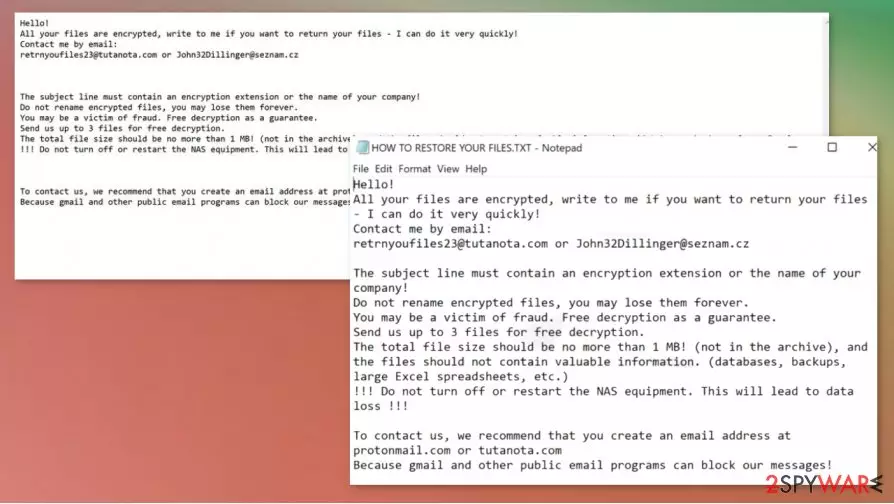
Nsemad ransomware is a file-locking computer virus that encrypts all personal victim data (pics, documents, archives, etc.) on an infected device and then demands a ransom to unlock them. All locked files are appended with a .nsemad extension, thus making them inaccessible.
As soon as any ransomware, including .nsemad file virus, gains entry to a computer, it scans the most frequently used files (.doc, .xls, .pdf, or any other file type) then encrypts all of them. After that, the cryptovirus generates and displays text files, named HOW TO RESTORE YOUR FILES.TXT, with ransom information and demands.
In order to restore access to their files, victims of ransomware virus would have to reach out to the cybercriminals via two given emails – retrnyoufiles23@tutanota.com or John32Dillinger@seznam.cz and, most likely, pay a forward the ransom payment in cryptocurrency Bitcoins.
| name | Nsemad ransomware |
|---|---|
| type | Ransomware |
| appended file extension | All non-system files receive .nsemad extension |
| Family | Snatch ransomware |
| Ransom note | HOW TO RESTORE YOUR FILES.TXT |
| Distribution | File-sharing platforms, spam emails |
| Criminal contact details | Two emails are provided to establish contact with the cybercriminals – retrnyoufiles23@tutanota.com and John32Dillinger@seznam.cz |
| Malware removal | Remove Nsemad ransomware with anti-malware software to be sure that all its components are deleted properly |
| System fix | Using the FortectIntego app might undo all the damage that the virus might have done to system settings and their files |
The creators of Nsemad ransomware start their ransom note message by stating that all files on the victim's device have been encrypted and that only they have the ability to unlock it. Then they provide two emails which should be used to contact them.
Just like in other ransomware developers, such as Nobu, Igdm, Cerber 4.1.6, and others, Nsemad ransomware makers offer free decryption of three files (not exceeding 1Mb) from the infected machines, thus trying to prove that the necessary tool exists and that they would send it to the victims.
FBI states[1] that paying the ransom only encourages the cybercriminals to expand their attacks and fuels their research for more effective ways to distribute their creations. Furthermore, the ransom money could be used to create more sophisticated ransomware.
With that being said, victims should remove Nsemad ransomware immediately after detection or the first sight of ransom notes. Use professional anti-malware software like MalwarebytesMalwarebytes or SpyHunterCombo Cleaner to perform a full system scan and eliminate the virus with all of its components.

Once Nsemad ransomware removal is completed, we recommend performing a system tune-up. Ransomware usually makes changes to system settings and system files (without encrypting them), and that could lead to abnormal behavior exhibits from your device. Take care of the overall system health with software like the FortectIntego.
The message in the HOW TO RESTORE YOUR FILES.TXT ransom note reads:
Hello! All your files are encrypted and only we can decrypt them.
Contact us: retrnyoufiles23@tutanota.com or John32Dillinger@seznam.cz
Write us if you want to return your files – we can do it very quickly!
The header of letter must contain extension of encrypted files.
We always reply within 24 hours. If not – check spam folder, resend your letter or try send letter from another email service (like protonmail.com).
Attention!
Do not rename or edit encrypted files: you may have permanent data loss.
Do not edit or delete any virtual machines file
To prove that we can recover your files, we am ready to decrypt any three files (less than 1Mb) for free (except databases, Excel and backups).
HURRY UP!

Simple steps to improve your cybersecurity level
Each and every day, there are more and more cyber attacks[2] on companies and everyday computer users. Having that in mind, we composed simple guidelines that could help prevent individuals from such attacks. Please read thoroughly and try sticking to these suggestions.
- Always keep backups of essential information in at least two separate places, one of which should be external storage without access to the internet. In case of an attack, victims can get their data back after they deal with the infection.
- All software must be up-to-date. Install all the latest updates as soon as they come out.
- Purchase a reliable anti-malware software that would safeguard your passages on the internet. Constantly update its virus database and run full system scans frequently.
- Maintain your device's core settings with powerful system repair tools.
Instructions on how to remove Nsemad ransomware and maintain system health
Getting your device attacked and locked by a cryptovirus is a disaster. But no matter how precious pics of your kids or sensitive company info is – paying the ransom isn't a good option. After meeting the assailants' demand, the victims are asked for even more money, or the cybercriminals just disappear. So instead of paying the ransom, victims should focus on Nsemad ransomware removal.
To get your device back on track, the first thing you need to do is to remove Nsemad ransomware. Although manual elimination is possible, we recommend leaving this dirty work to professional anti-malware software like MalwarebytesMalwarebytes or MalwarebytesMalwarebytes, which will automatically locate and delete the virus with all it's allocated files.
Once the device is virus-free, users should consider taking care of the overall system health. There's a bunch of system repair tools available, but experts[3] recommend using the FortectIntego to perform a full system scan and restore any modifications that the file-locking parasite might have done to core system settings.
Did this guide help?
Be the first to comment