

MONETA ransomware – is a file-locking virus that's created for direct cryptocurrency extortion
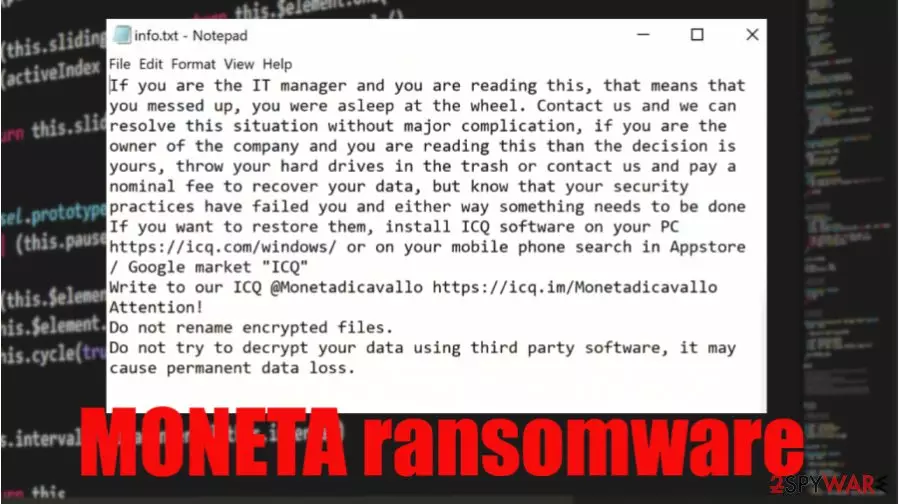
MONETA ransomware is a cryptovirus that locks all personal data on an infected device and then creates ransom notes with instructions to the victims. This file-locking virus belongs to the Phobos ransomware family, with previous versions like HOTEL, 1500dollars, .google, and others.
The virus appends all non-executable files with an elaborate three-part appendix, which consists of an appointed victim ID, criminal ICQ contact details [ICQ_Monetadicavallo], and .MONETA extension. All renamed data is rendered inaccessible.
Following file rename and encryption, most ransomware generates ransom notes to convince their victims into meeting their demands. The same goes for this file-locking parasite. It creates two types of ransom notes – a pop-up window (titled encrypted) and text files (named info.txt). Both messages portrayed in these notes can be seen below this paragraph.
| name | MONETA ransomware |
|---|---|
| type | Ransomware/ cryptovirus |
| Family | Phobos ransomware |
| Ransom note | A pop-up window and info.txt text files |
| Appointed file extension | Original filenames are appended with .id[user ID].[ICQ_Monetadicavallo].MONETA extension |
| Criminal contact details | Cyberthieves would like to be contacted via instant messaging service ICQ. Their ID – @Monetadicavallo |
| Virus removal | Let professional anti-malware software deal with MONETA ransomware elimination |
| System health | Ransomware can do damage to the system registry and other essential device settings. Run a full scan with the FortectIntego to restore your device to the pre-contamination phase |
Like all of its previous versions, MONETA ransomware virus uses AES[1] military-grade coding algorithm to encrypt all personal victim files on a targeted computer. Unfortunately, the locked data cannot be opened without a particular decryption key. But in no way does that mean that you should succumb to the demands of the criminals.
Although the cybercriminals try their hardest to persuade their victims into purchasing their decryption tool by offering a free decryption of up to five files (not exceeding 4Mb in total) or threatening them in various ways, the only right thing to do is to remove MONETA ransomware from the infected devices.
The best way to do it is with professional anti-malware software like SpyHunterCombo Cleaner or MalwarebytesMalwarebytes. Run a full system scan, and delete the cryptovirus along with all of its components. Keep virus databases of either of these apps up-to-date, and they might prevent cyberattacks in the future.
Ransomware is capable of making alterations in the system registry and other system settings. So once MONETA ransomware removal is done and your device is virus-free, we recommend performing a system tune-up with powerful system repair tools like the FortectIntego to revert any of these changes.

Cybercriminals wrote this message to their victims in the pop-up window:
ATTENTION!!!!
Unfortunately for you, a major IT security weakness left you open to attack, your files have been encrypted with ciphers more advanced than those used for diplomatic communications, you can spend days and months searching for a magical way to decrypt your files, but rest assured we are the only people who can help you recover your files, there is no free tool
If you want to restore them, install ICQ software on your PC hxxps://icq.com/windows/ or on your mobile phone search in Appstore / Google market “ICQ”
Write to our ICQ @Monetadicavallo hxxps://icq.im/Monetadicavallo
Write this ID in the title of your message –
Free decryption as guarantee
Before paying you can send us up to 5 files for free decryption. The total size of files must be less than 4Mb (non archived), and files should not contain valuable information. (databases,backups, large excel sheets, etc.)
Attention!
Do not rename encrypted files.
Do not try to decrypt your data using third party software, it may cause permanent data loss.
Decryption of your files with the help of third parties may cause increased price (they add their fee to our) or you can become a victim of a scam.
This message can be found in the ransom note text files:
If you are the IT manager and you are reading this, that means that you messed up, you were asleep at the wheel. Contact us and we can resolve this situation without major complication, if you are the owner of the company and you are reading this than the decision is yours, throw your hard drives in the trash or contact us and pay a nominal fee to recover your data, but know that your security practices have failed you and either way something needs to be done
If you want to restore them, install ICQ software on your PC hxxps://icq.com/windows/ or on your mobile phone search in Appstore / Google market “ICQ”
Write to our ICQ @Monetadicavallo hxxps://icq.im/Monetadicavallo
Attention!
Do not rename encrypted files.
Do not try to decrypt your data using third party software, it may cause permanent data loss.
Spam emails – one of the most common methods used to infect computers
We've all receive junk mail in our lives. There's even a separate folder for that. Some of the spam emails might be harmful, but some may contain malware. As the research shows,[2] in the third quarter of 2020, 51,025,889 spam emails with malicious file attachments were reported, and almost 50% of the emails sent in the world were spam emails.

Having that in mind, everyday computer users should learn how to identify these types of letters. We're here to help, so we comprised a short list of guidelines for our readers to evade getting their devices infected by malware:
- Never open any emails from the spam folder. They are there for a reason.
- Open an email only if you know the sender.
- Look for grammatical mistakes. Cybercriminals might do them to bypass detection.
- Banks, shipping companies, and other institutions won't send an email alarming you to log in immediately.
- Check the subject – if whatever is written is too good to be true or too threatening – it's spam.
- Avoid opening any links in phony looking emails.
- And please never download any email attachments without scanning them first with a reliable anti-malware application.
Instruction for MONETA ransomware removal and system repair
A trustworthy anti-malware app must accompany all everyday computer users on their journeys through the world wide web. These kinds of apps make sure cryptoviruses, like MONETA ransomware virus, can't get access to a computer. If they do, the viruses are isolated so they can't do any harm.
If you were unlucky and got your device infected, we recommend using dependable anti-malware software like SpyHunterCombo Cleaner or MalwarebytesMalwarebytes to remove MONETA ransomware. However, it is worth mentioning that eliminating the infection won't decrypt your files. If you didn't keep backups, then export all info to an offline storage device and wait for a decryptor to be available to the public.
If you had backups, don't rush to recover your data after MONETA ransomware removal. First, experts[3] recommend performing a full system tweak with system repair tools like the FortectIntego app to ensure all essential system values are correct and uncompromised.
Did this guide help?
Be the first to comment