

Stax ransomware can create major issues besides the file locking

Stax virus starts the infection by dropping the payload and then moves to the encryption. The file-locking process can be quick because the threat chooses particular data for the encoding and marks altered files using .stax appendix. The marker is there for the indication, so people suffering from the infection can see which files are affected. Encryption[1] makes files unopenable, so the person cannot know the content of the video, audio, or document file. However, criminals code the ransomware to search for commonly used files, so the data locked is more valuable. There are particular formats of files that the threat is not encoding, but many pieces on the machine can get affected by the cryptovirus.
Once those common files get encrypted, and the virus is done with its processes, the ransom note file _readme.txt gets placed on the desktop and in folders with locked files. Then Stax virus delivers the extortion message that informs about ransom amount – $980 and the contact emails – manager@mailtemp.ch, supporthelp@airmail.cc, via those, victims can contact the criminals. However, that is not recommended.
These people behind the development and deployment of the virus can only care about their gains – money. Cryptocurrency is the thing they are after, so you should ignore these messages and all the claims about discounts, legitimacy, trust-building tactics. Removing the threat from the system is the best option because decryption is not possible at this point. If you try to restore files on the still infected system, you might get those files encrypted again.
Stax virus developers list your options in the _readme.txt file that reads:
ATTENTION!
Don't worry, you can return all your files!
All your files like pictures, databases, documents and other important are encrypted with strongest encryption and unique key.
The only method of recovering files is to purchase decrypt tool and unique key for you.
This software will decrypt all your encrypted files.
What guarantees you have?
You can send one of your encrypted file from your PC and we decrypt it for free.
But we can decrypt only 1 file for free. File must not contain valuable information.
You can get and look video overview decrypt tool:
hxxps://we.tl/t-mj4o6S4Pz0
Price of private key and decrypt software is $980.
Discount 50% available if you contact us first 72 hours, that's price for you is $490.
Please note that you'll never restore your data without payment.
Check your e-mail “Spam” or “Junk” folder if you don't get answer more than 6 hours.To get this software you need write on our e-mail:
manager@mailtemp.chReserve e-mail address to contact us:
supporthelp@airmail.ccYour personal ID:
These tactics that the Stax virus developers use can help threat actors to get their payments. The offer with the 50% discount or the claim about test decryption of the one file can create trust between the victim and the criminal. However, these methods are only to encourage people to pay up. Experts[2] never recommend thinking about payments. Businesses and organizations even stay away from this once affected by ransomware.
Ransomware is a type of malware that has already caused damage to the machine. It encrypts your files and will only offer to decrypt them if you pay the cybercriminals. There is no guarantee these people will actually provide their decryption tool, so paying up might not be such an option after all. The virus also affects local computers, meaning victims can not access any information. Stax virus can also affect the whole network if the threat runs on the machine for a while.
| Name | Stax file-locker virus |
|---|---|
| Family | Djvu/STOP ransomware virus |
| Marker | .stax |
| Ransom note | _readme.txt |
| Previous versions | This is the 345th version that comes after Rivd, Cool, Palq released only a few days apart |
| manager@mailtemp.ch, supporthelp@airmail.cc, helprestoremanager@airmail.cc | |
| Distribution | Files placed alongside game cheats, software cracks, and in other pirated packages. The threat payload can get distributed as the file attachment in malspam |
| Ransom amount | $980 is a full price, but the $490 offer is for the first 72 hours |
| Elimination | A threat like this can be dangerous and damaging, so the sooner you get rid of it, the better. Anti-malware tools are the best for this |
| Repair | The system requires work, so the processes that are needed for the proper performance can run smoothly. Try to check for virus damage and repair the system using FortectIntego |
Cryptocurrency extortion is the process this virus is based on. File encryption and ransomware infection are two independent processes, but cryptocurrency extortion happens when the data is locked away. Threat actors have the option for direct blackmailing then. Stax file virus performs various changes within a Windows operating system to ensure persistence. The damage could also permanently harm your computer or cause irreversible data loss!
This is why we note about the need for the proper virus removal process. The threat can be eliminated with a tool that is based on a proper virus detection engine.[3] When the system is checked using the AV tool with the capability of detecting this infection, you can remove the virus properly. Then any file recovery is safe because Stax ransomware cannot affect those files since it is terminated.
File decryption option
The instructions below will show you how to remove the malicious files from your computer. You can remove the infection yourself, as we mentioned. Be careful when doing so, as it may cause system errors or malfunctions in other programs if not done correctly! The infection alters various processes and files on purpose.
The Stax virus is not only file-locking malware, the machine is damaged significantly. Unfortunately, files are the ones affected the most because encryption is a procedure that ransomware relies on. The newer variants of this family are created with the impossible decryption opportunity due to the advanced code updates.

This is because of offline keys vs. online ID when encoding data. These keys allowed the decryption of many versions in this family. Unfortunately, though more advanced versions are released nowadays, including the Stax virus. These threats cannot easily be cracked due to the coding complexity making them virtually unstoppable right now.
If your computer got infected with one of the Djvu variants, you should try using Emsisoft decryptor for Djvu/STOP. It is important to mention that this tool will not work for everyone – it only works if data was locked with an offline ID due to malware failing to communicate with its remote servers.
Even if your case meets this condition, somebody from the victims has to pay criminals, retrieve an offline key, and then share it with security researchers at Emsisoft. As a result, you might not be able to restore the encrypted files immediately. Thus, if the decryptor says your data was locked with an offline ID but cannot be recovered currently, you should try later. You also need to upload a set of files – one encrypted and a healthy one to the company's servers before you proceed.
- Download the app from the official Emsisoft website.
- After pressing Download button, a small pop-up at the bottom, titled decrypt_STOPDjvu.exe should show up – click it.
- If User Account Control (UAC) message shows up, press Yes.
- Agree to License Terms by pressing Yes.
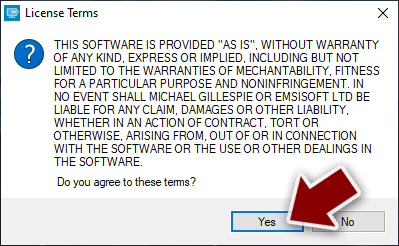
- After Disclaimer shows up, press OK.
- The tool should automatically populate the affected folders, although you can also do it by pressing Add folder at the bottom.

- Press Decrypt.



From here, there are three available outcomes:
- “Decrypted!” will be shown under files that were decrypted successfully – they are now usable again.
- “Error: Unable to decrypt file with ID:” means that the keys for this version of the virus have not yet been retrieved, so you should try later.
- “This ID appears to be an online ID, decryption is impossible” – you are unable to decrypt files with this tool.
System damage leading to impossible recovery
If you are concerned about the security of your personal data, then do not worry. It is understandable, but data recovery is not the only concern when it comes to an infection like this. You can regain access to those encrypted files by using a special key that only exists online and was generated at encryption time.
Criminals do not share the key unless victims decide to pay. Stax virus research for decryption can take a lot of time, but the machine needs to be used right now. You can store some of the malware files on the external device and try to wait for the decryption tool. Nevertheless, malware needs to be eliminated.
Since the malware affects how the system operates, you need some additional help. The infection can alter the Windows registry database, damage vital bootup, and other sections, delete or corrupt DLL files, etc. Once a system file is damaged by malware, antivirus software cannot do anything about it, leaving it just the way it is.
Using a one-of-a-kind, patented technology of FortectIntego can help recover the machine. Not only can it fix virus damage after the infection, but it can also remove malware that has already broken into the system thanks to several engines used by the program. Besides, the application is also capable of fixing various Windows-related issues that are not caused by malware infections, for example, Blue Screen errors, freezes, registry errors, damaged DLLs, etc.
- Download the application by clicking on the link above.
- Click on the ReimageRepair.exe.
- If User Account Control (UAC) shows up, select Yes.
- Press Install and wait till the program finishes the installation process.

- The analysis of your machine will begin immediately

- Once complete, check the results – they will be listed in the Summary
- You can now click on each of the issues and fix them manually
- If you see many problems that you find difficult to fix, we recommend you purchase the license and fix them automatically.


By employing this program, you would not have to worry about future computer issues, as most of them could be fixed quickly by performing a full system scan at any time. Most importantly, you could avoid the tedious process of Windows reinstallation in case things go very wrong due to one reason or another.
Other options for the .stax files
Stax ransomware is not decryptable. At least for now. There are some options for the versions with offline ID technique or some media files. The repair tool for mp3 or Wav files affected by this family can help users to restore media data easier. Other data should be in backups, so the user can restore affected files with safe copies.
Unfortunately, backup creation is not a habit that all people have. If you have separate storage for the file copies, you can remove the infection and then place safe files in place of the one encrypted. That is the best option after a ransomware infection, but not always possible. Stax virus needs to be completely eliminated before you do anything related to files.

Make sure to run the app like SpyHunterCombo Cleaner, MalwarebytesMalwarebytes, so the threat is removed and not active. Then the important processes of the machine can be repaired with a tool like FortectIntego. Once you double-check, there are no issues that can occur once your encrypted data is recovered. You can also find the third-party data recovery options below and the Stax ransomware removal process tips.
Did this guide help?
Be the first to comment