

Analysissoftwarecentr.com is a fake site that attempts to impersonate security software scans to scam users

Analysissoftwarecentr.com lures users in by scams and fake messages that are meant to intimidate them. While adware infection could be the reason some users may end up on this site, malicious links or automatic redirect scripts on other websites are a more likely cause. Once users are on the site, they never expect to see what's actually there, which makes the scheme all the more successful for those running it.
Users are quickly shown a supposed result of a Norton virus scan – a reputable security vendor. These findings claim that several infections were found, and the subscription to the security software had expired. Users are enticed to click on a link where they can buy a complete license after seeing these results.
The truth is that Analysissoftwarecentr.com and Norton have nothing to do with each other; mainly, the former is developed by scammers to profit from clicks on affiliate links. One can also never know whether the redirect to a download site of security software is legitimate, so you may end up installing a rogue program instead, infecting your system with malware.
We recommend ignoring all the requests by Analysissoftwarecentr.com to download anything and instead relying on our comprehensive guide. If you have installed something or suspect that your computer is already infected, check out the information below to find out what to do next.
| Name | Analysissoftwarecentr.com |
| Type | Scam, phishing, redirect, adware |
| Operation | A message claims the subscription for security software has expired and needs to be immediately renewed. Asks to download potentially malicious software and enable push notifications |
| Distribution | Compromised websites, pop-up ads, potentially unwanted applications |
| Risks | Installation of PUPs or malware, sensitive information disclosure, financial losses |
| Removal | You should not interact with the contents shown by a scam website and check your device with legitimate security software to check for adware |
| Other tips | To make sure that third parties can no longer track your online activities, we suggest clearing browser caches and other leftover PUP files with FortectIntego |
The fake messages are meant to frighten users about their computer security status
Fear is a powerful feeling, thus many internet fraud campaigns are aimed at it. Users become frightened when they see fearful messages informing them that viruses have been discovered on their computers if they are uncertain how malware and the infection process work. Scammers frequently utilize well-known business names such as Google, Microsoft, or Norton to deceive users successfully.
Upon accidentally entering the Analysissoftwarecentr.com scam site, users are often surprised by what they see – it is a security scan, which shows files being scanned and pop-ups triggered by detections of malicious entries. Just a few seconds later, people are presented with results, which read:
Your PC is infected with 5 viruses!
ACTION REQUIRED
Your Norton Subscription Has Expired!
Renew now to keep your PC protected.
If your PC is unprotected, it is at risk for viruses and other malware.
Those who are unfamiliar with scams of this type might actually believe that reputable security vendors found viruses on their systems and that action needs to be taken immediately. This is precisely what scammers are looking for – users who are not that familiar with these things.

As mentioned, none of the contents of this site are real, and the scan results are merely fabricated. Exactly the same tactics are being used by numerous phishing[1] sites, including Rebis.live, Cadom.live, Scanprotectiontoday.com, Securitycheckpanel.com, and many others. It is even likely that they were created by the same people and are being spread all over the internet.
How to clear your system from adware and other infections
If you have noticed that you are encountering websites like Analysissoftwarecentr.com more often and your browser is flooded with ads, there is a high chance that your system is infected with adware that may have slipped in without you noticing.
Before you proceed with the steps below, we strongly recommend you rely on powerful anti-virus software, such as SpyHunterCombo Cleaner or MalwarebytesMalwarebytes, to scan your system and check it for adware and other malware. Manual steps can be effective when dealing with most potentially unwanted programs, although malicious programs may use a lot of obfuscation[2] techniques to prevent their easy removal.
Delete malicious extensions
We suggest you start by checking your browser extensions, as it is one of the most common forms of adware.
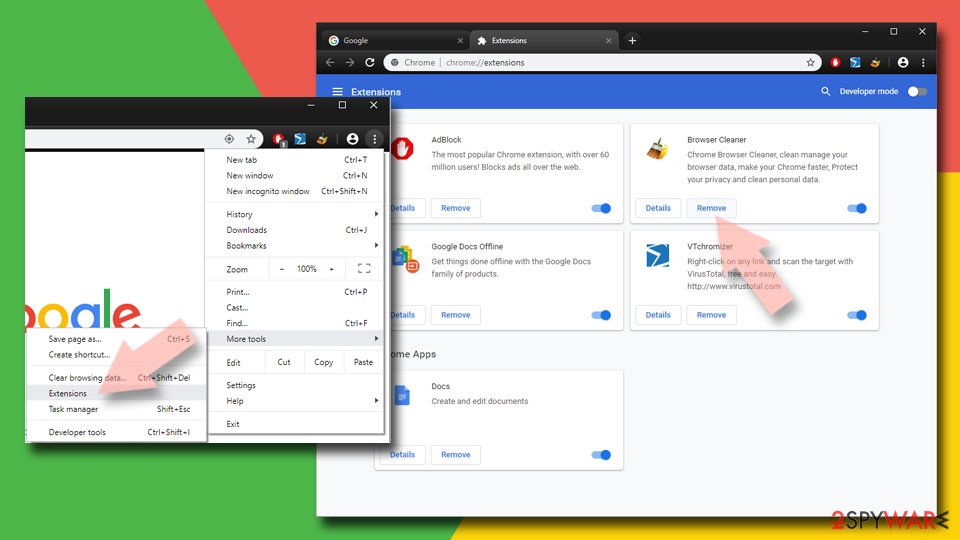
Google Chrome
- Open Google Chrome, click on the Menu (three vertical dots at the top-right corner) and select More tools > Extensions.
- In the newly opened window, you will see all the installed extensions. Uninstall all the suspicious plugins that might be related to the unwanted program by clicking Remove.

Mozilla Firefox
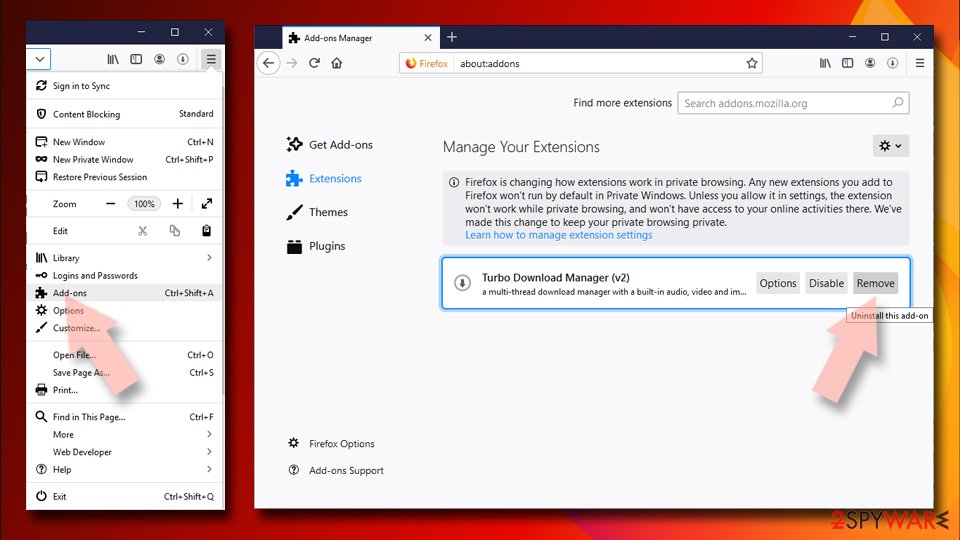
- Open Mozilla Firefox browser and click on the Menu (three horizontal lines at the window's top-right).
- Select Add-ons.
- In here, select the unwanted plugin and click Remove.

MS Edge (Chromium)
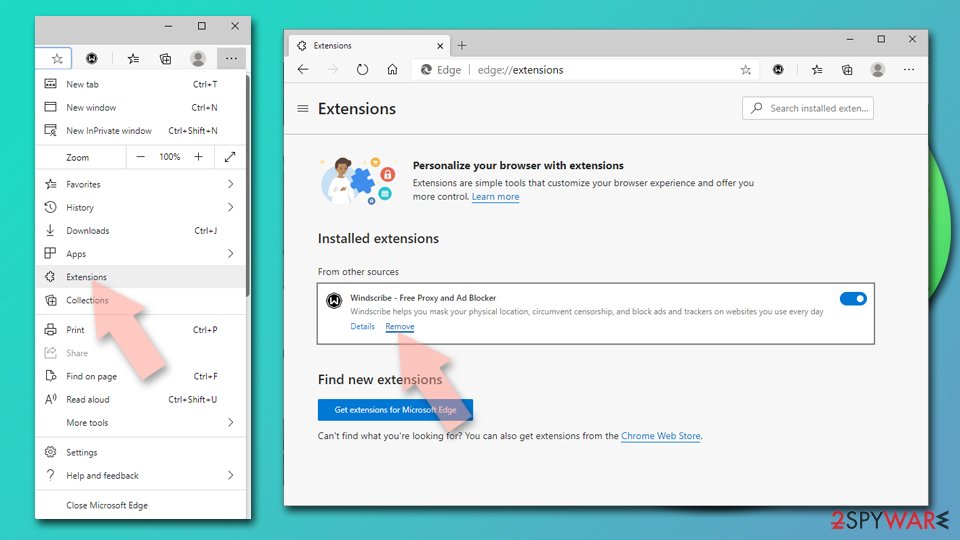
- Open Edge and click select Settings > Extensions.
- Delete unwanted extensions by clicking Remove.

Safari
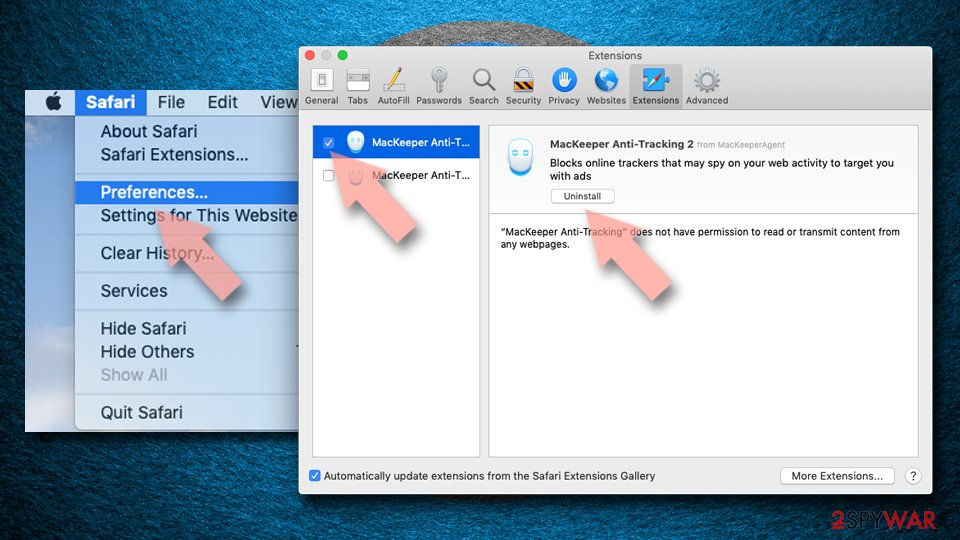
- Click Safari > Preferences…
- In the new window, pick Extensions.
- Select the unwanted extension and select Uninstall.

Internet Explorer
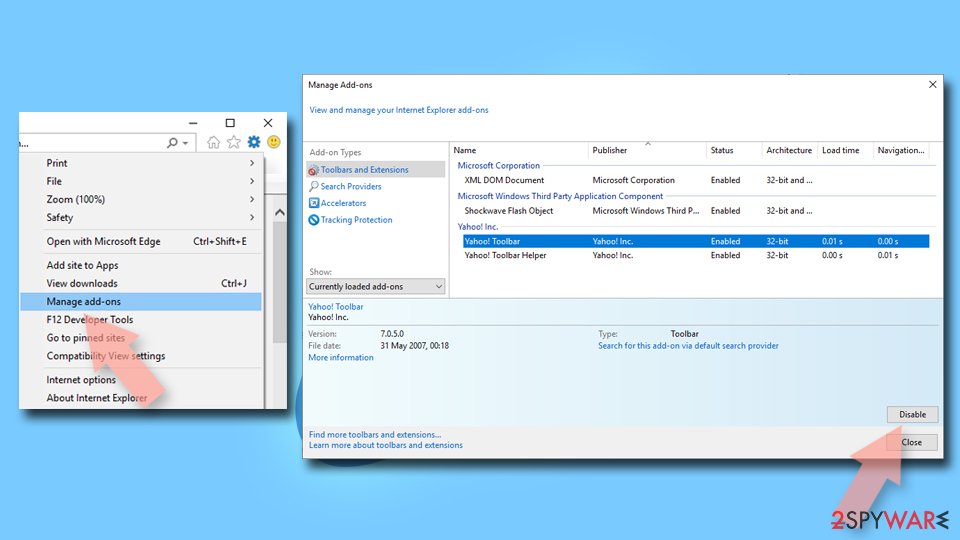
- Open Internet Explorer, click on the Gear icon (IE menu) on the top-right corner of the browser
- Pick Manage Add-ons.
- You will see a Manage Add-ons window. Here, look for suspicious plugins. Click on these entries and select Disable.

Remove unwanted programs installed at the system level
Installed programs may cause much more damage than browser extensions, so it is important to get rid of them. If you aren't sure which apps should remain and which should go, we recommend leaving the removal process to security software instead.
Windows
- Enter Control Panel into the Windows search box and hit Enter or click on the search result.
- Under Programs, select Uninstall a program.

- From the list, find the entry of the suspicious program.
- Right-click on the application and select Uninstall.
- If User Account Control shows up, click Yes.
- Wait till the uninstallation process is complete and click OK.



Mac
While moving apps into Trash is how you delete most normal applications, adware tends to create additional files for persistence. Thus, you should look for .plist and other files that could be related to the virus. If you are not sure, skip this step entirely.
- From the menu bar, select Go > Applications.
- In the Applications folder, look for all related entries.
- Click on the app and drag it to Trash (or right-click and pick Move to Trash)


To fully remove an unwanted app, you need to access Application Support, LaunchAgents, and LaunchDaemons folders and delete relevant files:
- Select Go > Go to Folder.
- Enter /Library/Application Support and click Go or press Enter.
- In the Application Support folder, look for any dubious entries and then delete them.
- Now enter /Library/LaunchAgents and /Library/LaunchDaemons folders the same way and terminate all the related .plist files.
Other tips
Some users are not quite sure about what to do after encountering phishing websites such as Analysissoftwarecentr.com, especially if they have never seen anything like it before. While scams are relatively widespread, they are unlikely to be encountered by those who choose not to risk their security by visiting dubious sites, so it's understandable.
Nonetheless, we recommend following some tips from cybersecurity experts from novirus.uk[3] – they should help you avoid suspicious websites and improve your overall security in the long run:
- Employ a working ad-blocker to block malicious scripts on various websites;
- Always keep anti-malware software running and keep it up-to-date;
- Use FortectIntego to clean browser caches and repair virus damage if such has occurred;
- If you have disclosed your contact details on dubious websites, expect those contact details to be used to send you more spam or scam content;
- Never download software from websites that claim your system is infected – only a reputable security application installed on your device can confirm this diagnosis.
Did this guide help?
Be the first to comment