

ARTEMY ransomware is a file locking malware that targets Russian users
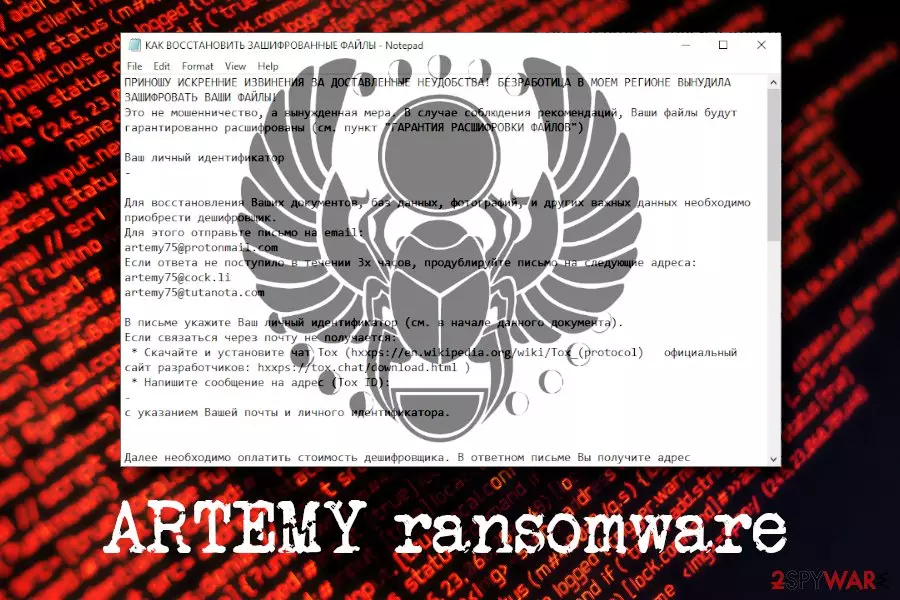
ARTEMY ransomware is a data locker that was first spotted by the security researcher Amigo-A at the end of February 2019. It comes from Scarab virus family and targets Russian-speaking users, similarly to other variants like Scarabey, Osk, and Bomber. The cyber threat uses the AES encryption algorithm to lock up documents, databases, pictures, music, videos, etc. and appends .ARTEMY extension and scrambles names of data, consequently preventing victims from opening any files that are modified that way. Scarab-Artemy virus then generates a ransom note КАК ВОССТАНОВИТЬ ЗАШИФРОВАННЫЕ ФАЙЛЫ.TXT (“how to recover encrypted files.txt”), which explains to users how to proceed next. Allegedly, the decryption key can be purchased for an undetermined amount of Bitcoin, after contacting cybercriminals via emails artemy75@protonmail.com, artemy75@cock.li, or artemy75@tutanota.com. According to researchers, discounts up to 80% are offered to pregnant women, the unemployed, the disabled, and the poor. However, paying ransom is not recommended in any case – victims should remove ARTEMY ransomware and use alternative file recovery methods.
| Name | ARTEMY |
| Type | Ransomware |
| Virus family | Scarab |
| Cipher | AES |
| File extension | [scrabled file name].ARTEMY |
| Ransom note | КАК ВОССТАНОВИТЬ ЗАШИФРОВАННЫЕ ФАЙЛЫ.TXT |
| Contact | artemy75@protonmail.com, artemy75@cock.li, or artemy75@tutanota.com |
| Related files | osk.exe, 27.02.19.scr |
| Distribution | Malicious spam emails, fake updates, weak RDP, etc. |
| Elimination | Use anti-malware applications like FortectIntego, SpyHunterCombo Cleaner, or any other software that can recognize the infection[1] |
ARTEMY ransomware is most likely distributed with the help of malicious phishing emails, repacked installers, unprotected RDP configuration, fake updates, torrent files, or similar methods. To stop the infection before it locks data, you should always keep a security application running in the background. For additional defense methods against Scarab-ARTEMY, check the second section of the article.
Once ARTEMY virus is extracted on the host device, it performs various changes to it, such as:
- Disables Windows auto-repair function at the startup;
- Removes Shadow volume snapshots;
- Creates and modifies Windows Registry[2] keys;
- Opens MountPointManager;
- Spawns and kills many processes, etc.
Once system modification is complete, ARTEMY ransomware begins file encryption procedure and drops the ransom note to the affected folders. The files are modified by using the encryption algorithm; for example, picture.jpg is turned into BUXjzYpCJ7O5zQH2s19jyqLbr.ARTEMY. This process consequently prevents users from accessing any data – only the decryption tool would be able to decode it.

Allegedly, ARTEMY ransomware authors claim that unemployment made them engage in this illegal business. Whether it is true or not is a different matter, but it does not change the fact that what these people are doing is money extortion – it is highly illegal and harmful to innocent users. Additionally, according to the ransom note, the offered discounts can only be applied once legal documents are provided.
Do not send any type of documents that confirm your identity – the sensitive information can be stolen and sold on the black market for profit. Instead, focus on ARTEMY ransomware removal. For that, you will have to employ anti-virus software that is capable of recognizing[1] the threat. We recommend using FortectIntego or SpyHunterCombo Cleaner
Avoid ransomware viruses by using precautionary measures
Ransomware developers usually take advantage of several malware distribution methods, such as spam emails, malicious executables hosted on hacked sites, brute-force attacks, botnets, and other techniques. Therefore, getting infected with ransomware might be easier than one might think.
You should never ignore security tips from industry experts:[3]
- Download and install a reputable security application;
- Enable Firewall;
- Always patch your system with the latest security updates;
- Do not click anything on suspicious websites;
- Avoid high-risk sites, such as porn, gambling, torrent, etc.
- Scan all executable files or suspicious URLs with tools like Virus Total;
- Use ad-block (don't forget to use exclusions for sites you want to support);
- Beware of spam email attachments and hyperlinks inside.
Terminate ARTEMY ransomware virus infection based on our instructions
Without a doubt, you should remove ARTEMY ransomware as soon as possible and never contact cybercriminals. For that you will need to employ reputable security application, such as FortectIntego or SpyHunterCombo Cleaner – these tools recognize the threat as TR/AD.ZardRansom.grojy and Ransom.Scarab. Be aware, however, that ARTEMY virus might hinder proper elimination procedure. In such a case, enter Safe Mode with Networking and scan your device from there.
Once you complete ARTEMY ransomware removal, you can proceed with the file recovery process. To recover data, you need a specific decryption key that is stored on a remote server, only accessible to criminals. Nevertheless, you can always return all your files if you store backups on a remote server (such as OneDrive) or an external device.
If you do not have backups ready (most people do not), you can take advantage of third-party solutions that might help you; you will find download links and instructions on how to use them below. Remember, paying crooks might result in money loss, so do not risk it.
Did this guide help?
Be the first to comment